MAINTENANCE
14.164.A_A707en.SM.V1.01.doc ARGUS Medical AG 10.02.04 AS 18 / 38
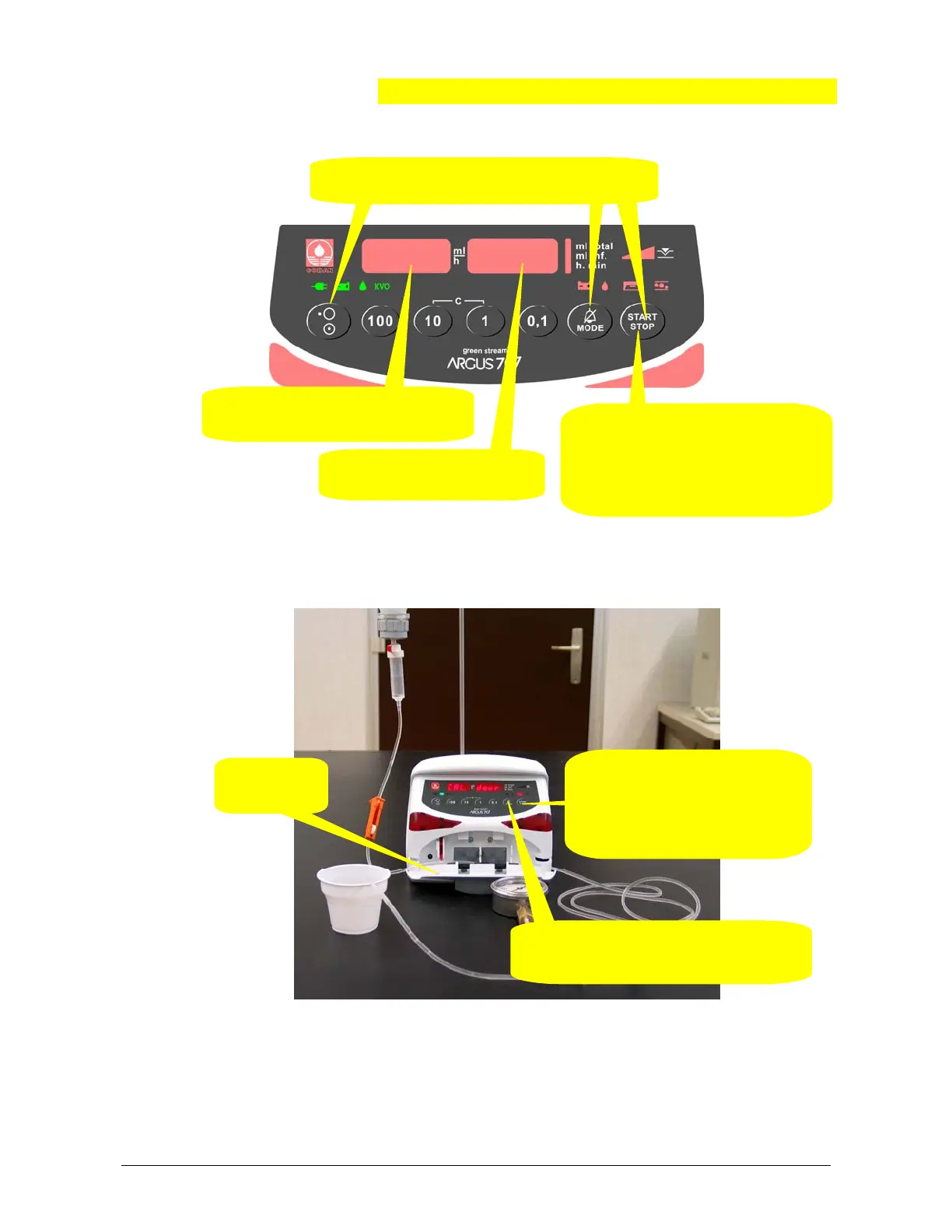
1. Open the
door.
2. Select address 399 in this display.
Press then key “MODE”.
3. Enter value 1234 in this
display.
4. Press the “START/STOP” key, the
pump starts to running at a constant
rate of 200 ml/h. The display
shows “CAL. door”.
2. Press the “START / STOP”
key to store both values for the
up- and downstream sensor,
this will be acknowledged by a
sound.
3. Press the “MODE” key to go to the next
calibration step. The display shows “roll
LAM”
5.3.2. Enter the pressure calibration mode
5.3.3. Calibrating the offset of both sensors
Remove any IV-set inserted in the pump!
Remark:
By pressing the key "1" the actual value of the offset voltage in mV is displayed,
for the upstream sensor in the left hand display, for the downstream sensor in the
right hand display. Return to the original state by pressing the key "1" again.
1. Enter into the configuration mode
see cha
ter 2.3
.
.
.
.
123


 To Next Page