37
Replace Disinfectant Bottle
(13 steps)
1 Put on protective gloves and glasses.
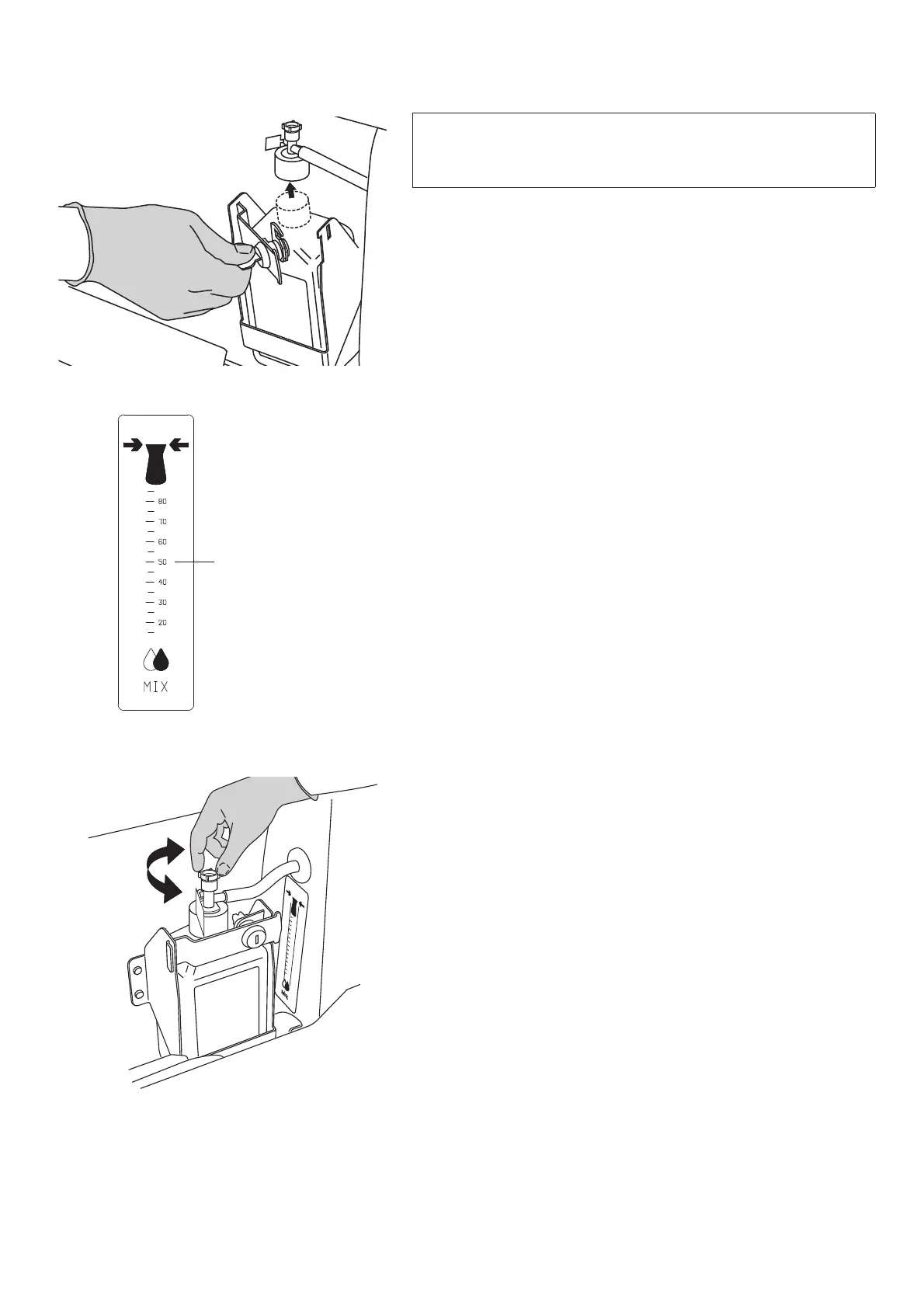
2 Open the disinfection door and unlock the disinfectant
bottle See Fig. 1
3 Disconnect the disinfection suction part from the
disinfection bottle. See Fig. 1
4 Remove and recycle the old bottle.
5 Place the new disinfectant bottle in the compartment and
remove the bottle cap.
6 Attach the bottle suction cap on the new disinfectant bottle.
7 Lock the disinfectant bottle inside the disinfection
compartment. See Fig.1
8 Set the temperature control as low as possible.
9 Grab the disinfection spray handle.
10 Spray disinfection fluid while keeping an eye on the flow
meter.
1 Check the liquid value so it is in accordance with the
recommended mix ratio. See Fig. 2
If necessary, adjust the bottle suction cap to get the right
mix ratio. See Fig. 3
1 Put the disinfection spray handle back into the
compartment.
1 Close the disinfection door after use.
WARNING
To prevent cross-contamination, always follow the
disinfection instructions in this IFU.


 To Next Page