installation &
operating instructions
ips 4000 controller - Integrated pumping
system for variable primary applications
11
Description
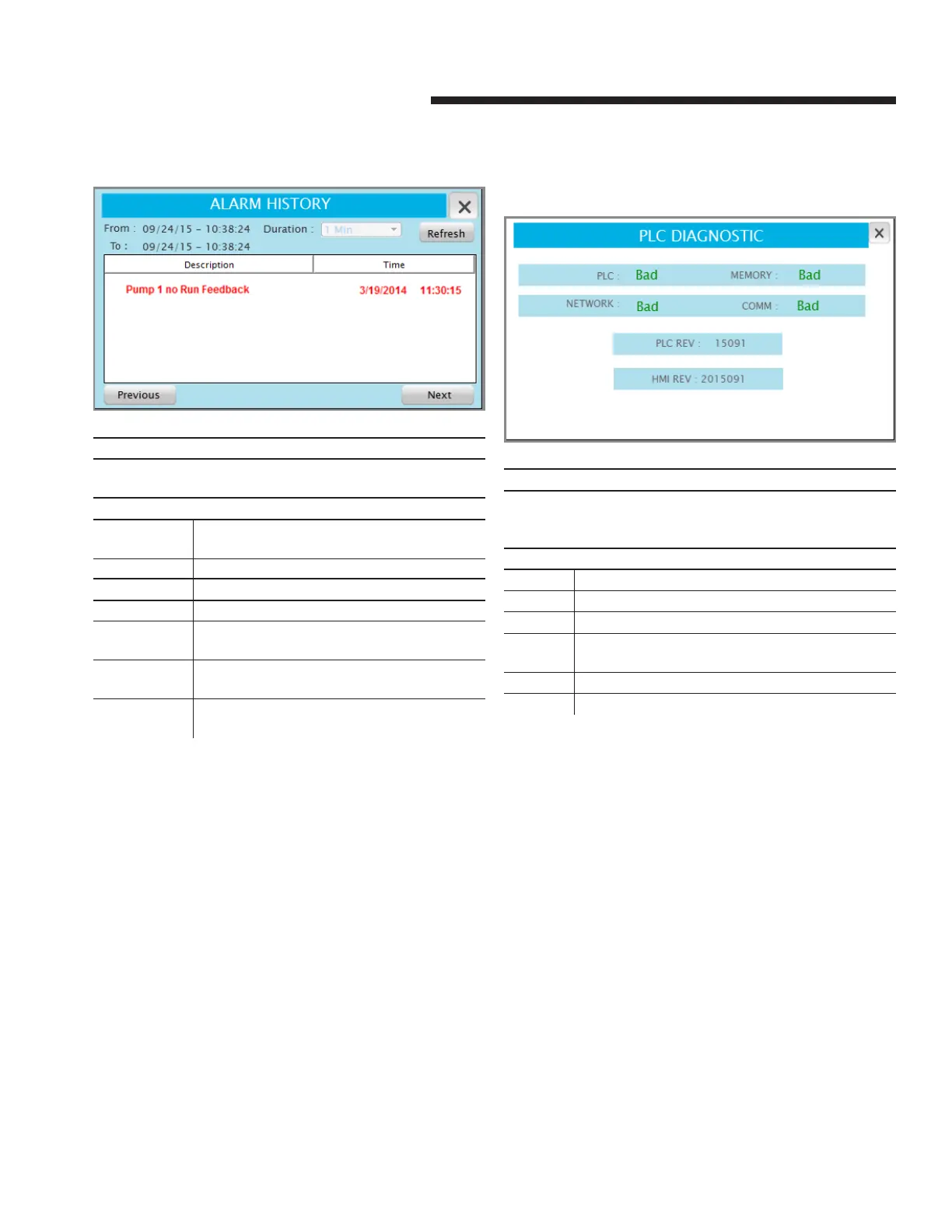
This screen shows the alarms history. Press the x on the top right
corner to go back to the previous screen
Data
Description Shows the description of the alarm. The possible
alarms are shown below in section 1.2.1
Time Shows the time of occurrence of each alarm
Buttons
refresh Refreshes the alarm list
Duration Drop down menu that allows to filter the list of
alarms based on time of occurrence
Previous Shows alarm history from the previous period
selected in the duration dropdown menu
Next Shows alarm history from the next period se-
lected in the duration dropdown menu
3.1.10 plc diagnostic
Description
This screen shows the current state of the plc and the software
revisions installed. Press the x on the top right corner to go back
to the previous screen
Data
plc Indicates if the plc is working properly
network Indicates if the plc network is working properly
memory Indicates if the plc memory is working properly
comm Indicates if the serial communication port of the plc is
working properly
plc rev Indicates the software revision installed on the plc
hmi rev Indicates the software revision installed on the hmi


 To Next Page