installation &
operating instructions
ips 4000 controller - Integrated pumping
system for variable primary applications
9
run hrs Indicates the pump total run time in hours.
Touching the run hrs label opens a dialog
window to confirm resetting the total run
hours
lead pump switch Indicates the remaining time in days or hours
to switch the Duty1 (Lead) pump
speed (%) Shows pump speed in percentage
speed (rpm) Shows pump speed in rpm
current (a) Shows the vfd current
volts (vac) Shows the vfd ac voltage
power (kw) Shows the vfd power in kWs
speed bars Show the pump speed reference and actual
speed in a graphical manner
auto bypass on If the pump is in auto bypass, the auto
bypass on label appears on the bottom of
the screen. Touching this label brings up the
auto bypass reset screen
Alarm If there is a pump alarm, a red bell appears at
the top right corner
Buttons
lead Assigns the pump as Duty1 or Lead
hand Changes the pump mode to hand. If the ips is
on, the pump will start immediately and run
at the hand speed (see below)
off Changes the pump mode to o. The pump
will stop immediately and it will be excluded
from the duty rotation
auto Changes the pump mode to auto. The pump
will be assigned a duty status and it will run
according to the ips control algorithm
hand speed If the pump is placed in hand, it will run at
the hand speed entered
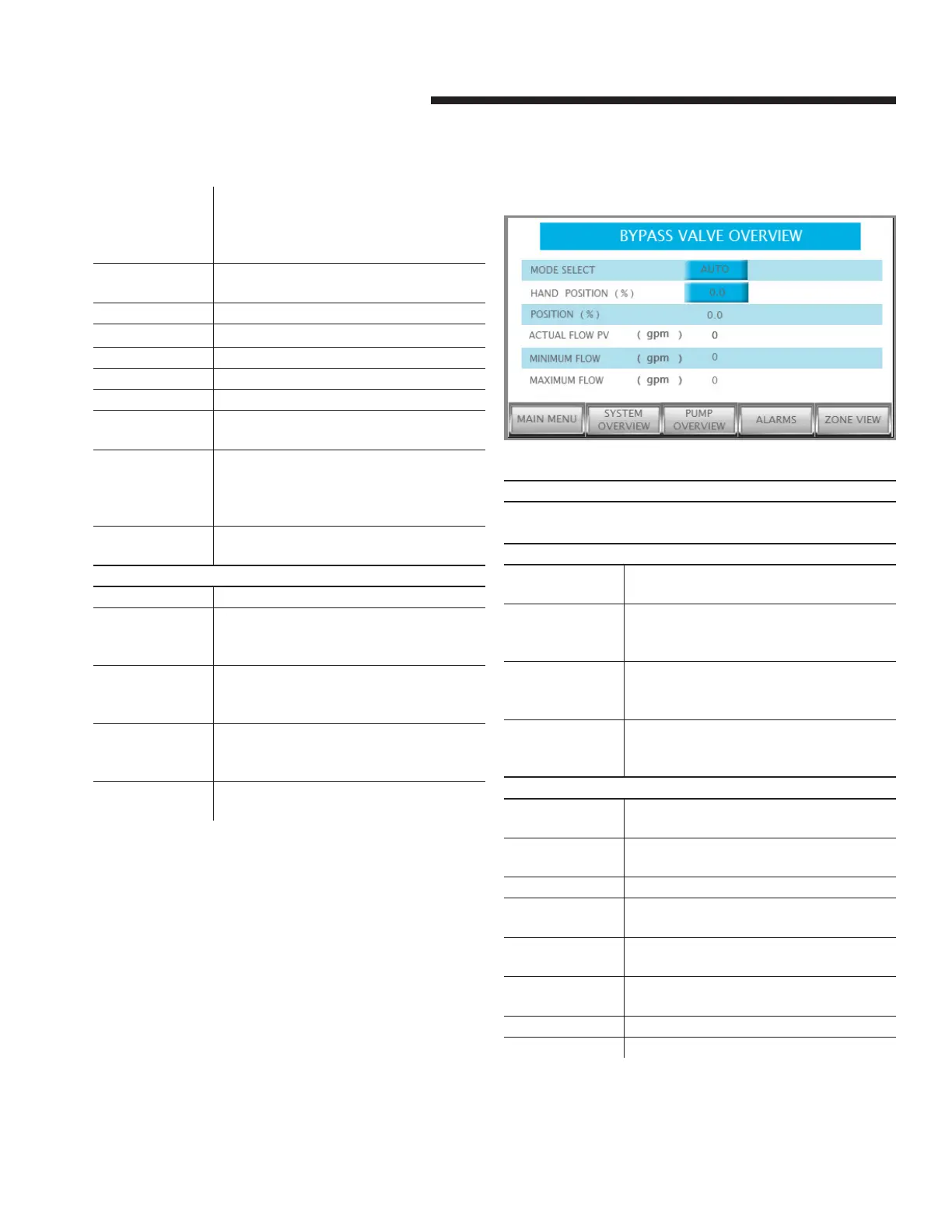
3.1.6 bypass valve overview
Description
This screen allows monitoring of the Bypass Valve Overview
feature
Data
position (%) Indicates valve position in percentage (100%
means fully open)
actual flow pv Displays system flow. Obtained from flow
meter or from sensorless readout depending
on the selection
minimum flow Indicates rated minimum chiller/boiler flow.
Updates dynamically based on number of
chillers/boilers enabled
maximum flow Indicates rated maximum chiller/boiler flow.
Updates dynamically based on number of
chillers/boilers enabled
Buttons
mode select Allows user to select the operation mode
manual or auto
hand position If manual mode is selected, the user can
enter the desired valve position
main menu Navigates to the main menu
system
overview
Changes the current screen to System
Overview
pump overview Changes the current screen to Pump
Overview
alarms Shows the alarm screen. If there is an
active alarm, this button turns red
zone overview Changes the current screen to Zone Overview
main menu Navigates to the main menu


 To Next Page