Exclusive distributor of Rx100
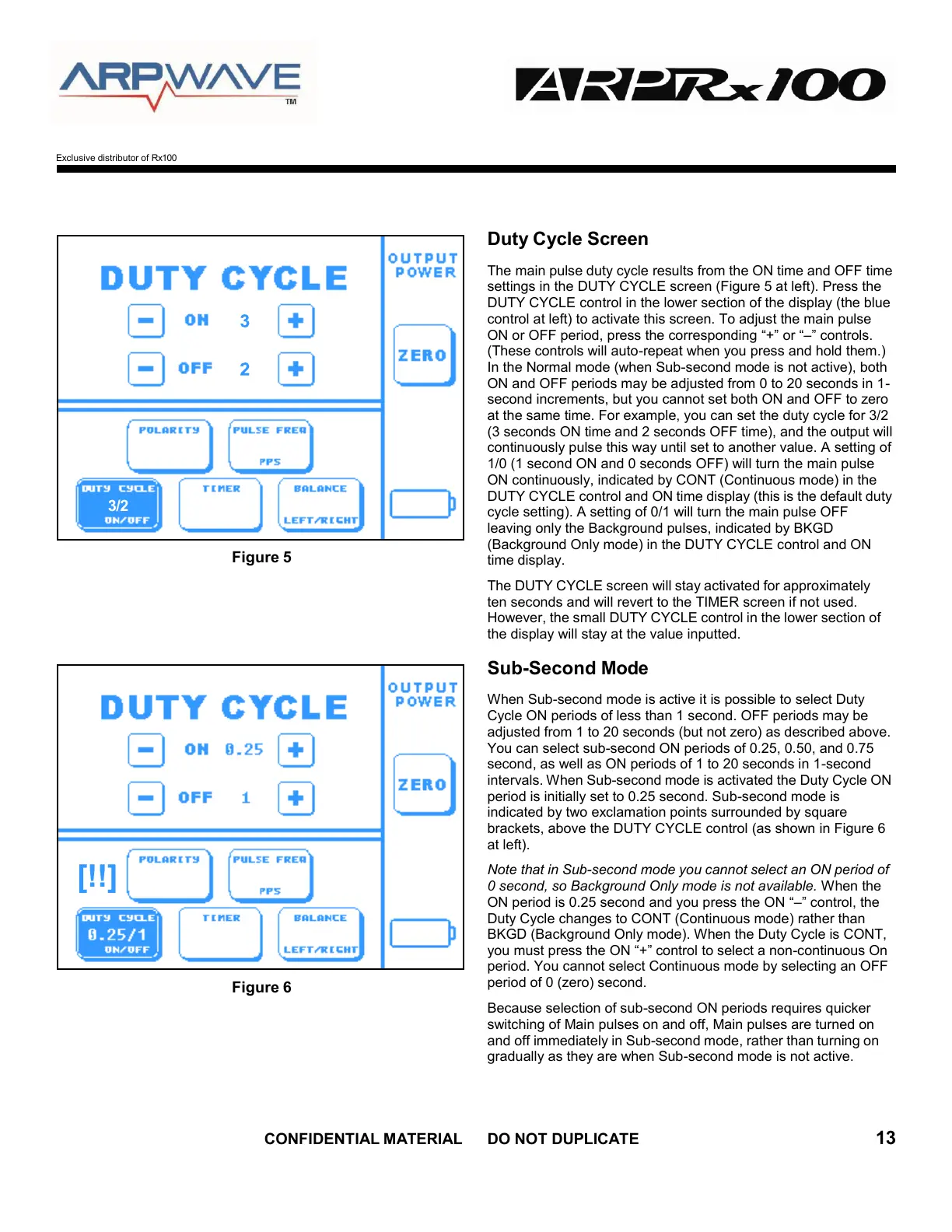
Figure 5
Figure 6
Duty Cycle Screen
The main pulse duty cycle results from the ON time and OFF time
settings in the DUTY CYCLE screen (Figure 5 at left). Press the
DUTY CYCLE control in the lower section of the display (the blue
control at left) to activate this screen. To adjust the main pulse
ON or OFF period, press the corresponding “+” or “–” controls.
(These controls will auto-repeat when you press and hold them.)
In the Normal mode (when Sub-second mode is not active), both
ON and OFF periods may be adjusted from 0 to 20 seconds in 1-
second increments, but you cannot set both ON and OFF to zero
at the same time. For example, you can set the duty cycle for 3/2
(3 seconds ON time and 2 seconds OFF time), and the output will
continuously pulse this way until set to another value. A setting of
1/0 (1 second ON and 0 seconds OFF) will turn the main pulse
ON continuously, indicated by CONT (Continuous mode) in the
DUTY CYCLE control and ON time display (this is the default duty
cycle setting). A setting of 0/1 will turn the main pulse OFF
leaving only the Background pulses, indicated by BKGD
(Background Only mode) in the DUTY CYCLE control and ON
time display.
The DUTY CYCLE screen will stay activated for approximately
ten seconds and will revert to the TIMER screen if not used.
However, the small DUTY CYCLE control in the lower section of
the display will stay at the value inputted.
Sub-Second Mode
When Sub-second mode is active it is possible to select Duty
Cycle ON periods of less than 1 second. OFF periods may be
adjusted from 1 to 20 seconds (but not zero) as described above.
You can select sub-second ON periods of 0.25, 0.50, and 0.75
second, as well as ON periods of 1 to 20 seconds in 1-second
intervals. When Sub-second mode is activated the Duty Cycle ON
period is initially set to 0.25 second. Sub-second mode is
indicated by two exclamation points surrounded by square
brackets, above the DUTY CYCLE control (as shown in Figure 6
at left).
Note that in Sub-second mode you cannot select an ON period of
0 second, so Background Only mode is not available. When the
ON period is 0.25 second and you press the ON “–” control, the
Duty Cycle changes to CONT (Continuous mode) rather than
BKGD (Background Only mode). When the Duty Cycle is CONT,
you must press the ON “+” control to select a non-continuous On
period. You cannot select Continuous mode by selecting an OFF
period of 0 (zero) second.
Because selection of sub-second ON periods requires quicker
switching of Main pulses on and off, Main pulses are turned on
and off immediately in Sub-second mode, rather than turning on
gradually as they are when Sub-second mode is not active.
[!!]
3/2


 To Next Page