Exclusive distributor of Rx100
Operation of Display Screens
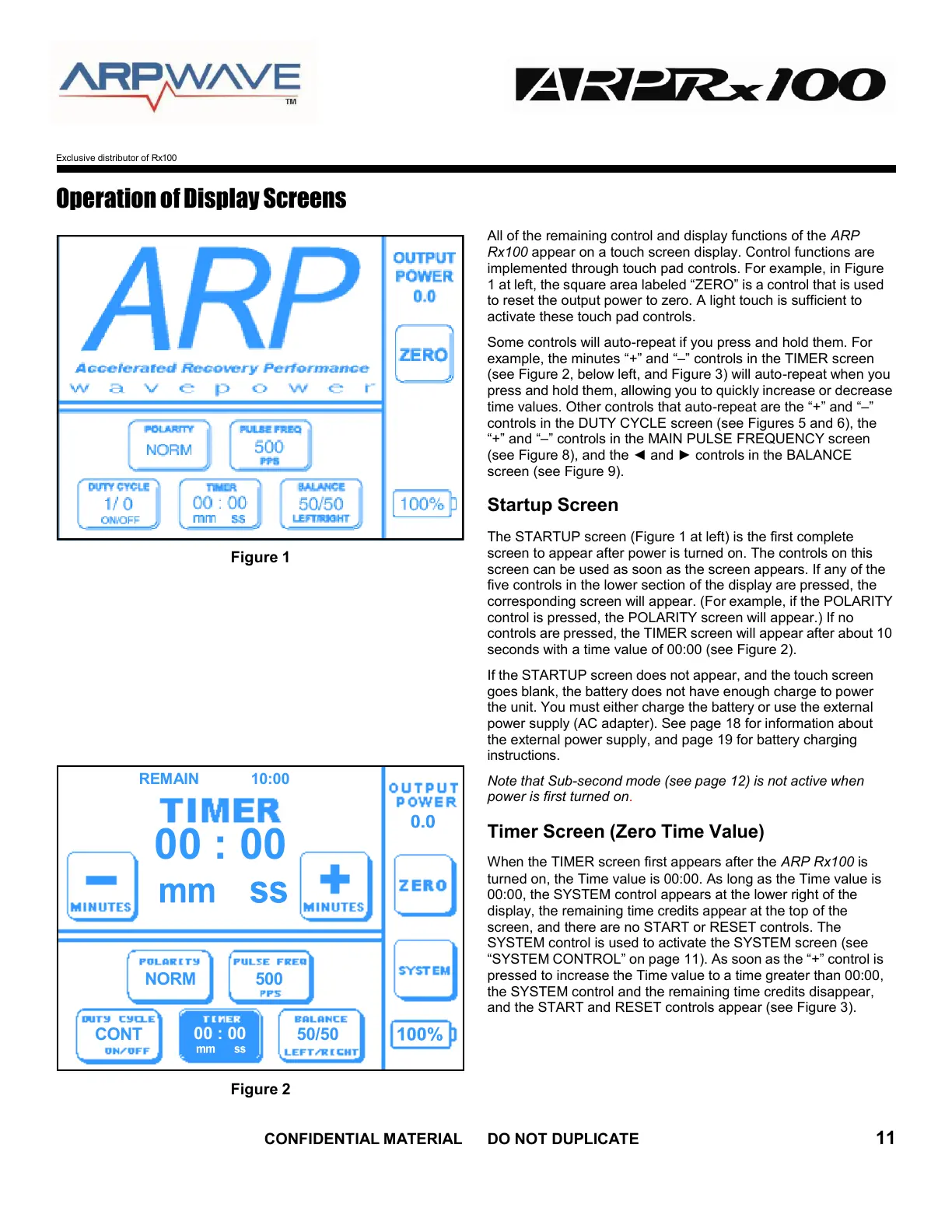
Figure 1
Figure 2
All of the remaining control and display functions of the ARP
Rx100 appear on a touch screen display. Control functions are
implemented through touch pad controls. For example, in Figure
1 at left, the square area labeled “ZERO” is a control that is used
to reset the output power to zero. A light touch is sufficient to
activate these touch pad controls.
Some controls will auto-repeat if you press and hold them. For
example, the minutes “+” and “–” controls in the TIMER screen
(see Figure 2, below left, and Figure 3) will auto-repeat when you
press and hold them, allowing you to quickly increase or decrease
time values. Other controls that auto-repeat are the “+” and “–”
controls in the DUTY CYCLE screen (see Figures 5 and 6), the
“+” and “–” controls in the MAIN PULSE FREQUENCY screen
(see Figure 8), and the ◄ and ► controls in the BALANCE
screen (see Figure 9).
Startup Screen
The STARTUP screen (Figure 1 at left) is the first complete
screen to appear after power is turned on. The controls on this
screen can be used as soon as the screen appears. If any of the
five controls in the lower section of the display are pressed, the
corresponding screen will appear. (For example, if the POLARITY
control is pressed, the POLARITY screen will appear.) If no
controls are pressed, the TIMER screen will appear after about 10
seconds with a time value of 00:00 (see Figure 2).
If the STARTUP screen does not appear, and the touch screen
goes blank, the battery does not have enough charge to power
the unit. You must either charge the battery or use the external
power supply (AC adapter). See page 18 for information about
the external power supply, and page 19 for battery charging
instructions.
Note that Sub-second mode (see page 12) is not active when
power is first turned on
.
Timer Screen (Zero Time Value)
When the TIMER screen first appears after the ARP Rx100 is
turned on, the Time value is 00:00. As long as the Time value is
00:00, the SYSTEM control appears at the lower right of the
display, the remaining time credits appear at the top of the
screen, and there are no START or RESET controls. The
SYSTEM control is used to activate the SYSTEM screen (see
“SYSTEM CONTROL” on page 11). As soon as the “+” control is
pressed to increase the Time value to a time greater than 00:00,
the SYSTEM control and the remaining time credits disappear,
and the START and RESET controls appear (see Figure 3).


 To Next Page