Exclusive distributor of Rx100
VER: 12345678
952-431-9708
Time Credit Request
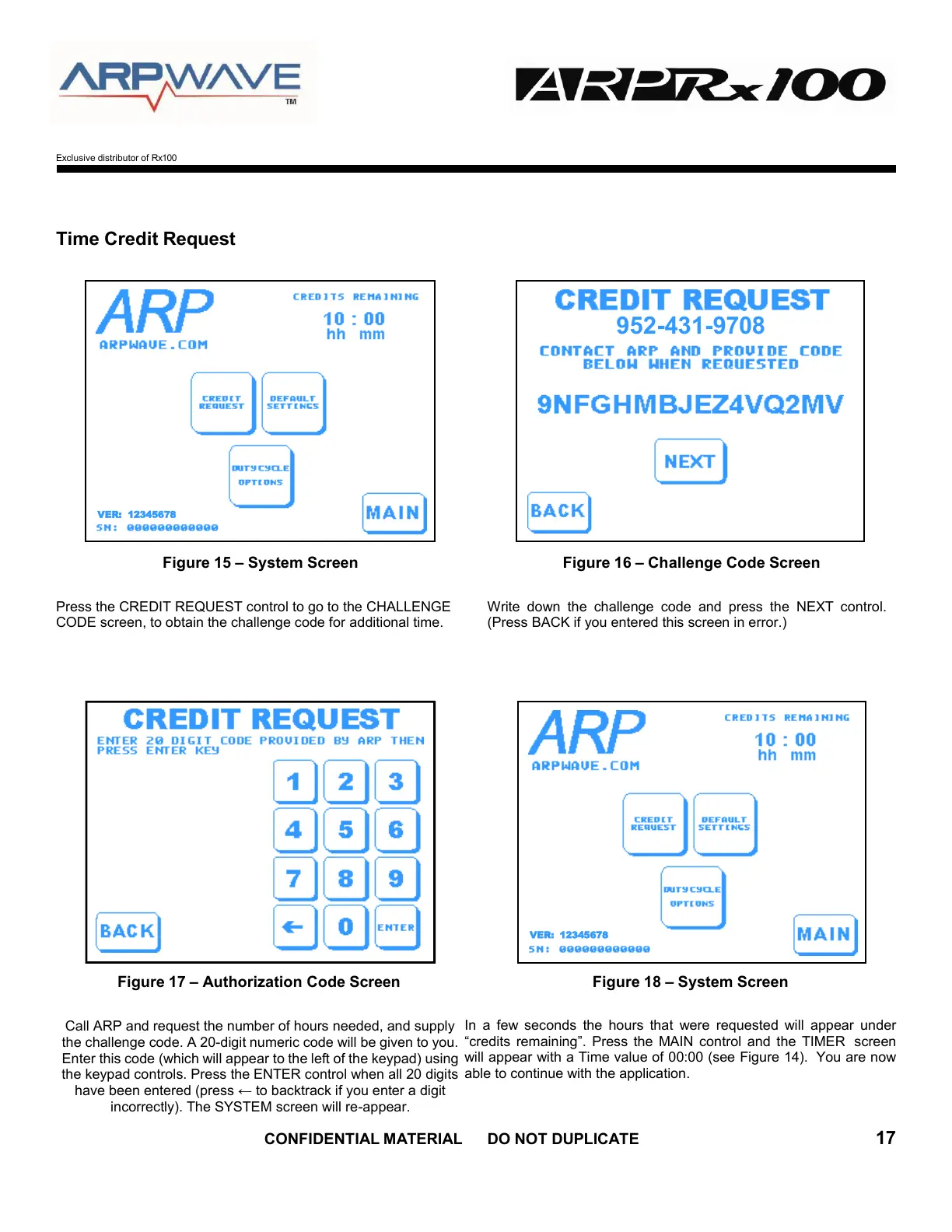
Figure 15 – System Screen Figure 16 – Challenge Code Screen
Press the CREDIT REQUEST control to go to the CHALLENGE
CODE screen, to obtain the challenge code for additional time.
Write down the challenge code and press the NEXT control.
(Press BACK if you entered this screen in error.)
Figure 17 – Authorization Code Screen Figure 18 – System Screen
Call ARP and request the number of hours needed, and supply
the challenge code. A 20-digit numeric code will be given to you.
Enter this code (which will appear to the left of the keypad) using
the keypad controls. Press the ENTER control when all 20 digits
have been entered (press ← to backtrack if you enter a digit
incorrectly). The SYSTEM screen will re-appear.
In a few seconds the hours that were requested will appear under
“credits remaining”. Press the MAIN control and the TIMER screen
will appear with a Time value of 00:00 (see Figure 14). You are now
able to continue with the application.
VER: 12345678


 To Next Page