3 Push the battery pack into the bay until it seats into place. If you are tak-
ing the battery out of the Telephony Modem, position your finger in
the battery opening area and use leverage to dislodge the battery
while pulling it straight back.
Note: The Telephony Modem will not begin operating until you apply AC
power.
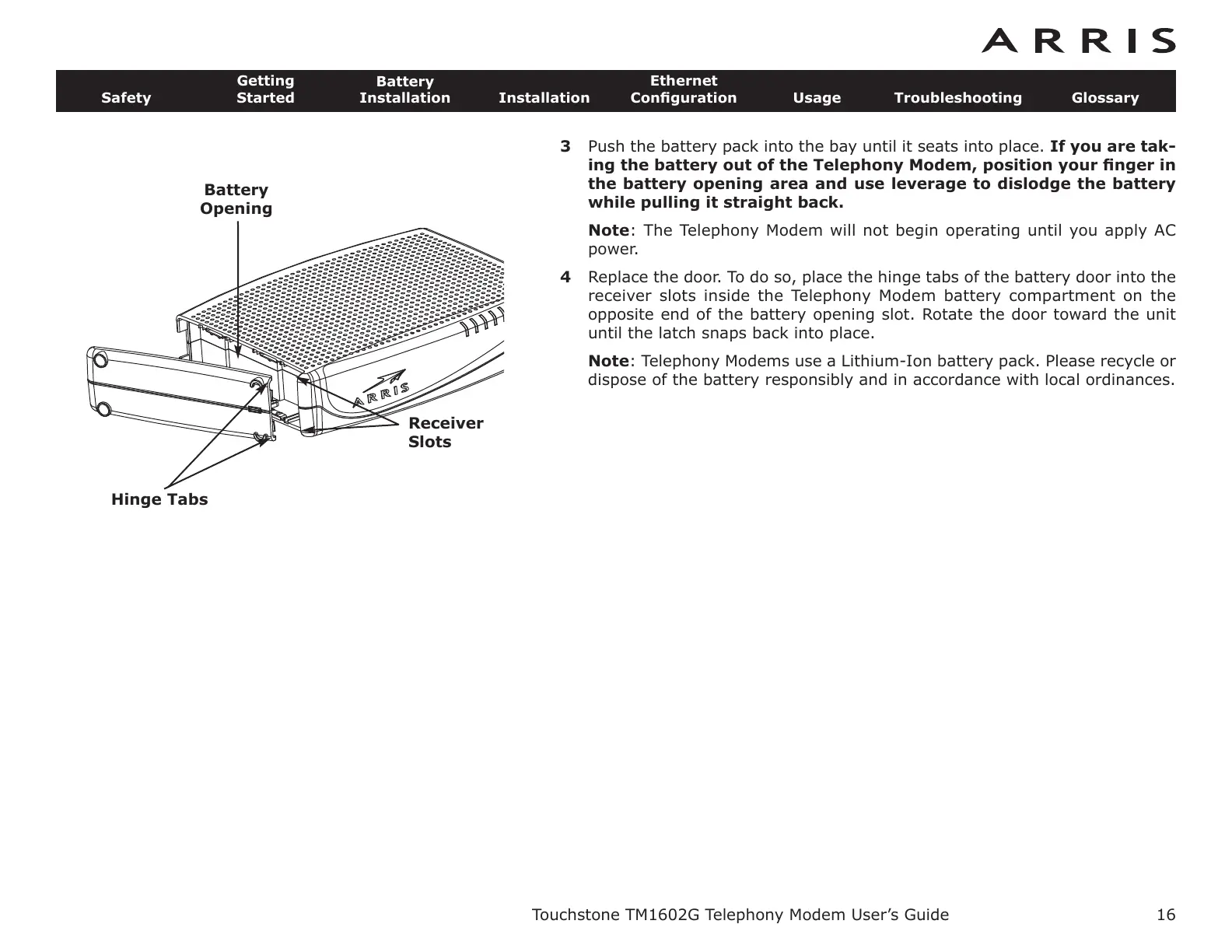
4 Replace the door. To do so, place the hinge tabs of the battery door into the
receiver slots inside the Telephony Modem battery compartment on the
opposite end of the battery opening slot. Rotate the door toward the unit
until the latch snaps back into place.
Note: Telephony Modems use a Lithium-Ion battery pack. Please recycle or
dispose of the battery responsibly and in accordance with local ordinances.
Touchstone TM1602G Telephony Modem User’s Guide
Safety
Getting
Started
Battery
Installation
Installation
Ethernet
Configuration Usage Troubleshooting Glossary
16
Battery
Opening
Receiver
Slots
Hinge Tabs















 To Next Page