20
Main Screen
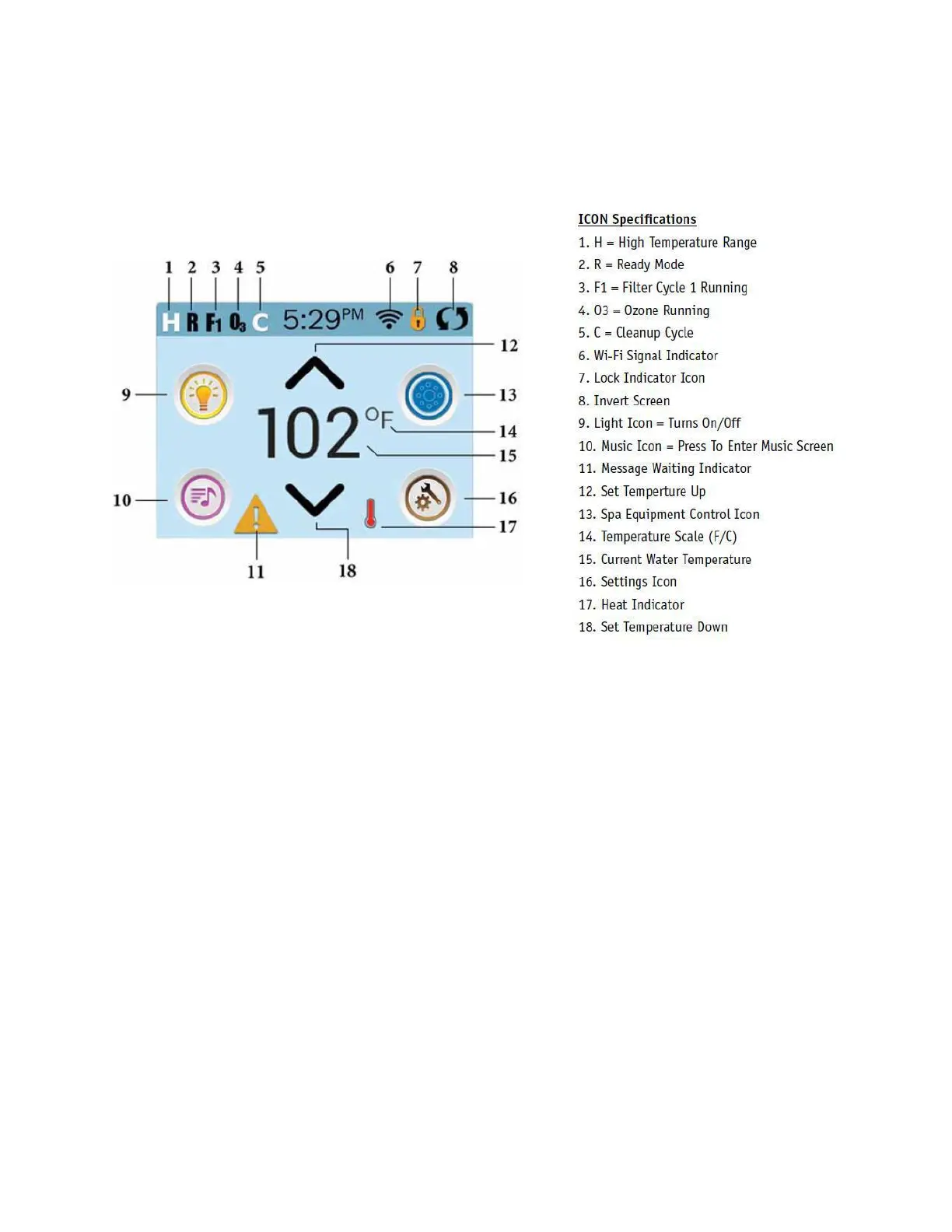
Figure 8. Main Screen Layout
Spa Status
Important information about spa operation can be seen quickly from the Main Screen.
Most features, including Set Temperature adjustment, can be accessed from this
screen. The actual water temperature and Set Temperature can be seen, and the Set
Temperature can be adjusted (see The Set Temperature Screen). Time-of-Day, Ozone
and Filter status is available, along with other messages and alerts. The selected
Temperature Range is indicated in the upper right corner. The Jets Icon in the centre
will spin if any pump is running and changes colour when the heater is on. A Lock icon
is visible if the panel or settings are locked.
The Menu choices on the right can be selected and the screen will change to show
more detailed controls or programming functions.
To ensure proper functionality and component longevity, individual Jet Pumps
must not be cycled on and off more than one time every minute.
Note: After 30 minutes the display will automatically go into sleep mode, which
turns the display off. This is normal operation. Touch anywhere on the screen to
wake the panel up. The actual number of minutes can be customized. See Panel
section.







 To Next Page