7.2.7. Sync
There is no pre-wired connection for this input. It can be used to set up the classic "hard
sync" sound by forcing VCO 1 to follow the pitch of VCO 2.
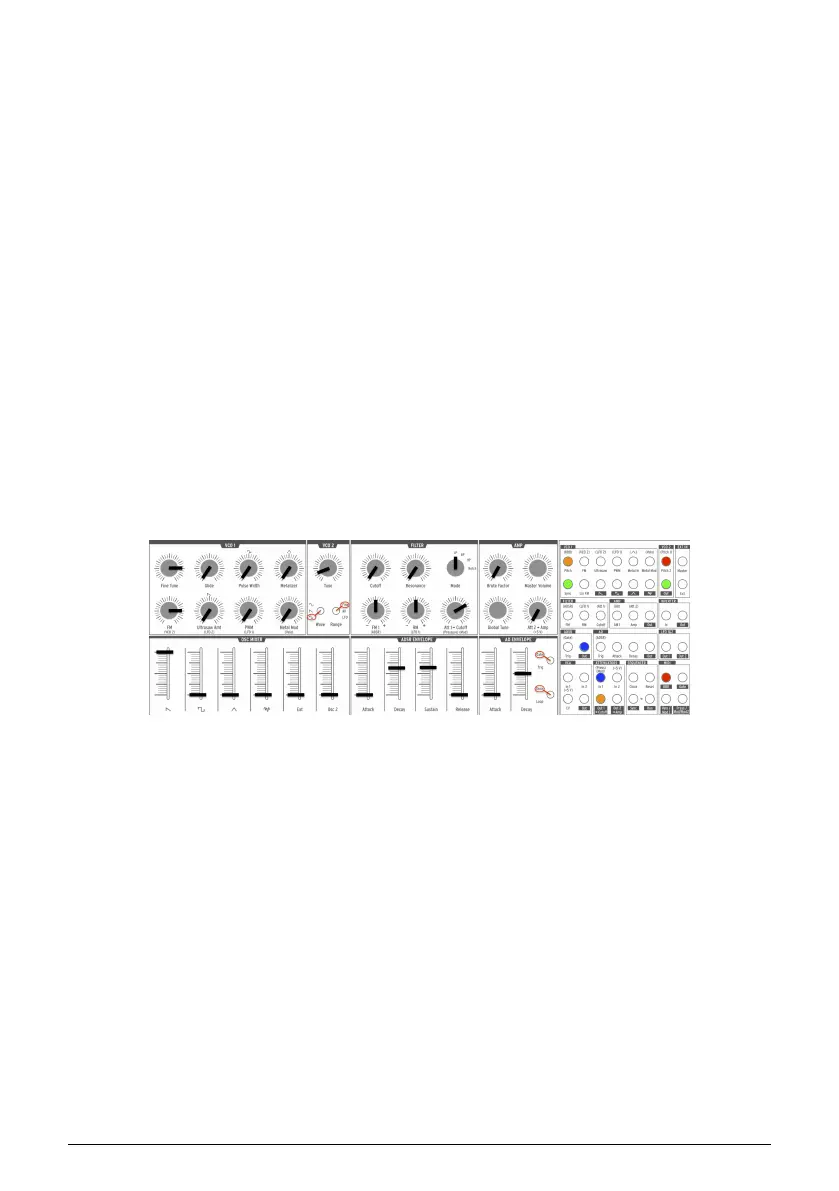
Here's an example patch:
• Tune VCO 2 down one octave
• Set VCO 2 Wave to Square and Range to Fine
• Transpose the MiniBrute 2S down two octaves
• Set all OSC MIXER faders to minimum except Sawtooth
• In the VCO 1 section, set Fine Tune and FM to about the 3:00 position
• Select LP in the Filter section and set FM and RM to center (12:00)
• Set Cutoff and Resonance to zero and Att 1>Cutoff to 2:00
• Set the ADSR Attack and Release to zero
• Set the ADSR Decay and Sustain about 2/3 of the way up
• Make the following connections in the patch bay:
◦ MIDI section: KBD (Out) to VCO 2 section: Pitch 2 (In)
◦ VCO 2 section: Out to VCO 1 section: Sync (In)
◦ ADSR section: Out to ATTENUATORS section: In 1
◦ ATTENUATORS section: Out 1 to VCO 1 section: Pitch (In)
Here's roughly how the patch should look. We've omitted the LFOs and other irrelevant
settings:
Now play some low notes. You should hear a recognizable sync sweep.
Hard Sync example patch
Arturia - User Manual MiniBrute 2S - The Patch bay 65











 To Next Page