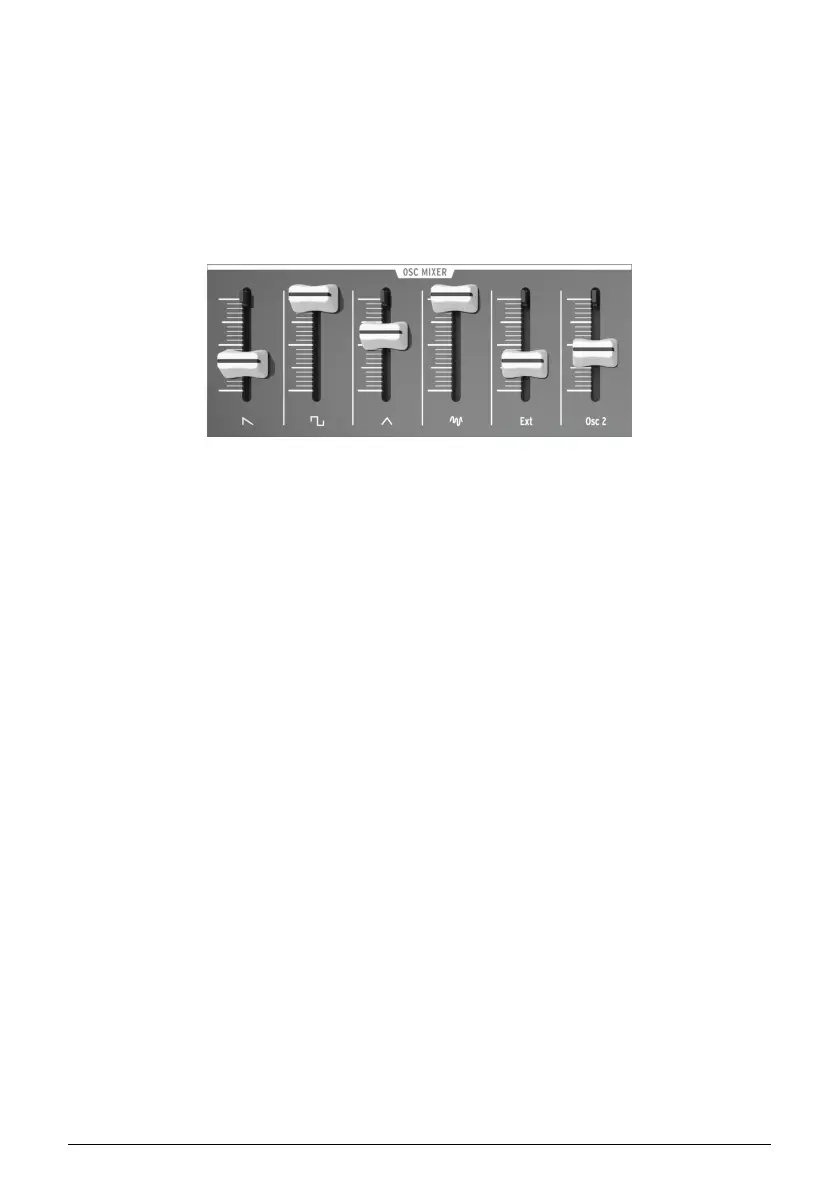
5.6. The Osc Mixer
The oscillators deliver four basic waveforms: sawtooth, pulse, triangle, and sine (VCO 2
only). These waveforms are accessible through the Oscillator mixer and their respective
levels can be adjusted with the sliders. A second oscillator is available to thicken the sound
through detuning or setting its pitch to other intervals.
The mixer also controls the level of noise and of external audio (if an external source
is plugged into the patch bay's Ext in jack). The mixed signals then feed the filter. The
waveforms of VCO 1 can also be modified using signal enhancers (Ultrasaw, Pulse Width
Modulation and Metalizer).
5.6.1. Saw / Ultrasaw (VCO 1)
The combined level of the plain Saw (sawtooth) and Ultrasaw signals is controlled with the
slider labeled with the saw icon. Pulling it down completely mutes the signals, while moving
it up increases their level. When the Ultrasaw Amt knob is fully counter-clockwise, only the
saw signal is audible. Turning this knob clockwise mixes more Ultrasaw sound in with the
plain saw signal.
The Ultrasaw consists of two copies of the plain saw that are independently phase-shifted
using LFO 2 (by default). The phase shift of one copy is modulated at a constant rate
(1Hz), while the second copy’s phase shift modulation rate can be controlled with the LFO
2 Rate knob from a rate of 0.1Hz (minimum) for slow-beating frequency effects, increased
gradually for chorusing and supersaw effects, and increased further to 100Hz (maximum)
for special effect sounds.
The shape of the phase-shifting can also be altered by changing the LFO 2 waveform.
5.6.2. Square / Modulated Pulse (VCO 1)
The level of the plain Square wave and Pulse width modulated signals is controlled with
the slider labeled with the square symbol. Pulling it down completely mutes the signals
and moving it up increases their level. When the PWM knob and the Pulse Width knob are
both fully counter-clockwise, the pure square wave is audible. Turning the Pulse Width knob
clockwise transforms the square wave into an asymmetrical pulse whose width can be
increased up to 98%, giving a very “acid” sound (like an oboe).
The pulse width is also under the control of LFO 1 by default. The depth of the pulse width
modulation can be adjusted with the PWM knob in the VCO 1 section, and the shape of the
LFO can be changed the with LFO 1 Wave knob.
The Oscillator mixer section
Arturia - User Manual MiniBrute 2S - The top panel 41











 To Next Page