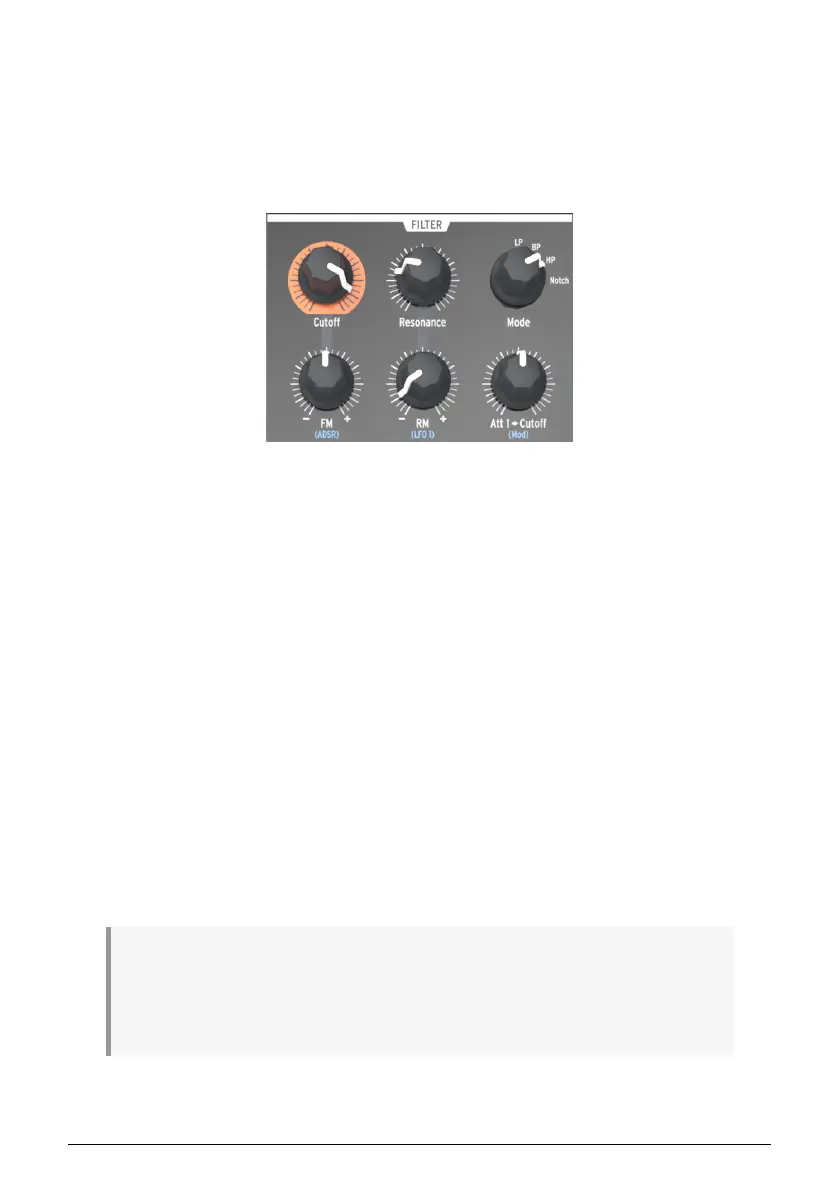
5.4. The Filter section
The filter alters the oscillators’ timbre via the four response modes described in the next
chapter [p.50] (LP, BP, HP & Notch). Its cutoff and resonance can be adjusted manually.
The cutoff can also be controlled by the keyboard and modulated by various modulation
generators. The MiniBrute 2S filter is based on Nyle Steiner’s
Sallen & Key
architecture
(designed in the 70s) and offers -12dB/octave slopes in LP and HP modes, and -6dB/octave
slopes in BP and Notch modes.
5.4.1. Mode
This selects among the four filter modes: LP (low-pass), BP (band-pass), HP *
(high-pass),
and *
Notch. The LP mode is the most commonly used, and provides sounds which are full,
fat, and round. The BP and HP modes provide thinner and harsher sounds. When modulated
by an LFO, the Notch filter mode sounds similar to a phaser effect pedal.
5.4.2. Cutoff
This knob adjusts the filter’s cutoff frequency. The frequency range goes from below 20Hz
when turned fully counter-clockwise up to 18kHz when fully clockwise. For example, in LP
mode you can adjust a sound’s brightness. As an exercise,
• Set all of the OSC MIXER sliders to 0 (lowest position)
• Adjust the NOISE generator slider to midrange
• Set all of the filter envelope and amplifier envelope sliders to 0
• Set the filter mode to LP
• Play and hold a note
• Adjust the Cutoff knob as you listen to the changes in the sound.
♪: You may want to try the same experiment with the other filter settings (BP, HP, and Notch). Since
a noise source contains all frequencies, this is a great way to hear exactly which ones are cut and
boosted by each filter type. !: Resonant filters can overload an audio circuit very easily. Be careful with
the various levels involved (Noise level, Resonance amount, Master Volume, and the channel settings of
your mixer or speaker). This is especially true when you are working with headphones!
The Filter section
Arturia - User Manual MiniBrute 2S - The top panel 35











 To Next Page