
 Need help?
Do you have a question about the Ascon tecnologic Y39 and is the answer not in the manual?
Provides an overview of the digital controller and its primary applications in cooling systems.
Details the layout and function of the controller's front panel, including keys and indicators.
Explains the procedure for quickly setting the desired temperature set point.
Guides users through parameter programming when password protection is disabled.
Describes how to implement and use a password to protect controller parameters from unauthorized changes.
Outlines the intended use, operating conditions, and safety precautions for the instrument.
Provides instructions and considerations for the physical installation and mounting of the instrument.
Details the required panel cut-out, mounting brackets, and overall instrument dimensions.
Explains how to correctly wire the instrument, including power supply and input/output connections.
Describes how to switch the controller between active operation and standby mode.
Covers probe selection, unit of measurement, resolution, and display settings.
Details the various functions that can be assigned to the digital input terminal.
Explains how to configure the relay outputs and the internal buzzer for different functions.
Allows setting and selecting between two different temperature set points (SP and SP2).
Explains the ON/OFF temperature control logic based on set points and hysteresis.
Details features to protect the compressor from short cycling and manage power-on delays.
Covers various methods for managing defrost cycles, including timing and evaporator temperature.
Explains how automatic defrost cycles are initiated based on intervals or power-on delays.
Describes how the evaporator fan output is controlled based on temperature and operating modes.
Details the different types of alarms (probe error, temp, external, door) and their signaling.
Explains configuration of temperature alarms, thresholds, and relative/absolute settings.
Describes how to use a digital input to signal an external alarm condition.
Explains the function and signaling for door opening alarms.
Allows customization of the 'U' and 'Aux' keys for specific operational functions.
Details the use of the A01 device for transferring and configuring instrument parameters.
Explains how to connect and use the TVR Y remote display unit.
Lists common error codes, their reasons, and the recommended actions to resolve them.
Explains various status messages displayed by the instrument during operation.
Provides guidance on how to clean the instrument safely and effectively.
Informs about the proper disposal of the appliance in compliance with local regulations.
Specifies the electrical characteristics, power supply, and output ratings of the instrument.
Details the mechanical specifications, dimensions, materials, and operating environment.
Summarizes key functional capabilities like temperature control, defrost, and measurement ranges.
The Y39 is a digital controller with a microprocessor, primarily designed for cooling applications. It offers ON/OFF temperature control and defrosting control, which can be triggered by time intervals or by reaching a specific temperature, stopping the compressor, or using electrical heating or hot gas/reverse cycle.
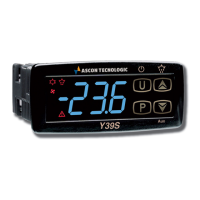
This instrument features up to three relay outputs, three inputs for PTC or NTC temperature probes, and a digital input (which can serve as an alternative to a temperature input). Additionally, it can be equipped with an internal buzzer for alarm signals. The three outputs are highly configurable, allowing them to control the compressor or temperature control device, the defrosting device, the evaporation fan, or act as an auxiliary device or alarm. The temperature probe inputs can measure control temperature, evaporator temperature, product temperature, or auxiliary temperature. The digital input, when configured as an alternative to an evaporator or auxiliary temperature input, can perform various functions such as signaling an open door, initiating defrost commands, or selecting a different set of temperature regulations. The Y39S model specifically incorporates an "S-touch" capacitive sensor keyboard system.
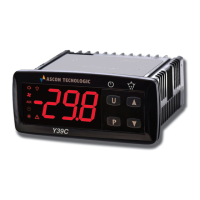
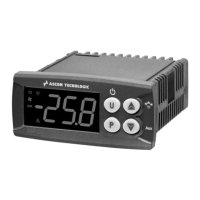
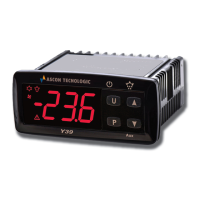
The device's front panel includes several keys and LEDs for operation and status indication. The P key is used to change the Set Point and program function parameters. Pressing it momentarily displays the Set Point, while holding it for 5 seconds enters programming mode. In programming mode, it confirms values and, when combined with the Aux key, changes the programming level. The Aux key decreases values in programming mode and selects parameters. Holding it for 1 second in normal mode can activate auxiliary outputs or continuous cycles. The U key initiates a manual defrost when pressed for 5 seconds in normal mode. In programming mode, it increases values and selects parameters, and when pressed with P for 5 seconds, it unlocks the keyboard. The A key displays instrument variables (temperatures) when pressed and released. Holding it for 1 second in normal mode can turn the device ON/OFF, activate auxiliary outputs, or start continuous cycles. The SET LED signals a key press in normal mode and indicates the programming level in programming mode. The COOL LED indicates the compressor or temperature control device status (ON, OFF, or flashing for inhibited). The HEAT LED shows the heating operation status (ON, OFF, or flashing for inhibited). The Defrost LED indicates defrost in progress (ON) or drainage time (flashing). The Fan LED shows the fan output status (ON, OFF, or flashing for inhibited). The A LED indicates alarm status (ON, OFF, or flashing for acknowledged/latched alarms). The Aux LED shows the auxiliary output status (ON, OFF, or flashing for inhibited). The Stand-By LED is the only lit LED when the instrument is in Stand-by mode.
Programming the device involves both fast Set Point programming and standard mode parameter programming. Fast Set Point programming is done by momentarily pressing the P key, which displays the Set Point value. This value can be adjusted using the U and Aux keys. Pressing P again exits this mode. Standard mode parameter programming is accessed by holding the P key for 5 seconds. Parameters can be selected using the U and Aux keys, and their values adjusted. The device also features a parameter protection function with a customizable password, set via the E.PP parameter, to prevent unauthorized changes. If the password is lost, the device can be reset by switching it OFF and ON and pressing the P key during initial power-up. Parameters can also be reset to their factory default values by setting the r.P password request to -48. A keyboard lock function, activated by setting the t.Lo parameter to a value other than oF, disables key functions after a period of inactivity. To unlock, P and A keys must be pressed simultaneously for 5 seconds. Customized mode parameters programming allows certain parameters to be accessible without a password, even when protection is active.
The instrument supports an ON/STAND-BY function. When powered, it can be in ON mode (control functions active) or STAND-BY mode (no control functions, display OFF except for Stand-by LED). The transition between these states is similar to power ON. The ON/Stand-by function can be selected by pressing the A key for at least 1 second (if t.UF = 4), the Aux key for at least 1 second (if t.Fb = 4), or via the digital input (if F. = 10).
Measurement and display configuration is managed through parameter S.E to select probe types (PTC or NTC) and u.P for temperature engineering units and resolution. Calibration is possible via parameters o.1, o.2, and o.3 for probes Pr1, Pr2, and Pr3, respectively. Probes Pr2 and Pr3 can be configured for evaporator probe (EP), auxiliary probe (Au), or digital input (dG) functions. An optional software filter (F.F) can be set to reduce sensitivity to rapid temperature changes. The d.S parameter determines the variable normally displayed. An offset (o.U) can be applied to the displayed variable. The device can display various variables, including probe temperatures and peak measurements, by repeatedly pressing the A key.
The digital input, available on terminal 11 (alternative to Pr2 input) or terminal 12 (alternative to Pr3 input), can be configured for various functions via the F. parameter, with actions delayed by i.ti. Functions include starting/ending defrost, continuous cycle activation, external alarm signaling, cell door opening with fan/compressor stop, auxiliary output remote control, active Set Point selection (SP/SP2), external alarm with control output deactivation, and instrument ON/OFF switching.
Outputs and buzzer configuration is done via parameters o.o1, o.o2, and o.o3. Outputs can control the compressor (ot), defrosting device (dF), fans (Fn), auxiliary device (Au), or various alarm types (silenceable At, non-silenceable AL, memory An, or their inverse logic counterparts). An output can also be set to be ON when the instrument is in ON state (on) or disabled (oF). The auxiliary output function (o.Fo) can be configured for delayed temperature control, manual activation by key or digital input, light with eco mode, or internal light. The buzzer (o.bU) can be configured to sound for active alarms only, when a key is pressed, or both.
Temperature control is ON/OFF, acting on the ot output based on Pr1 probe measurement, active Set Point (SP or SP2), differential (r.d), and action (r.HC). The differential is automatically adjusted for cooling (positive values) or heating (negative values). In case of a probe error, the instrument can be set to operate in cycles according to programmed activation (r.t1) and deactivation (r.t2) times. A continuous cycle function can be activated manually or via digital input, keeping the ot output active regardless of temperature control. This function inhibits defrosts and disables temperature alarms.
Compressor protection and power-on delay functions prevent frequent compressor start-ups in cooling applications. Three time controls manage the ot output activation: P.P1 (ON delay), P.P2 (delay after switching OFF), and P.P3 (minimum time between two ONs). The P.od parameter delays all output activations at power-on.
Defrost control acts on ot and dF outputs. The defrost type (d.dt) can be electrical heating (EL), hot gas/reverse cycle (in), without compressor conditioning (no), or electrical heating with evaporator temperature control (Et). Automatic defrosts are initiated by interval times (d.d). The first defrost after power ON can have a different delay (d.Sd). Interval defrosts can be disabled by setting d.d = oF. The defrost starting mode (d.di) can be real-time intervals (rt), ot output on time intervals (ct), defrost at compressor stop (cS), defrost for Pr2 < d.tS (St), or dynamic defrost intervals (dd). Dynamic defrost intervals (d.dd) can reduce the defrost interval based on performance decrease. Defrosts end by time (d.dE) or by evaporator temperature (d.tE) if an EP probe is used. The d.dS parameter sets the defrost enable temperature. After defrost, a delay (d.d.d) allows the evaporator to drain. The display behavior during defrost (d.dL) can be configured to show the last Pr1 temperature, "DEF" label, or the current Pr1 temperature.
Evaporator fans control operates on the Fn output based on instrument states and evaporator probe temperature. Parameters F.En and F.EF manage fan operation when the compressor (ot) is OFF. F.FE determines if fans run during defrost. A delay (F.Fd) can be set for fan start after defrost. Fans can be disabled if the evaporator temperature is too high (F.FL) or too low (F.LF).
Alarm functions include probe errors, temperature alarms, external alarms, and open door alarms. Alarms are indicated by the A LED and can activate the internal buzzer or configured outputs. The buzzer can be silenced manually. Output parameters for alarms (o.o1, o.o2, o.o3) can be configured for silenceable, non-silenceable, or memory functions, with normal or inverse logic. The "alarm memory" function (R.ER) can maintain the alarm signal even after the alarm condition ends. Temperature alarms are configured by R.AY (type), R.HA (high threshold), R.LA (low threshold), and A.Ad (differential). Delays for alarm intervention (A.PA, A.dA, A.At) can be set. External alarms from digital input (F. = 4 or 9) and open door alarms (F. = 5 or 6) are also supported.
The instrument can be connected to a PC via USB using the A01 device and "AT UniversalConf tools" software for parameter configuration and duplication. A remote display, TVR Y, can also be connected to show the Pr1 probe temperature.
For maintenance, the instrument should be cleaned with a slightly wet cloth using water, avoiding abrasive cleaners or solvents. The appliance must be disposed of separately in compliance with local waste disposal standards. The instrument comes with an 18-month warranty against manufacturing flaws or faulty material. Opening the housing, improper use, or installation voids the warranty. For faulty instruments, contact the sales department for authorization before shipping.
 General
| Processor | Unknown |
|---|---|
| Clock Speed | Unknown |
| Flash Memory | Unknown |
| RAM | Unknown |
| Operating Voltage | Unknown |
| Digital I/O Pins | Unknown |
| Analog Input Pins | Unknown |
| Communication Interfaces | RS-485 Modbus RTU |


 To Next Page