English
39
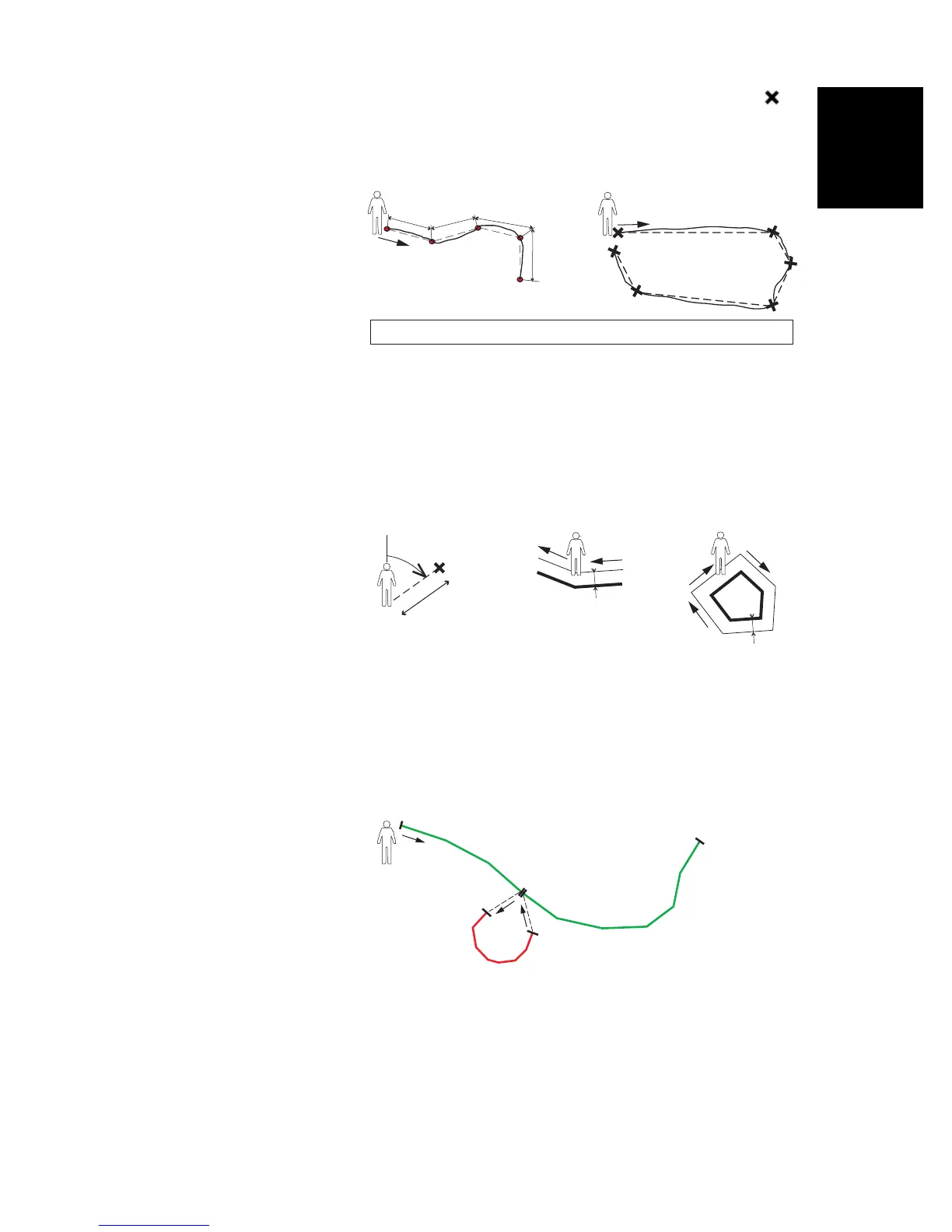
In Manual mode, you stop at each of the vertices ( ),
on which the receiver computes a position averaged
over n seconds
•On the Offset tab, you can set:
– The bearing and horizontal distance if you wish to
offset a point feature.
– The direction (left or right) and horizontal distance if
you wish to offset a line or polygon feature.
MobileMapper Field also allows the logging of two features to
be run concurrently (“double logging”). This can be done
through the appropriate use of the Pause/Resume/Stop
functions. Double logging is useful to reduce both the time
spent logging features and the distance walked in the field.
MobileMapper Field allows you to delete a logged feature
directly from the map screen showing the location of this
feature.
NOTE: You may need to tap on the ESC button after logging
your first feature so that map screen can show the location of
Automatic Manual
i
i
i
i
Continuous lines show actual paths traveled. Dotted lines show features, as logged.
Right
Bearing
Left
d= Horizontal Distance
d
d
d
N
1. Log
2. Pause
5. Resume
3. Log
4. Stop
6. Stop


 To Next Page