English
43
• For a numeric attribute, type your number using the
virtual keyboard and then tap OK.
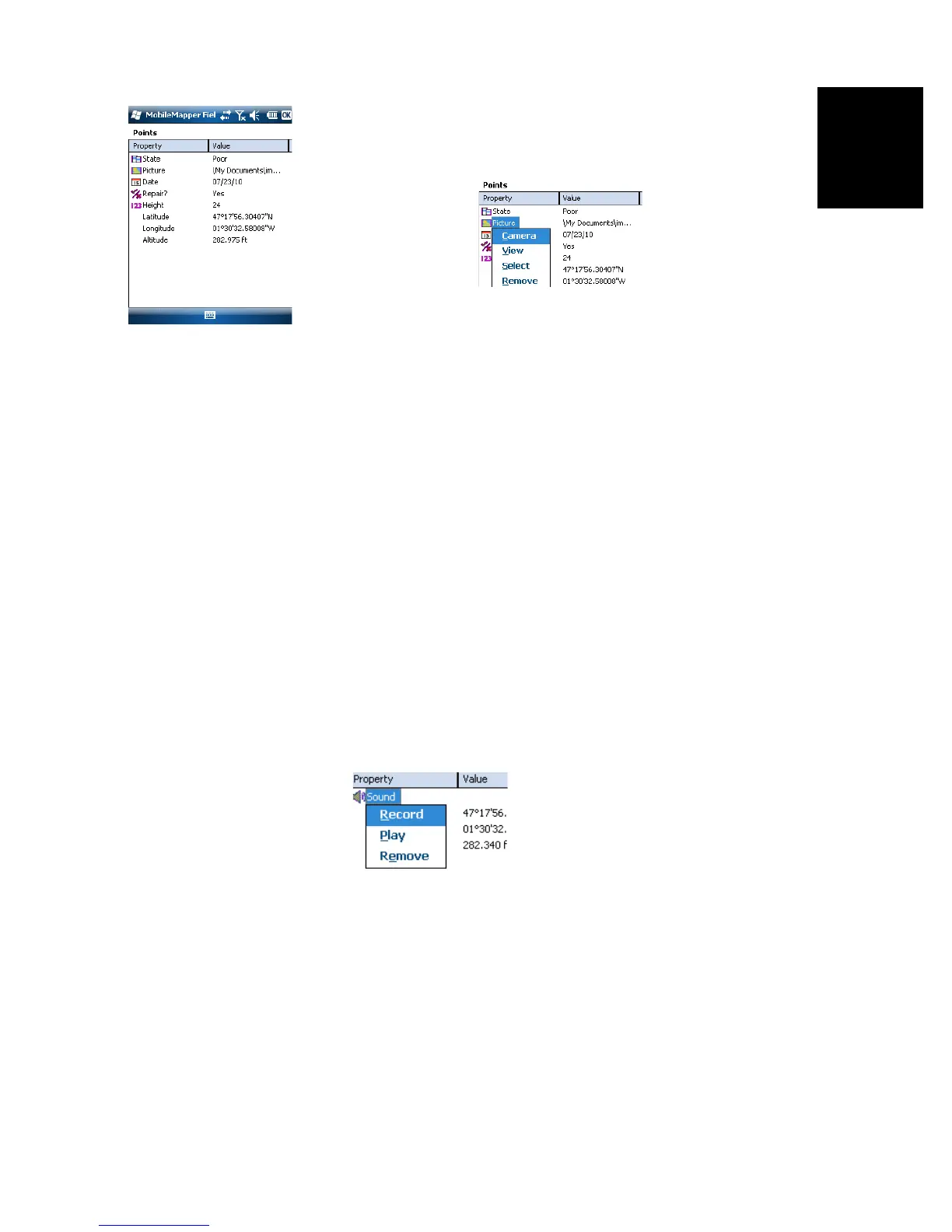
• For an image attribute, the following menu is displayed:
– Camera: Runs the camera utility so you can take a
picture. For more information on using the built-in
camera, see Using the Camera on page 19.
NOTE: Picture attributes are saved as JPG files in the
same folder as the layer they belong to. The file naming
convention used is Img#.jpg where # is the picture
number (1, 2, 3, etc.). The picture number is ascribed
in chronological order, with no reference to any other
file.
– View: Allows you to view the picture assigned to the
attribute.
– Select: Allows you to display a slide show of all the
pictures taken so you can choose which one to assign
to the attribute.
– Remove: Allows you to disconnect the selected jpg file
from the picture attribute. This does not delete the
picture itself, which is still present in the slide show.
• For a voice attribute, the following menu is displayed:
– Record: Opens the recorder bar from which you can
start, then, stop recording a voice message as an
attribute of the current feature.


 To Next Page