6
7. Chose cenrtifugations
spin speed...
5. Set the required temperature
on the thermostat . . .
6. Press any required
program option
buttons
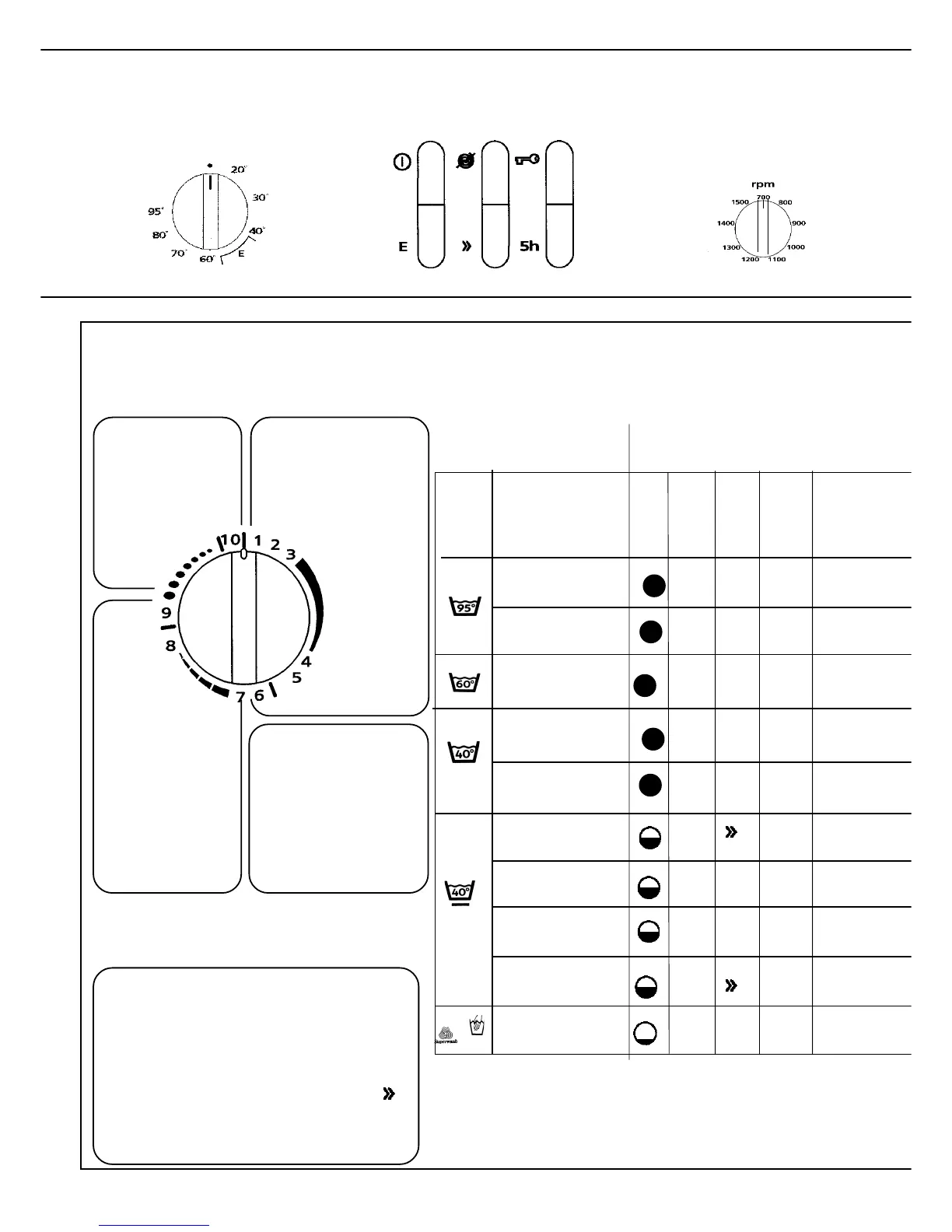
Which program should I choose?
9 Wool program
9. Start wool
10 Pumping out
6–8 Synthetics
6. Start long
Synthetics
wash**
7. Start short
Synthetics wash
8. Short spin
1–5 Whites/Colors
3. Start Quick
wash pro-
gram
4. Start Rinse
program
5. Long spin
The marks
indicate program finis-
hing points. The door
can be opened only
when the pointer is
against a mark.
What the figures on the
program knob mean
The machine has a special Quick Wash
program, which saves both time and energy.
The program can be used at any temperature.
If the load is small, you can also press the
button and speed the program up even more.
Quick Wash program
1. Start Whites/Colors
with prewash
2. Start Whites/Colors,
main wash**
You can naturally select a standard program or, by combining
your preferred temperature setting, program and option
selection, produce a program to suit your requirements.
The programs below are suggestions.
** When you choose program 2 (6) the knob
advances directly to 3 (7). The machine still
performs all stages of program 2 (6) .
Fabric
care
label
White Cottons
with pre-wash
White Cottons
without pre-wash
Fill
Type of fabric
Pro-
gram
2
Option
button
Fast colors
Quick wash
6
2
3
7
7
9
2
2
1
White Cottons
Fast colors
+ Economy
Quick synthetics *
Wool,
Handwash
E
60-95°
40-60°
40°
40°
40°
Tempe-
rature
Time,
minutes
110-125
30-40°
85-110
75
95
50
50
40
35-40
40°
40-45
Synthetics
colours, white
75-85
***
Superquick
60-95°
30-40°
40°
*


 To Next Page