CONTENTS
2FRONT PANEL
3SAFETY INSTRUCTIONS
4BEFORE WASHING FOR THE FIRST TIME
4LOADING THE DISHWASHER
6USING THE DISHWASHER
9SETTINGS
11CARE AND CLEANING
13TROUBLESHOOTING
16TECHNICAL INFORMATION
18INSTALLATION
19SERVICE
20PROGRAM CHART
21YOUR NOTES
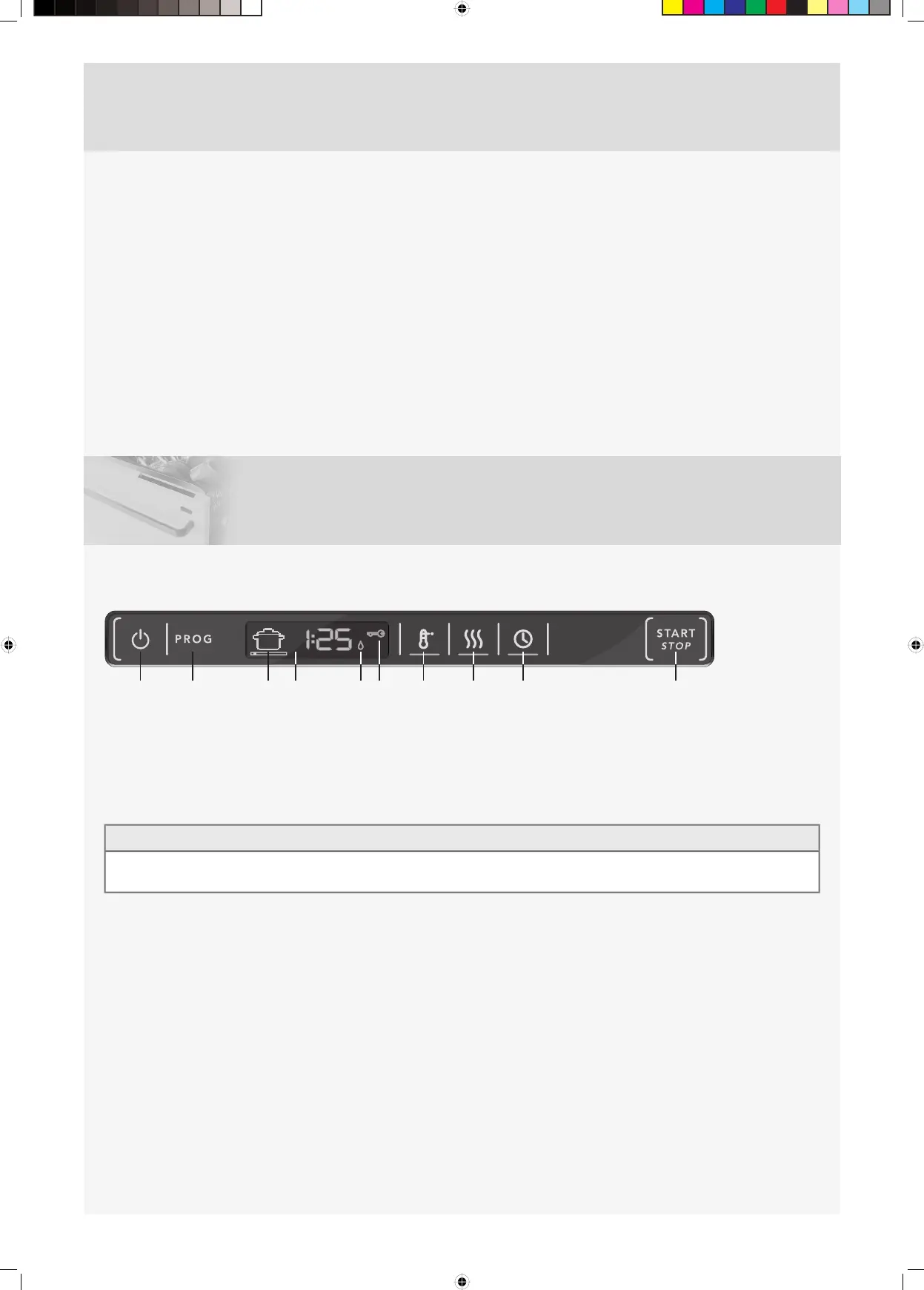
FRONT PANEL
The panel is fitted with touch buttons with audible feedback (see the chapter Settings).
1 On/Left-on mode
2 Program selector
3 Program symbol
4 Display
5 Rinse aid indicator
6 Child lock (button lock)
7 High temperature
8 Long dry
9 Delayed start
10 Start/Stop
NOTE!
•
Two minutes after the last button press, the panel backlight enters energy saving mode. Close and reopen the door, or press the
On/Left-on mode button, to reactivate the panel.
2



 To Next Page