PROGRAM SELECTION
Press the Program selector one or more times until the desired
program symbol appears on the display.
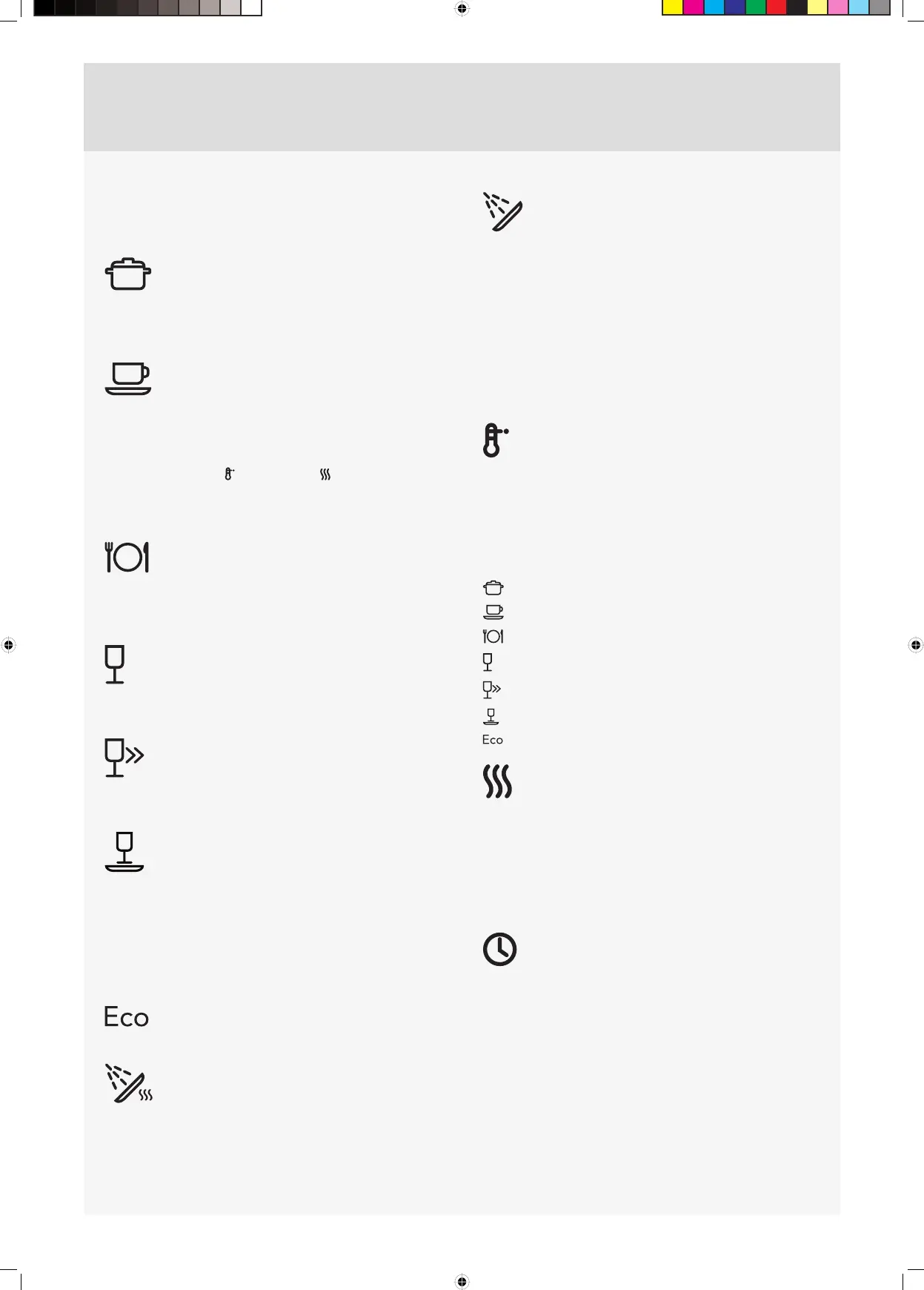
Heavy
Program for very dirty dishes, such as pans, casserole dishes and
oven dishes. If these dishes do not completely fill the dishwasher,
you can add plates and the like.
Normal
Use to wash normally dirty dishes, and even dishes with dried
leftovers, such as plates, serving dishes, cups, glasses and so on.
For washing normally soiled mixed loads use the Normal program
with high temperature and long drying .
To save more water and energy use low temperature and short
drying.
Daily
A program suitable for day-to-day dishwashing. This program can
also clean dried leftovers, but is not intended for burnt food, such
as on oven dishes.
Quick
This program is used for glasses and porcelain that is slightly dirty,
such as coffee cups.
Super Quick
Short program lasting about 15 minutes with acceptable results
for very slightly dirty dishes.
Delicate
If the dishes are not very dirty, you can select Delicate. This
program is intended for glasses and porcelain that have just been
used and as such do not require such a powerful program.
This program can be used for fragile dishes. Select Short dry if you
want to be especially cautious. See also the section Fragile dishes
in the chapter Loading the dishwasher.
Eco
Use when you want to save water. For normally dirty dishes.
Rinse & Dry
This program comprises a rinse with heating and drying. This is a
suitable program if, for example, you plan to make jam and want
to rinse and heat clean glass jars.
Rinse & Hold
Used to rinse dishes while you wait for the dishwasher to become
fully loaded.
SELECTING OPTIONS
To select an option, press one of the option buttons. The field
under the button lights when the option is activated. The available
options depend on the selected program. Once you have started
the program, the options you selected are saved for the next time
you use the same program. An exception is the Delayed start
option.
High temperature
Activate this option for improved dishwashing results. The machine
then uses a higher temperature for the main wash.
If you want to use the lower temperature, press again so that the
field under the button turns off.
You can vary the temperature as shown below:
60 °C / 70 °CHeavy:
50 °C / 65 °CNormal:
60 °C / 65 °CDaily:
30 °C / 60 °CQuick:
30 °C / 60 °CSuper Quick:
40 °C / 50 °CDelicate:
55 °C / 60 °CEco:
Long dry
A higher temperature in the final rinse and a longer drying phase
improves the drying result if you activate the Long dry option. This
causes a slight increase in energy consumption. This option can be
used with all programs except Rinse & Dry and Rinse & Hold.
If you want a program with Short dry, press again so that the field
under the button turns off.
Delayed start
When you select Delayed start, the dishwasher will start 1–24
hours after you press the Start/Stop button.
1 Press the button once to activate Delayed start. Press the
button several times – or hold it in – to set the desired number
of hours.
2 Press Start/Stop and the dishwasher counts down 1 hour at a
time and starts after the selected delay.
Press and hold Start/Stop for three seconds if you want to cancel
the Delayed start option.
7



 To Next Page