Service manual DW90
32
DW90.3
Service menu
Menu step/Turn/Push LCD Comments/instructions
S4
Most recent fault
S3
Date code control unit xxxx Shows the date code (year/week) of control unit
Software xxx Shows the software version
3 FAIL. xxxx Shows most recent fault
2 FAIL. xxxx
Shows second most recent fault (fault other than most
recent)
1 FAIL. xxxx
Shows third most recent fault (fault other than two
most recent)
S4
Diagnostics
S3
Testing No component tested
Test Valve A: XXX Mixer valve and inlet valve on (1 second delay between
mixer valve and inlet valve), a pulse meter shows the
water intake volume as a number of pulses (XXX)
Test Valve B: XXX Inlet valve on (1 second delay), a pulse meter shows the
water intake volume as a number of pulses (XXX)
Testing Salt Salt valve on
Testing Dispenser Combi dispenser on
Testing Circ: XXV Circulation pump on and the spray arm diverter (if
available) shall alternate between positions 1 and 3
every 30 seconds, turbidity (XX)in volts
Testing Heat: XX°C Circulation pump and heater on - max. 75°C (167°F),
temperature shown in °C or °F depending on the
machine setting.
Testing Fan: XXXX Fan and Wax motor on, humidity (XXXX Hz)
Testing Drain: XXV Drain pump on, pressure sensor value (XX) i volts
S4
Opening the service menu
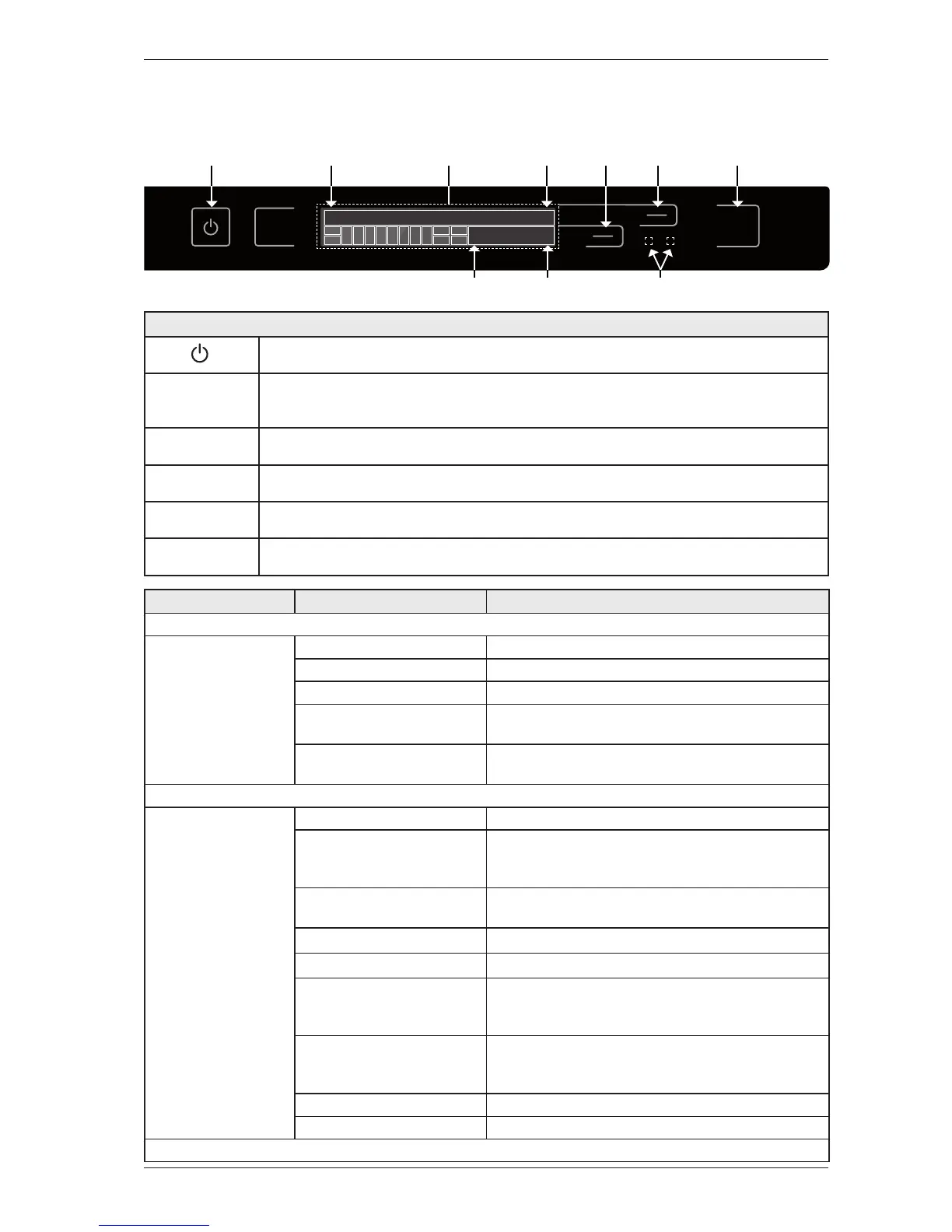
Check that the machine is switched off. Otherwise switch off the main power by pressing the
button (S5).
PROG + START
Press and hold the program selector (S1) while also pressing (S2). Switch on the main power by
pressing the button (S5). LCD1 M 2, 1-8 shall display: ”Next >”. The service menu is closed by
turning off the main power to the machine.
S4 Press the button (S4) to navigate the menu system step by step.
S3
Press the button (S3) to access the machine information and any fault codes. All error messages
are erased by a total reset.
S4
Press (S4) to save the setting and continue to the next menu step.
START
Press (S2) to exit the service menu.
IRM2,8M2,1
S TA R T
P R O G
S T O P
S5 M1,1 M1,28 S3 S2S4
LCD
I1:1 I7 I8
I1:3
I6
I2:1
I2:2
I3
I10
I4
I5
I1:2 I11 I9


 To Next Page