SECTION 2 BIS VISTA MONITORING SYSTEM OVERVIEW
_______________________________________________________________________
2-3
ON/Standby button
The ON/Standby button is located in the lower right corner of the monitor and is used to
put the monitor in ON or in Standby mode. When the small LED light to the right of the
ON/Standby button is green, the unit is running and providing power to the BISx. When it
is yellow, the battery is charging and the system is in Standby mode. When it is not lit, no
A/C power is available to the unit; pressing the ON/Standby button will start up the
monitor using the battery.
Clamp Shoe
Serial Port
USB Port
(Type A)
USB Port
(Type B)
Reset Button
Battery/Power
Supply
Cover
Power Cord
Receptacle
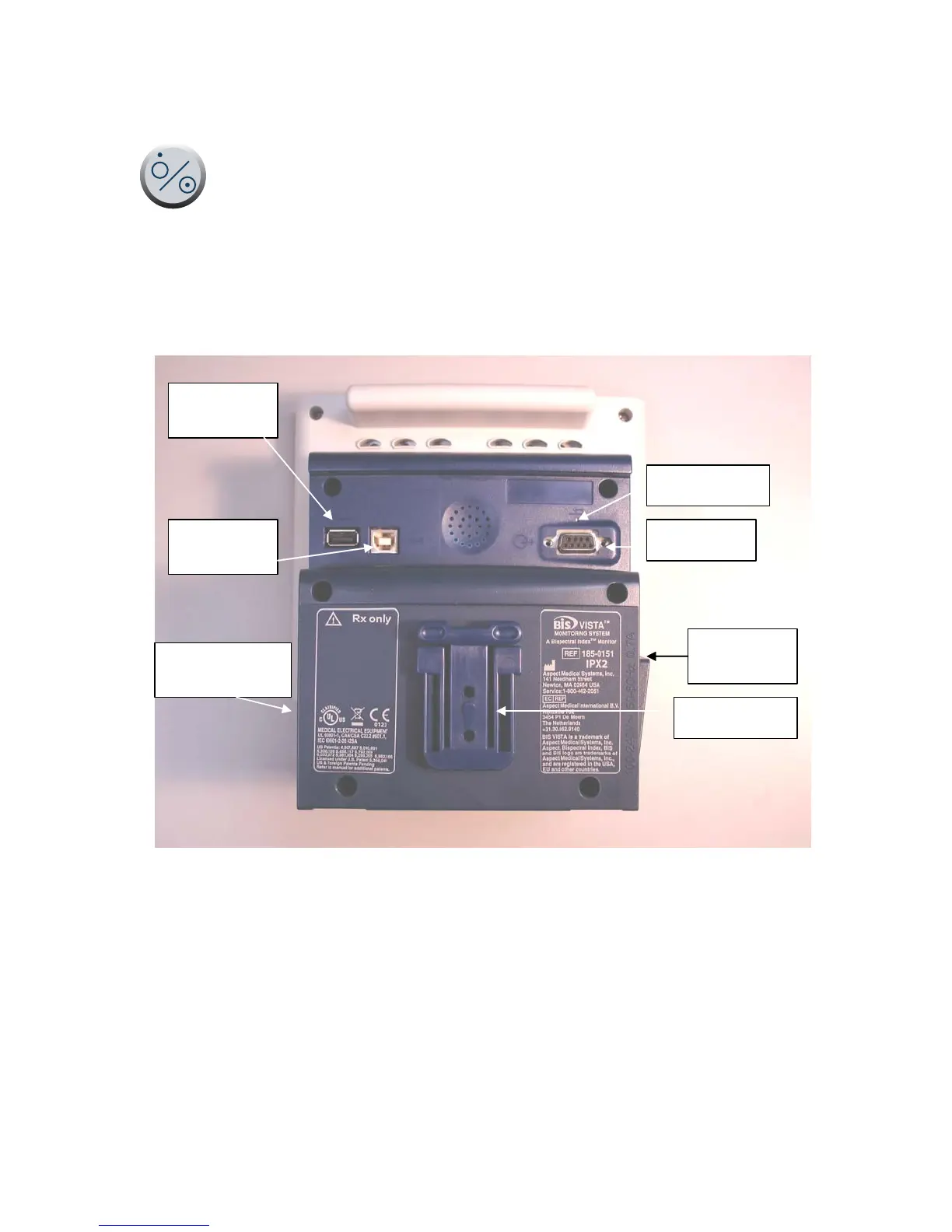
Figure 3 - Rear Panel
Rear Panel
The rear panel components are pictured in Figure 3. They include: two USB ports (Type A
and B), the clamp shoe, an RS-232 port, the Reset button, the Battery/Power Supply cover,
and the power cord receptacle.
The clamp shoe allows the monitor to slide into the pole clamp so that it can be attached to
a ½" – 1 ½" diameter vertical pole.


 To Next Page