14
800-810-WIRE (9473) • www.sargentlock.com • A7113E
12/15/07 © SARGENT Manufacturing Company 2005, 2007. All rights reserved.
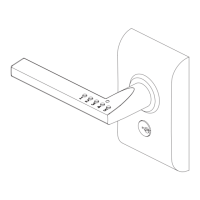
Keypad 10 Line Lock
8/14/08 Copyright © 2005, 2007,2008, SARGENT Manufacturing, an ASSA ABLOY Group company. All rights reserved.
Reproduction in whole or in part without the express written permission of SARGENT Manufacturing is prohibited.
To Enter a User Code:
• Supervisory or Master Code* (Yellow LED Begins to Blink Slowly)
• 50# 1# User Number (04-97)# User Code* (Yellow LED Blinks Quickly)
• User Code* (Yellow LED Blinks Slowly)* (Yellow LED Goes Out)
To Enter a Passage (Maintained Mode) Code: When Passage Mode is used, the same User Code
must be used to Re-lock the Lock.
• Supervisory or Master Code* (Yellow LED Begins to Blink Slowly)
• 50# 2# User Number (04-97)# User Code* (Yellow LED Blinks Quickly)
• User Code* (Yellow LED Blinks Slowly)* (Yellow LED Goes Out)
To Enter a One Time User Code:
• Supervisory or Master Code* (Yellow LED Begins to Blink Slowly)
• 50# 3# User Number# User Code* (Yellow LED Blinks Quickly)
• User Code* (Yellow LED Blinks Slowly) * (Yellow LED Goes Out)
To Deactivate “Beep” With the Depression of Each Key:
• Supervisory or Master Code* (Yellow LED Begins to Blink Slowly)
• 30# 0# 0# (Yellow LED Continues to Blink Slowly)
• * (Yellow LED Blinks Quickly)
• * (No Beep on Depression and Yellow LED Blinks Slowly)
• * (No Beep on Depression and Yellow LED Goes Out)
To Reactivate “Beep” With the Depression of Each Key:
• Supervisory or Master Code* (Yellow LED Begins to Blink Slowly)
• 30# 0# 1# (Yellow LED Continues to Blink Slowly)
• * (Yellow LED Blinks Quickly)
• * (Beep on Depression and Yellow LED Blinks Slowly)
• * (Beep on Depression and Yellow LED Goes Out)
To Clear the Entire Memory:
• Master Code* (Yellow LED Begins to Blink Slowly)
• 46# 00000# 00000# (Yellow LED Continues to Blink Slowly)
• * (Yellow LED Blinks Quickly)
• * (No Beep on Depression and Yellow LED Goes Out)
• PAUSE, Yellow LED Begins to Blink Again
• * (Yellow LED Goes Out)
Note: This Deletes ALL Codes, including Master, Emergency and Supervisory. The Master Code is set back to
1234, Door Number to 0001 and Unlock time 5 Sec. If the Master Code is not known, Factory Assistance will be
required to clear the memory. 1-800-810-WIRE.
To Program Door Numbers into Keypad:
• Master Code* (Yellow LED Begins to Blink Slowly)
• 43# 0# Door Number# (must be four digits) (Yellow LED Blinks Slowly)
• * (Yellow LED Begins to Blink Quickly)
• * (Yellow LED Blink Slowly)
• * (Yellow LED Goes Out)
All of the following procedures start with 99# (continued).
If after the last “*” is depressed, the yellow LED does not go out, depress “*” once more.


 To Next Page
 Loading...