12. Expansion slot brackets. Remove the expansion slot bracket when installing an
expansion card.
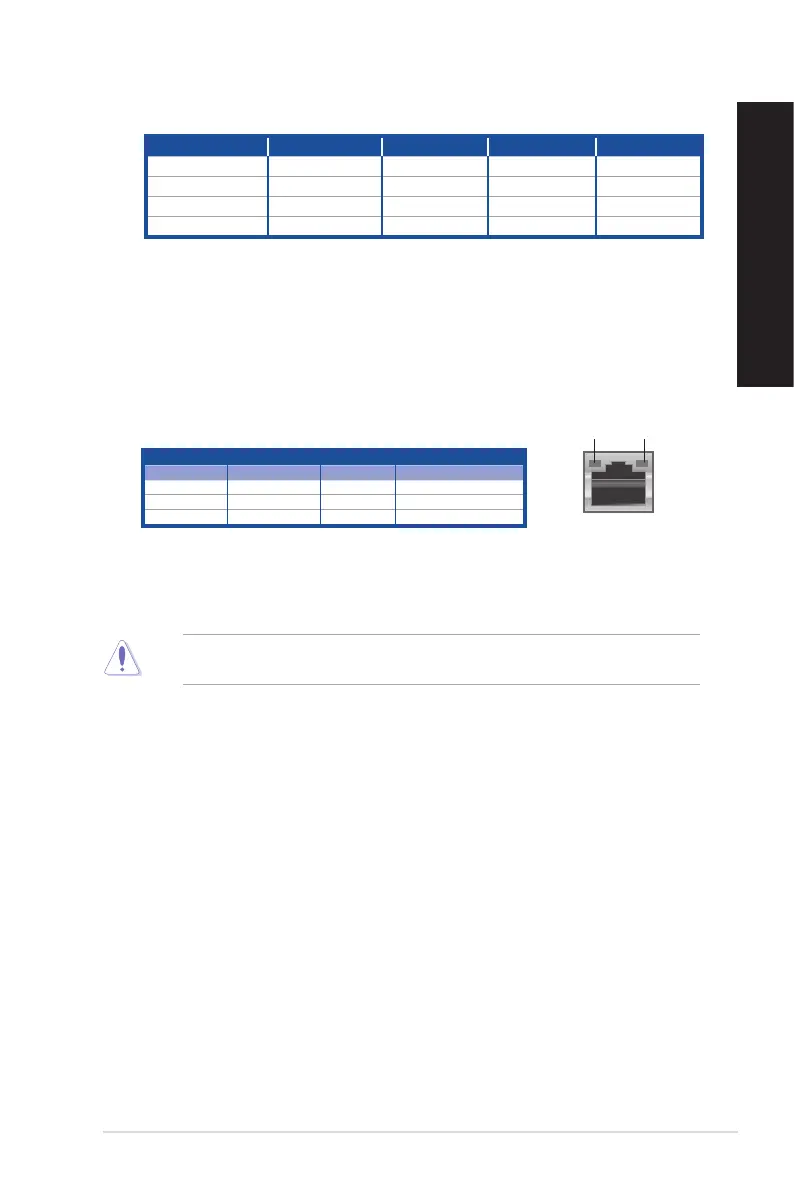
13. LAN (RJ-45) ports. These ports allow Gigabit connection to a Local Area Network
(LAN) through a network hub.
* BM3CE (MD790) has dual LAN ports while BM3CF (MD580) has one LAN port.
LAN port LED indications
14. VGA port. This port is for VGA-compatible devices such as a VGA monitor.
15. Air vents. These vents allow air ventilation.
DO NOT block the air vents on the chassis. Always provide proper ventilation for your
computer.
Activity/Link LED Speed LED
Status Description Status Description
OFF No link OFF 10Mbps connection
ORANGE Linked ORANGE 100Mbps connection
BLINKING Data activity GREEN 1Gbps connection
LAN port
SPEED
LED
ACT/LINK
LED
Audio 2, 4, 6, or 8-channel configuration
Port Headset 2-channel 4-channel 6-channel 8-channel
Light Blue (Rear panel) Line In Rear Speaker Out Rear Speaker Out Rear Speaker Out
Lime (Rear panel) Line Out Front Speaker Out Front Speaker Out Front Speaker Out
Pink (Rear panel) Mic In Mic In Bass/Center Bass/Center
Lime (Front panel) - - - Side Speaker Out
ASUS Desktop PC
19
ENGLISH
ENGLISH



 To Next Page