Preloading the USB 2.0/3.0 drivers for Windows
®
7
installation
Preload the USB 2.0/3.0 drivers to be able to use the keyboard and mouse during the
Windows
®
7 installation. The following steps guide you in preloading the USB 2.0/3.0 drivers
and installing Windows
®
7.
Method 1: Preloading/installing via ODD and USB device
1. Ensure that you have the following:
• ASUS Support DVD (included with your Desktop PC package)
• Windows
®
7 installation source (copied to a formatted USB storage device with
8GB or more capacity)
• Optical disk drive (ODD)
2. Connect the USB storage device containing the Windows
®
7 installer.
3. Insert the ASUS support DVD into the ODD of your Desktop PC.
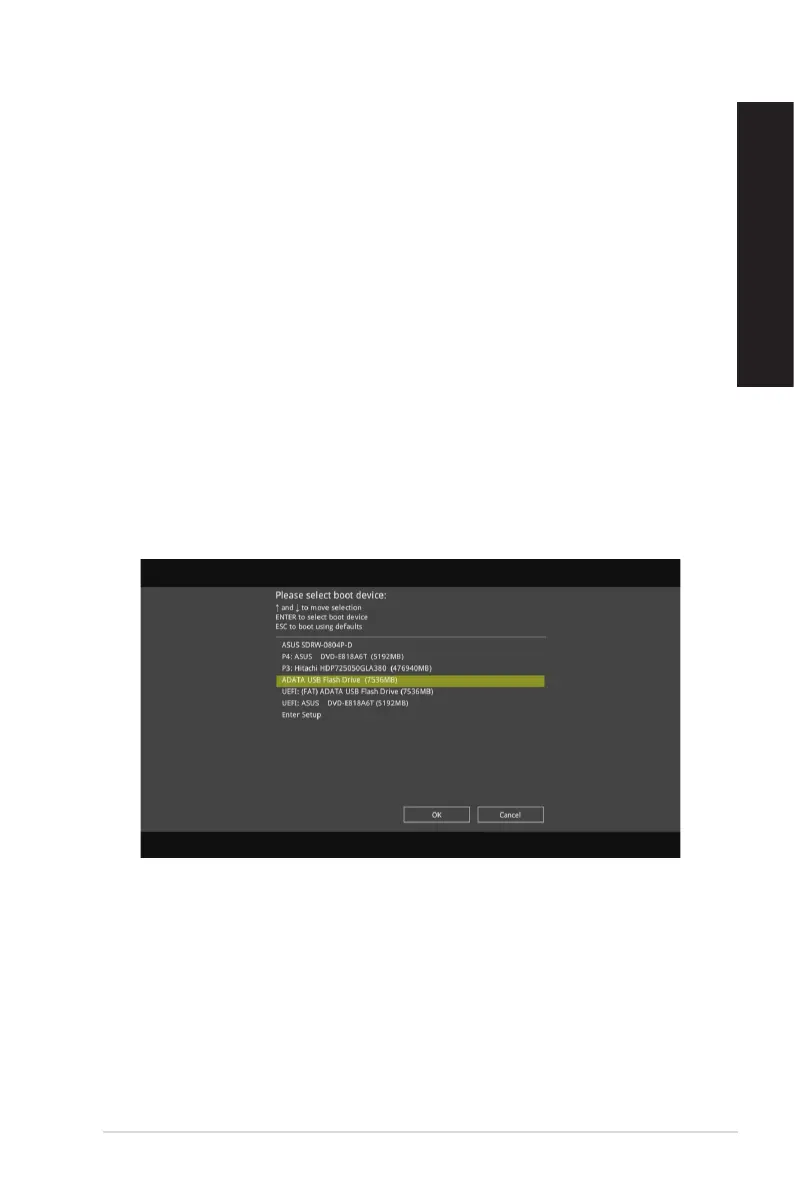
4. Turn on your Desktop PC and press [F8] during POST (Power-On Self Test) to enter
the boot screen.
5. Select the USB storage device as the boot device.
ASUS Desktop PC
41
ENGLISH
ENGLISH



 To Next Page