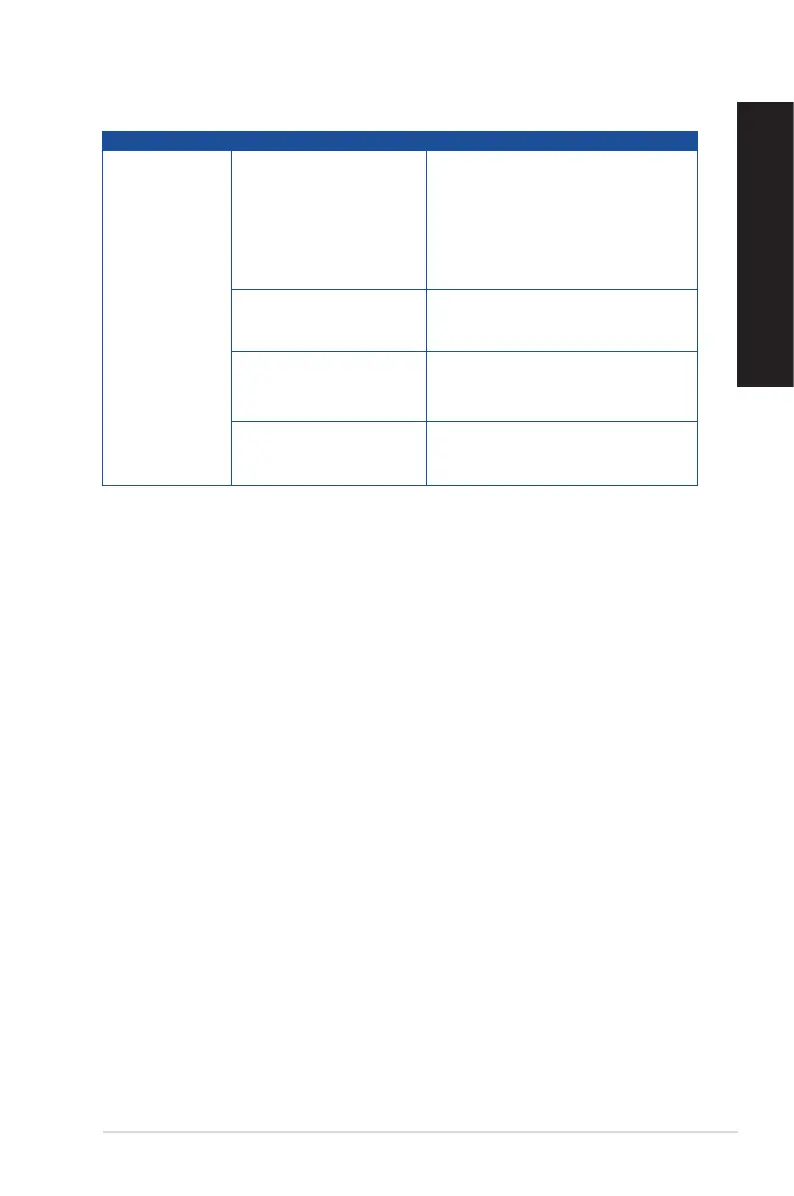
Power
Problem Possible Cause Action
No power
(The power
indicator is off)
Incorrect power voltage
• Set your computer’s power voltage
switch to your area’s power
requirements.
• Adjust the voltage settings. Ensure
that the power cord is unplugged
from the power outlet.
Your computer is not
turned on.
Press the power key on the front panel
to ensure that your computer is turned
on.
Your computer’s power
cord is not properly
connected.
• Ensure that the power cord is
properly connected.
• Use other compatible power cord.
PSU (Power supply unit)
problems
Contact the ASUS Service Center
about installing another PSU on your
computer.
ASUS Desktop PC
67
ENGLISH
ENGLISH



 To Next Page