K00C
63
Conguring the camera settings and eects
The Camera app also allows you to adjust the settings of your camera and apply
eects to your pictures and videos.
Conguring the camera settings
To congure the camera settings:
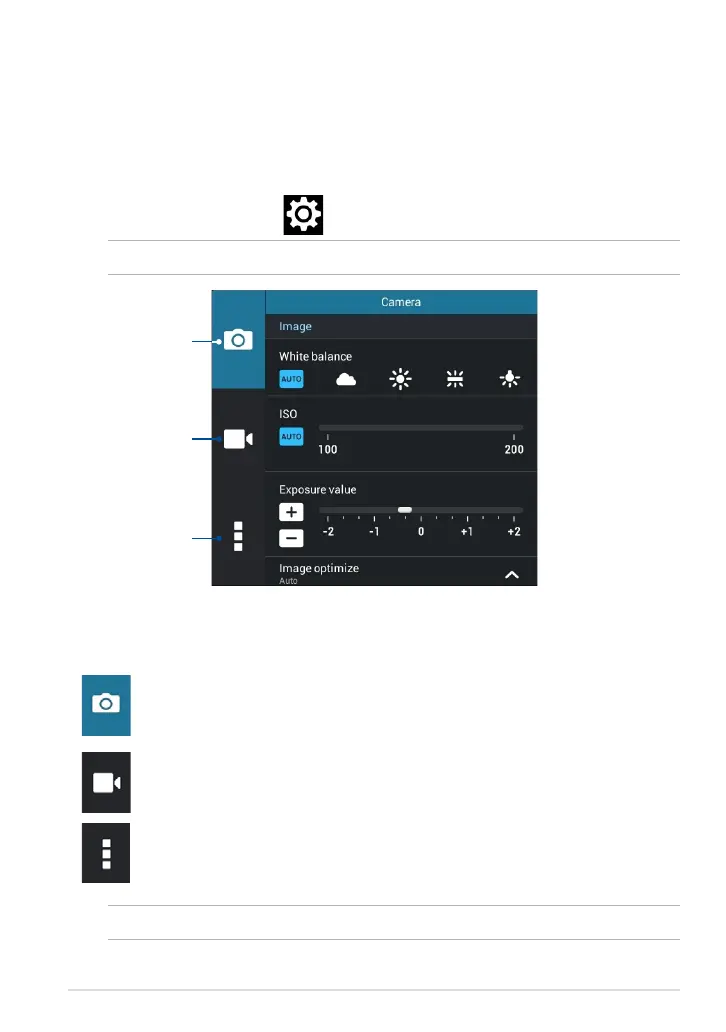
From the camera screen, tap .
Tap to adjust the
camera settings
Tap to adjust the video
settings
Tap to adjust other
settings
Tap this icon to adjust the white balance, ISO settings, exposure value,
camera resolution, shoot modes, and focus settings to take high-
denition pictures.
Tap this icon adjust the white balance, exposure value, video quality,
and focus settings to record high-denition videos.
Tap this icon to enable screen guidelines, add location information on
your pictures and videos, congure other camera settings, and restore
default settings of your ASUS Tablet’s camera.
Below are the settings of your ASUS Tablet’s camera that you can use to take or
record high-denition pictures and videos:
IMPORTANT! Apply the settings rst before taking pictures or recording videos.
NOTE: You can only adjust the white balance function using the rear camera.



 To Next Page