24
RT-N10E Chapter 4: Conguring via the web GUI
Setting up the Wi-Fi Protected Setup (WPS)
WPS (Wi-Fi Protected Setup) allows you to set up a secure and protected wireless
network easily.
Note:
• Ensure that you use a wireless LAN adapter with WPS function.
• Windows
®
operating systems and wireless LAN cards/adapters that support WPS:
OS Support Wireless Adapter Support
Vista 32/64
Intel wireless LAN card
ASUS 167gv2 driver v3.0.6.0 or later
ASUS 160N/130N driver v2.0.0.0 or later
XP SP2
Intel wireless LAN card
ASUS 167gv2 driver v1.2.2.0 or later
ASUS 160N/130N driver v1.0.4.0 or later
XP SP1 and 2000
ASUS LAN card with ASUS WLAN Utility
ASUS 167gv2 driver v1.2.2.0 or later
ASUS 160N/130N driver v1.0.4.0 or later
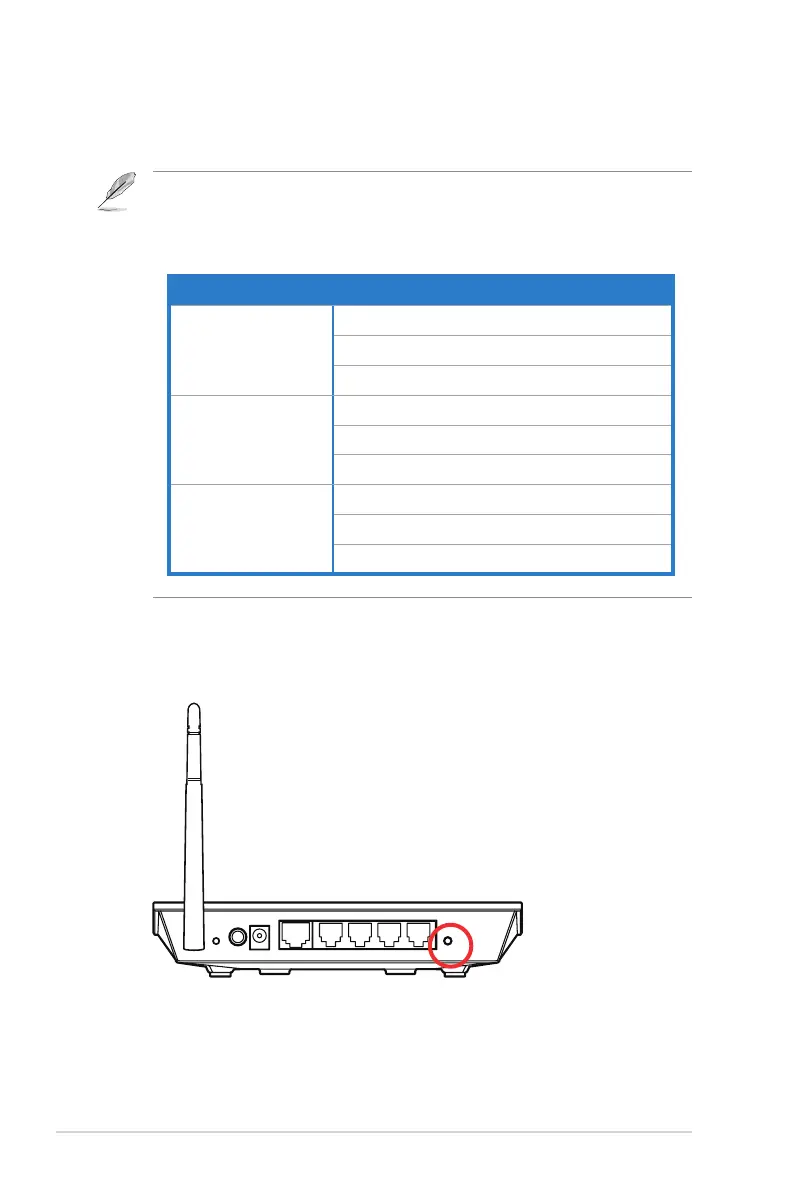
To set up the WPS:
1. Press the WPS button on your router.
Reset
Power
WAN
LAN4
LAN3 LAN2
LAN1 WPS



 To Next Page