6-31
ASUS TS700-E9 Series
6.6 Intel
®
Virtual Raid on CPU in BIOS
This feature requires a KEY module to enable CPU RAID functions with Intel
®
CPU RSTe.
• The KEY module is purchased separately.
• Due to chipset behavior, CPU RAID functions with Intel
®
CPU RSTe only supports
Intel
®
SSD modules.
• Refer to section 1.1.9 Internal connectors for the location of the VROC_HW_KEY
connector.
• Due to hardware design, [U.2_1 to U.2_4], or [PCIEX16_1], or [PCIEX16_2], or
[PCIEX16_3], or [PCIEX16_5], or [PCIEX16_6], or [PCIEX16_7], or [PCIEX16_2 and
PCIEX16_6] can support CPU RAID conguration as OS drives, but OS RAID may not
be built across the different [items] mentioned above.
• [PCIEX16_1], or [PCIEX16_2], or [PCIEX16_3], or [PCIEX16_5], or [PCIEX16_6], or
[PCIEX16_7], or [PCIEX16_2 and PCIEX16_6] can support OS RAID on Hyper M.2
cards installed on the [items] mentioned above.
• [PCIEX16_2 and PCIEX16_6] can support OS RAID on installed Intel
®
P3500 or
P3600 SSD.
To enter the Intel
®
Virtual Raid on CPU in BIOS:
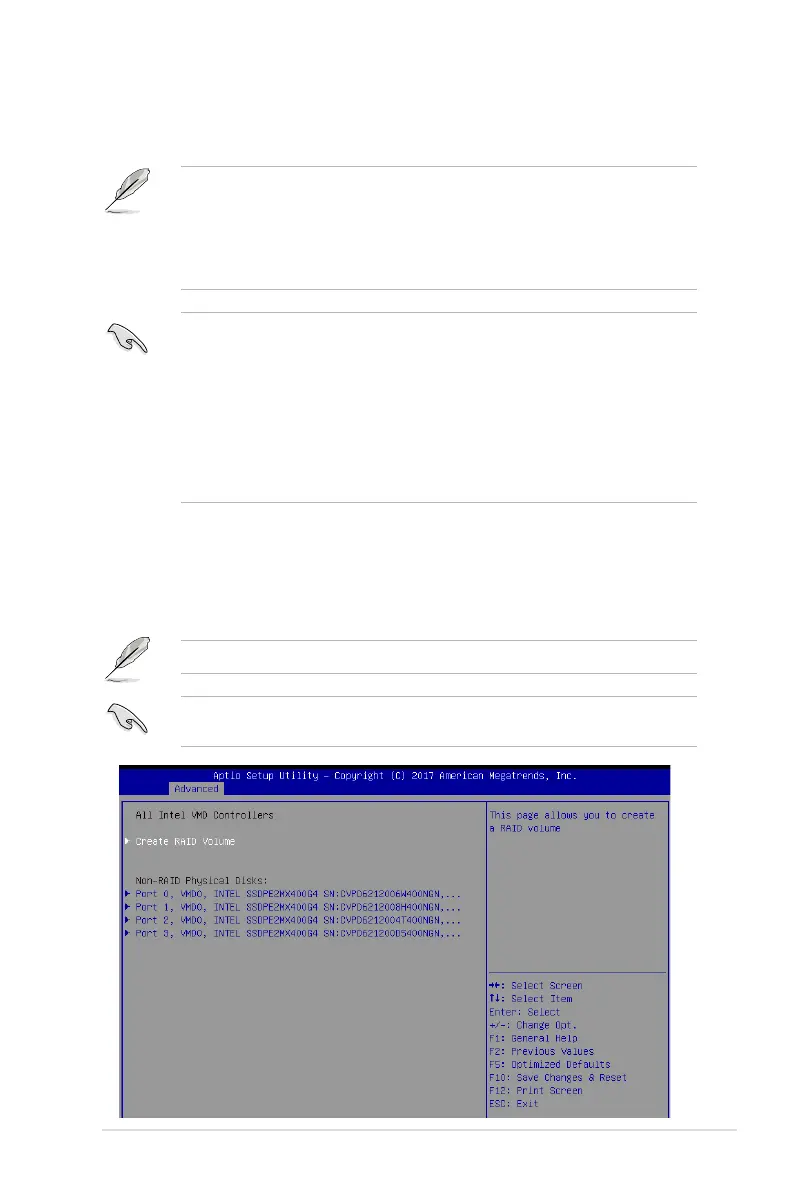
1. Enter the BIOS Setup during POST.
2. Go to the Advanced menu > Intel(R) Virtual Raid on CPU > All Intel VMD
Controllers then press <Enter> to display the Intel
®
Virtual Raid on CPU menu.
Refer to Chapter 3 for details on entering and navigating through the BIOS Setup.
Due to chipset limitation, when SATA ports are set to RAID mode, all SATA ports run at
RAID mode together.












 To Next Page