Chapter 2: Hardware Setup
2-4
2.2 Central Processing Unit (CPU)
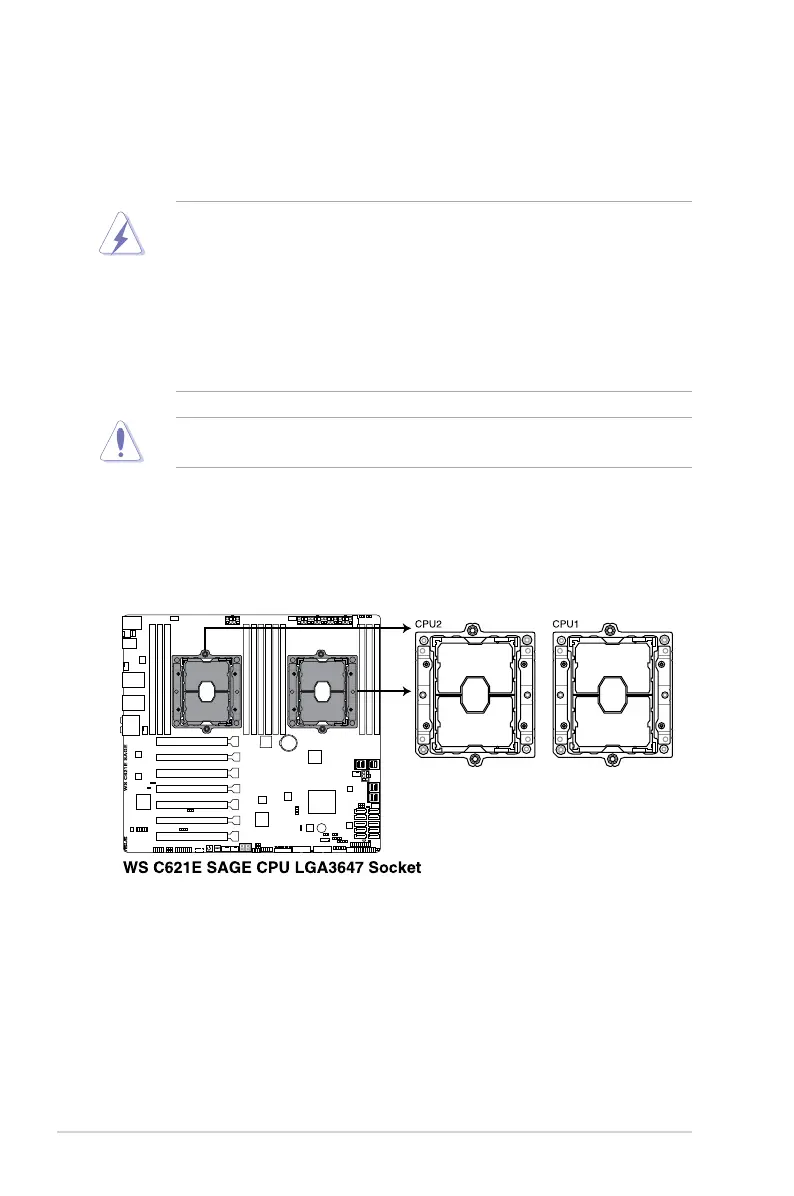
ThemotherboardcomeswithtwosurfacemountLGA3647socketsdesignedfortheIntel
®
Xeon
®
Skylake-SPproductfamilyseriesprocessors.
2.2.1 Installing the CPU and heatsink
1. Remove the chassis side cover. For more information, see the section
Chassis cover
.
2. LocatetheCPUsocketonthemotherboard.
• EnsurethatallpowercablesareunpluggedbeforeinstallingtheCPU.
• Uponpurchaseoftheserversystem,ensurethatthePnPcapisonthesocketand
thesocketcontactsarenotbent.ContactyourretailerimmediatelyifthePnPcap
ismissing,orifyouseeanydamagetothePnPcap/socketcontacts/motherboard
components.ASUSwillshoulderthecostofrepaironlyifthedamageisshipment/
transit-related.
• Theproductwarrantydoesnotcoverdamagetothesocketcontactsresultingfrom
incorrect CPU installation/removal, or misplacement/loss/incorrect removal of the PnP
cap.
EnsurethatyouinstallthecorrectCPUdesignedforLGA3647socketonly.DONOTinstall
aCPUdesignedforothersocketsontheLGA3647socket.



 To Next Page