2-11
ASUS TS700-E9 Series
2.5 SATA/SAS hard disk drives
Thesystemcomeswithtwosetsofharddiskdrivemodules.TS700-E9-PS4andTS700-E9-
RS4supportstherstsetasdefault.TS700-E9-PS8andTS700-E9-RS8supportsbothsets.
Eachharddiskdrivemodule,includingexternallyremovabletraysformountingfourhot-swap
SATA/SASharddiskdrives,allowsyoutoaccessthedrivetraysbysimplyopeningthefront
bezel.
AnHDDmodulecagecomeswithaSATAorSASbackplane.TakenoteofthetypeofHDD
modulecageyoupurchasebeforebuyingharddisks.
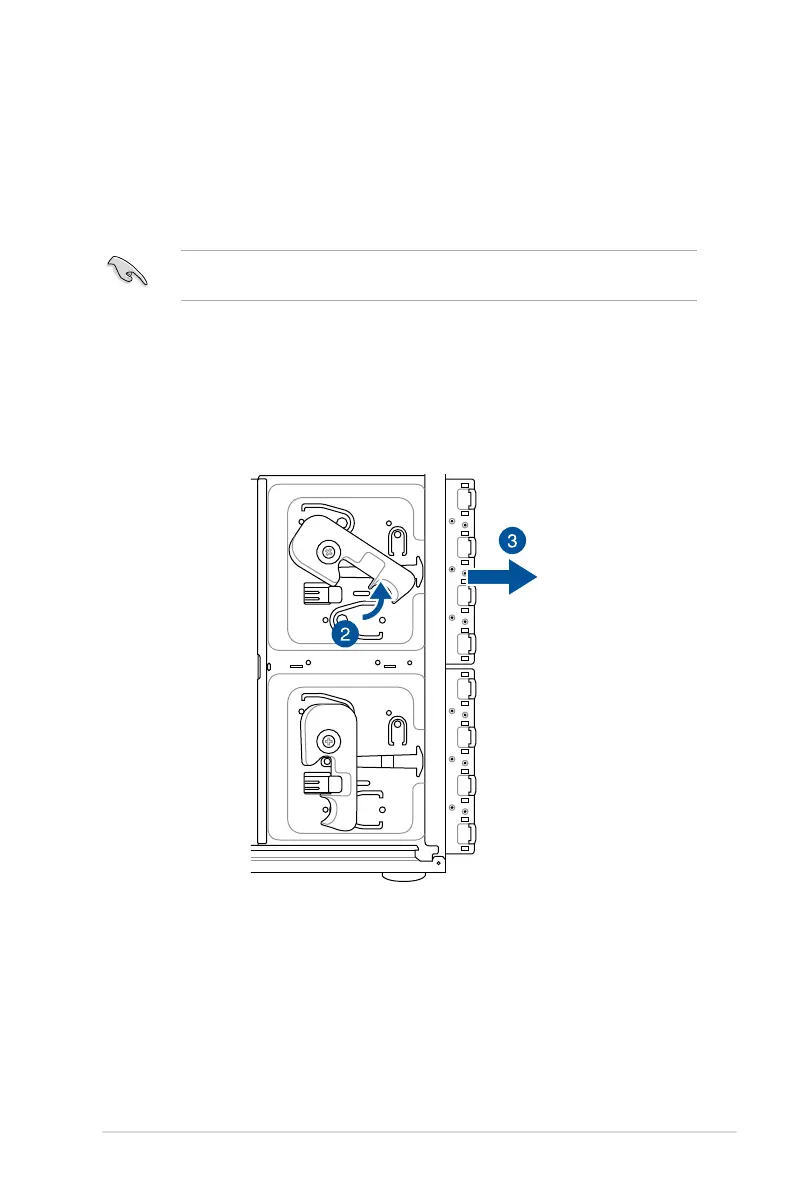
2.5.1 Removing the HDD module cage
1. DisconnectallthecablesfromtheSATA/SASbackplaneontheHDDmodulecage.
2. LeveltheHDDmodulecagelatchcounterclockwise.TheHDDmodulecagewillbe
pushed out of the chassis.
3. Remove the HDD module cage.



 To Next Page