Chapter 2: Hardware Setup
2-20
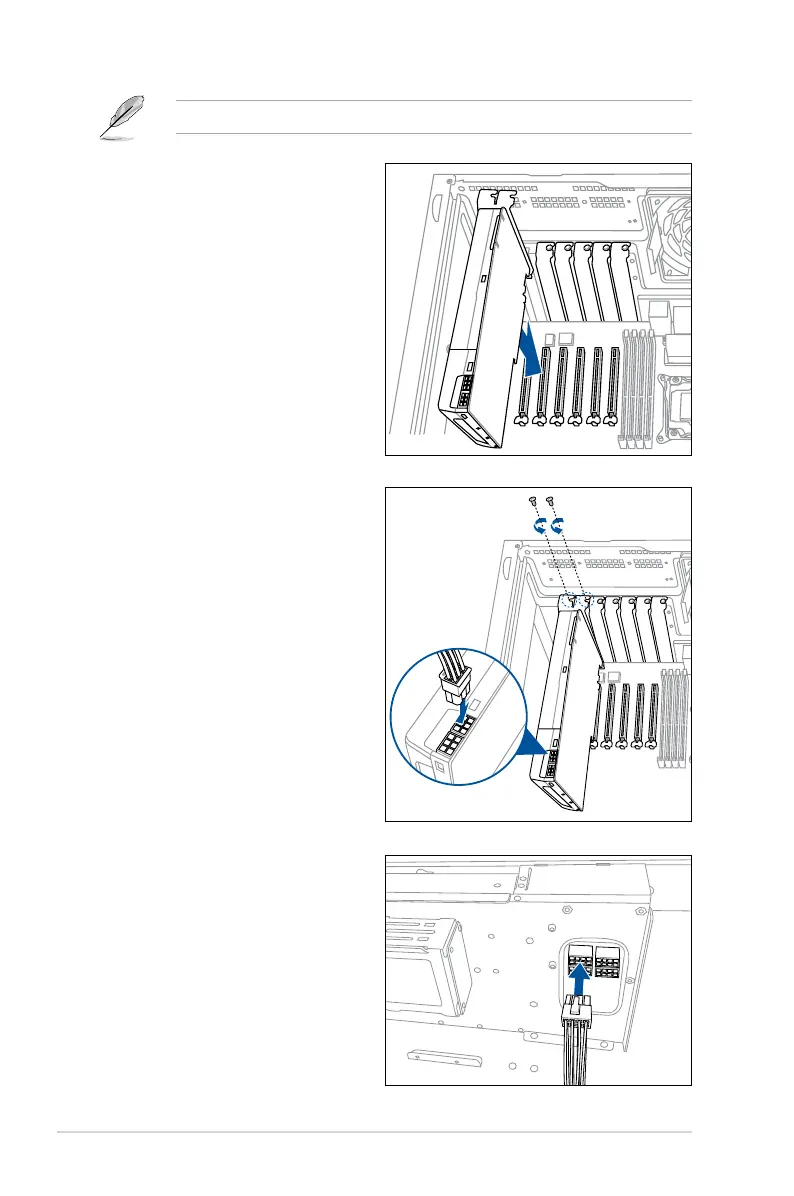
8. Connectthe8-pinATXpower
connectorofthepowercabletothe
powersupplymoduletogetexternal
power supply.
5.
Alignthecard’sgoldenngers
with the slot, and then press
rmlyuntilthecardiscompletely
seated on the slot.
6. Securetheexpansioncardwiththe
screws that you removed earlier in
step 3.
7. WheninstallingaPCIex16graphics
cardthatrequiresexternalpower
supply,connectthe6+2pin
connectorofthebundledpower
cabletothegraphicscard.
Refertothefollowingstepstoinstalladouble-deckGPUcard.



 To Next Page