EasyManua.ls Logo

ASUSTOR AS6504RD - Appendix; LED Indicators

ASUSTOR AS6504RD
33 pages
Print Icon
To Next Page IconTo Next Page
To Previous Page IconTo Previous Page
Loading...
27
5. Appendix
LED Indicators
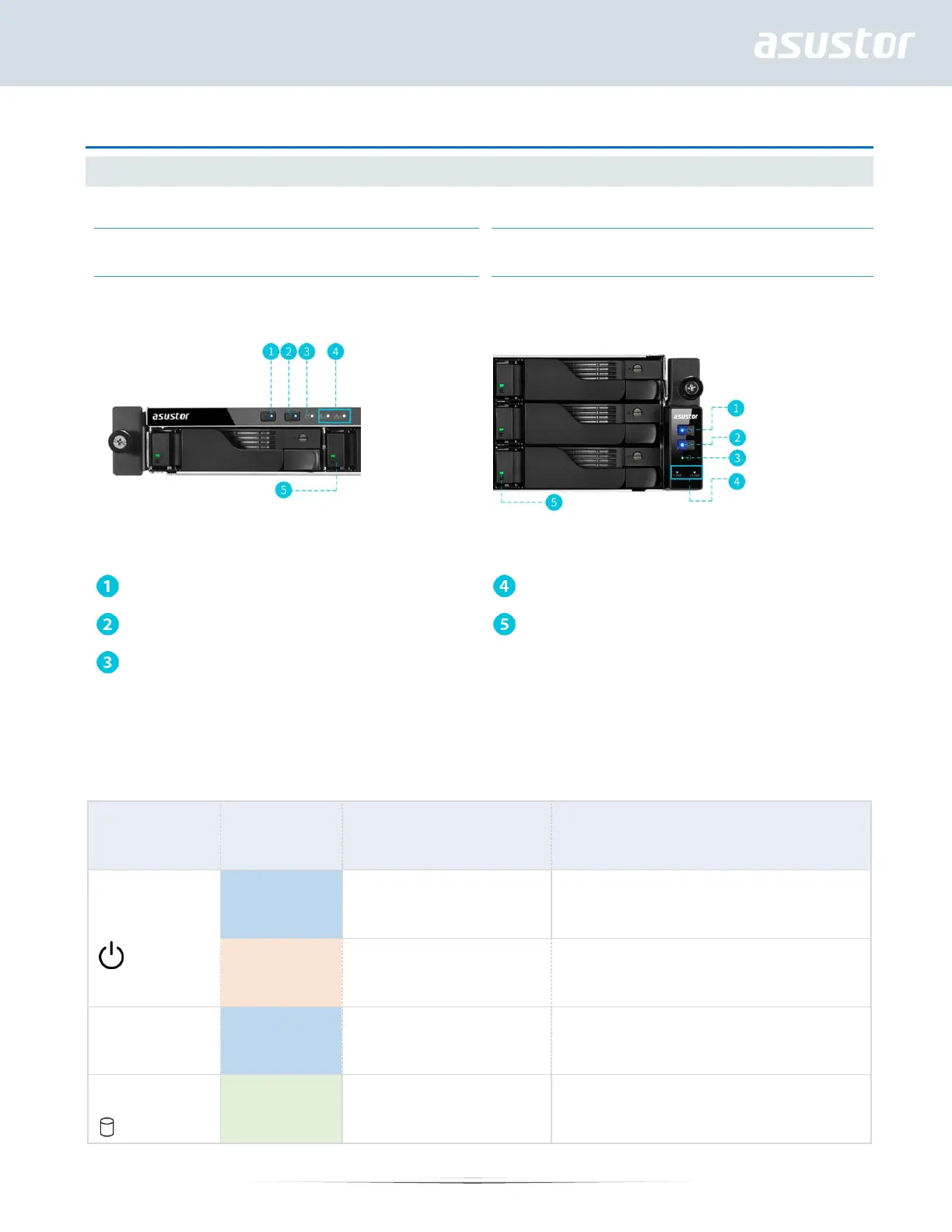
AS6512RD
Power LED Indicator
Network LED Indicator (*)
Inspection LED Indicator
Hard Disk LED Indicator
System Status LED Indicator
*For AS6504RD/AS6504RS/AS6512RD models: When Ethernet cables are connected to [Ethernet Port 1] and [Ethernet
Port 2] on the rear panel of the NAS, the first network LED indicator on the front of the NAS will become steadily lit. Once
Ethernet cables are connected to [Ethernet Port 3] and [Ethernet Port 4] on the rear panel of the NAS, the second
network LED indicator on the front of the NAS will become steadily lit.

LED Indicator
Color
Description
State
Power
Blue
Steadily lit
Power on
Orange
Flashes every 10 seconds
LED night mode
Inspection
Blue
Steadily lit
Inspection light activated
System Status
Green
Flashing
Powering on

Other manuals for ASUSTOR AS6504RD

Related product manuals