SMART TDS BLOWDOWN CONTROLLER
5. FUNCTION AND CONFIGURATIONS
5.1 Display Definitions and Button Functions.
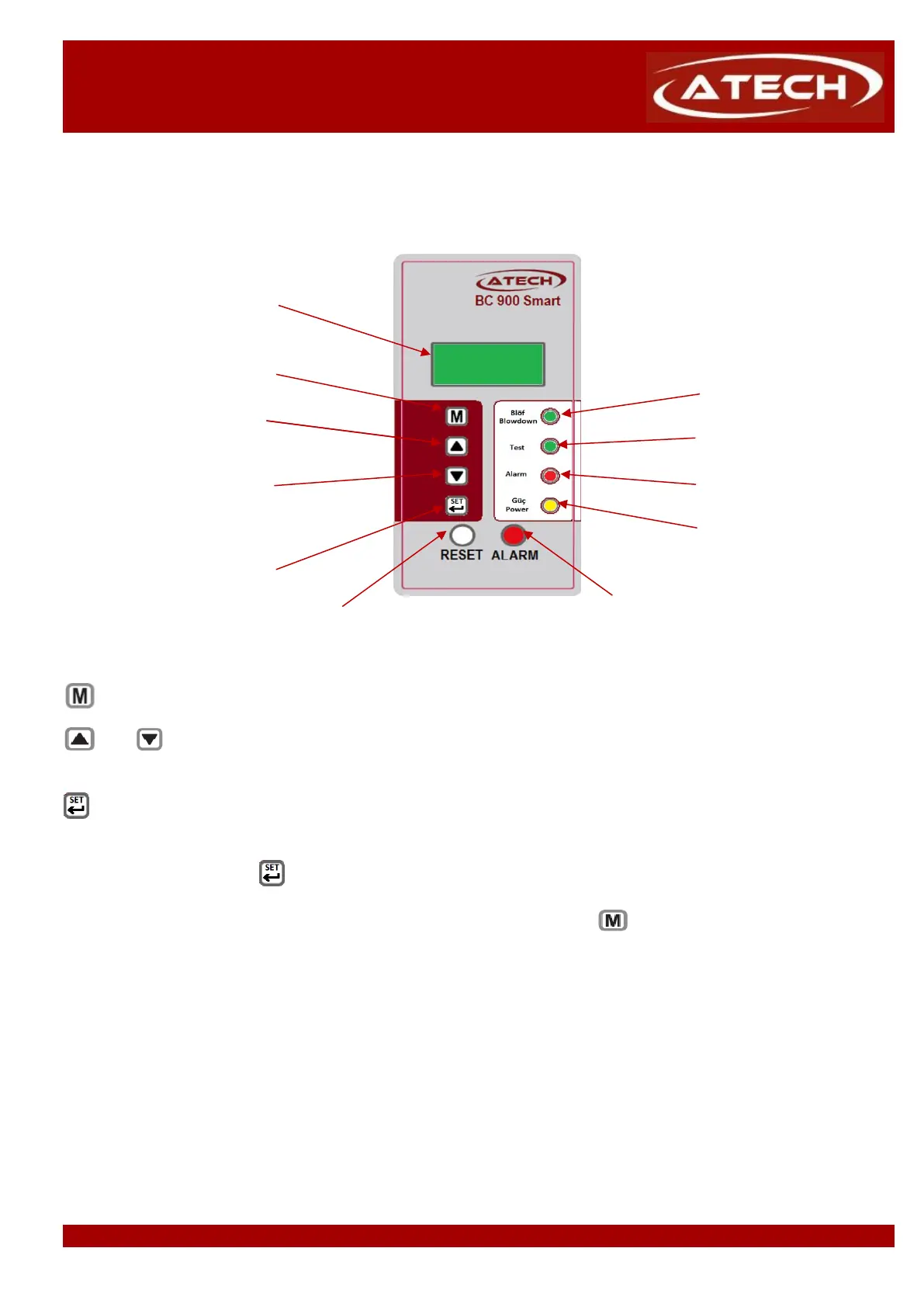
LCD Screen
Enter or return to main menu
Blowdown Led
Scroll up menus and
increase digits Test Led
Scroll down menus and Alarm Led
decrease digits
Power Led
Enter to functions, submenus
and pass to next digit while
changing a function value
Alarm Reset Buton Alarm Test Buton
button is used to enter main menu or return to main menu.
and buttons are used to scroll down or up function menus in main menu and also is used to change the
numerical values. Those buttons increase or decrease digits.
button is used to enter to functions, submenus and is used to pass the next digit while changing
After change the last digit, button accepts the whole value and returns to main menu.
To return to the main menu without making any changes, press the button


 To Next Page