CL5708 / CL5716 User Manual
68
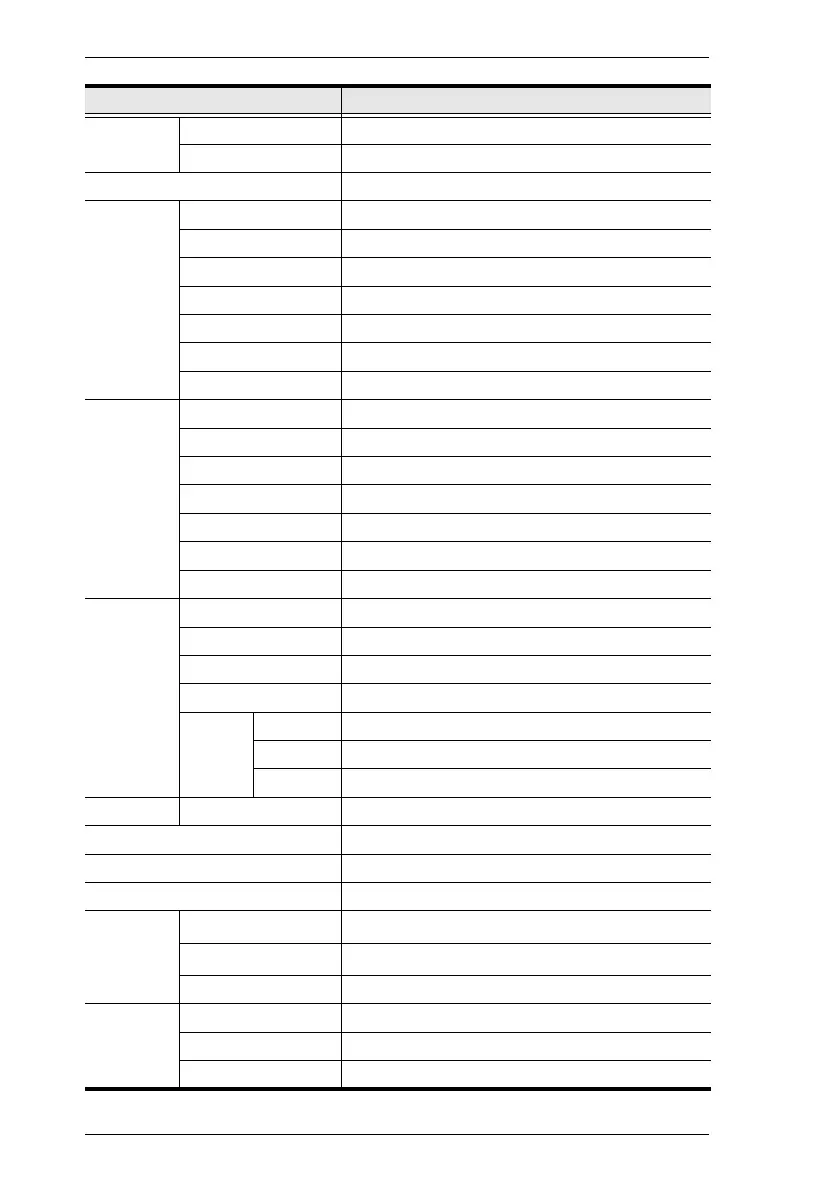
Function CL5716D
Computer
Connections
Direct 16
Max 512 (via daisy chain)
Port Selection OSD, Hotkeys, Pushbuttons
Connectors External Console Port 1 x SPHD-18 (Male)
External Mouse Port 1 x USB Type-A (Female)
KVM Ports 16 x SPHD-15 (Female)
Daisy Chain 1 x DB-25 (Male)
FW Upgrade 1 x RJ-11 (Female)
Power 1 x 3W3
USB 1.1 Hub 1 x USB Type-A (Female)
Switches Reset 1 x Semi-recessed pushbutton
Power 1 x Rocker Switch
Firmware Upgrade 1 x Switch
LCD Adjust 4 x Pushbutton
LCD On/Off 1 x LED Pushbutton (Orange)
Port Selection 2 x Pushbutton
Station Selection 2 x Pushbutton
LEDs On Line 16 (Orange)
Port ID 2 x 7-segment LED Display (Yellow)
Station ID 2 x 7-segment LED Display (Yellow)
Power 1 (Dark Green)
Lock Num 1 (Green)
Caps 1 (Green)
Scroll 1 (Green)
Emulation Keyboard / Mouse PS/2, USB
Video 1280 x 1024 @ 75 Hz; DDC2B
Scan Interval (OSD Select) 1–255 sec.
Power Consumption DC48V; 27W
Environment Operating Temp.
0–40
o
C
Storage Temp.
-20–60
o
C
Humidity 0–80% RH, Noncondensing
Physical
Properties
Housing Metal + Plastic
Weight 14.00 kg
Dimensions (L x W x H) 63.40 x 48.00 x 4.40 cm



 To Next Page