CL5708 / CL5716 User Manual
74
Clear Login Information
If you are unable to perform an Administrator login (because the Username and
Password information has become corrupted, or you have forgotten it), you can
clear the login information with the following procedure.
1. Power off the switch and remove the top cover from the unit chassis.
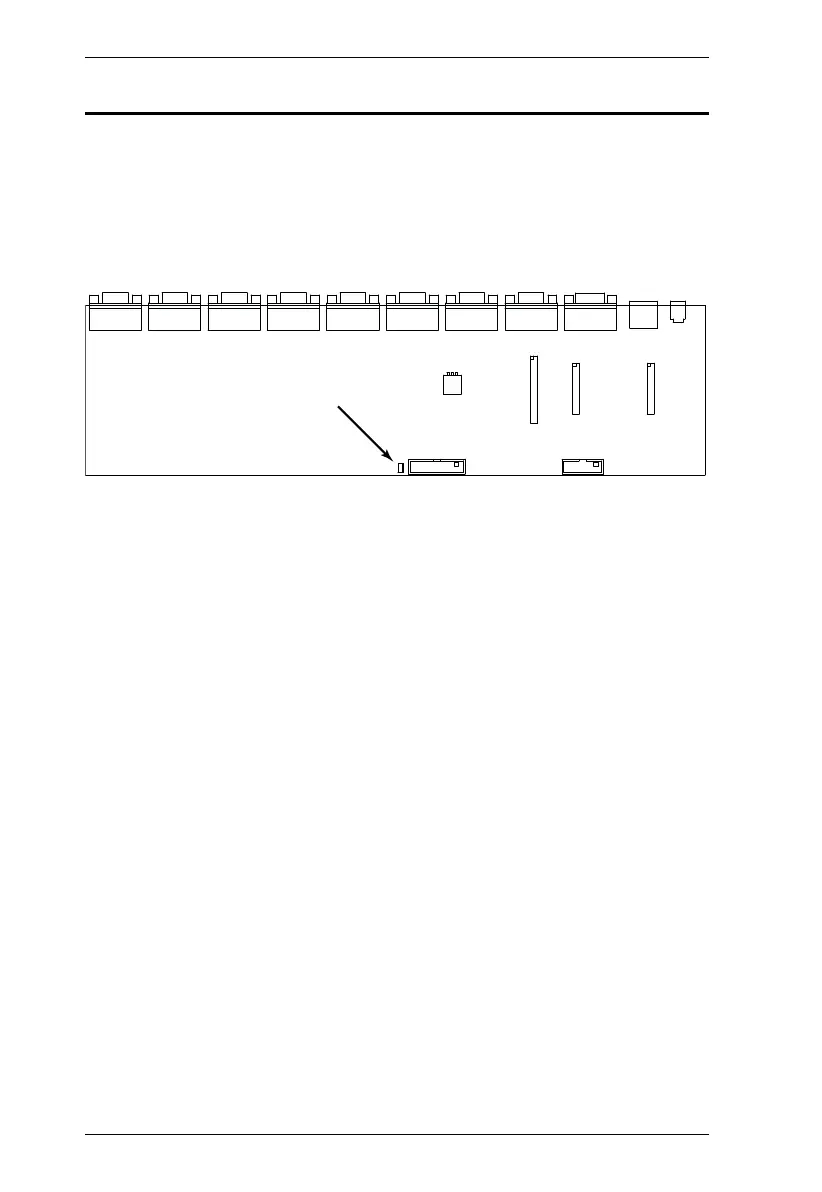
2. Short the jumper labeled Default Password on the switch's main board
.
3. Power on the switch.
When you power the switch on, the following message appears on the
LCD display:
USERNAME AND PASSWORD INFORMATION HAS BEEN CLEARED.
PLEASE POWER OFF THE SWITCH, REMOVE THE JUMPER, CLOSE
THE CASE, THEN RESTART.
4. After you start back up, the OSD login function acts exactly the way it did
the first time the switch was run (see OSD Overview, page 31) and you can
reset passwords for the Administrators and Users.



 To Next Page