EasyManua.ls Logo

ATEN CN8000A - User Manual

ATEN CN8000A
207 pages
Print Icon
To Next Page IconTo Next Page
Loading...
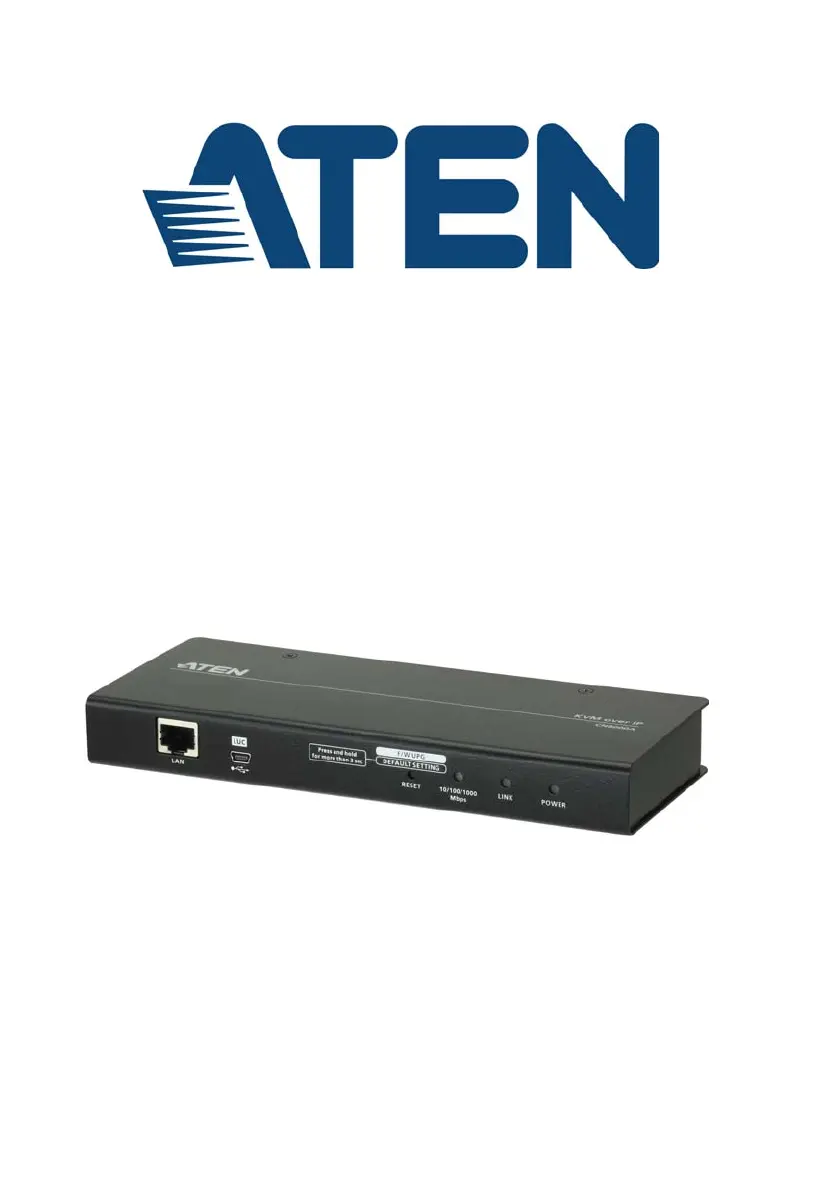
Single Port KVM over IP
CN8000A
User Manual
www.aten.com

Table of Contents

Questions and Answers

  • D
    dianesandovalSep 8, 2025
    What to do if I can’t access the ATEN CN8000A Switch?
    • S
      Steve PhamSep 8, 2025
      If you are unable to access the CN8000A ATEN Switch, even after correctly specifying the IP address and port number, and the CN8000A is behind a router, ensure that the router’s Port Forwarding feature is configured.
  • T
    Theresa KingAug 23, 2025
    Why is the mouse movement extremely slow on my ATEN Switch?
    • M
      Marcus MaysAug 23, 2025
      If you find the mouse pointer movement extremely slow when using the ATEN Switch, it indicates that too much data is being transferred for your connection to handle. To resolve this, lower the video quality in the Video Settings to reduce the amount of video data being transmitted.
  • M
    Mary SantiagoAug 25, 2025
    How to sync local and remote mouse pointers on ATEN CN8000A Switch?
    • J
      jamesyatesAug 25, 2025
      If the local and remote mouse pointers don't sync when using the ATEN Switch, the default configuration is for automatic syncing, which only supports USB mice on Windows and Mac (G4 or higher) systems. Select Manual as the Mouse DynaSync Mode and sync the pointers manually.
  • M
    mitchellyvonneAug 26, 2025
    What to do if Java Applet won't connect to ATEN Switch CN8000A?
    • S
      Sherry JonesAug 27, 2025
      If the Java Applet won't connect to the CN8000A ATEN Switch, ensure that Java 6 Update 3 or higher is installed on your computer. Also, verify that you are including the correct login string when specifying the CN8000A's IP address. If the issue persists, close the Java Applet, reopen it, and try again.
  • H
    hooverkristenAug 27, 2025
    Why doesn’t the Windows Client link appear in Firefox for my ATEN CN8000A?
    • A
      Ashley LandryAug 28, 2025
      If the Windows Client link isn’t appearing in the Remote Console Display when you log in with Firefox on your ATEN Switch, it's because the Windows Client link requires ActiveX, which Firefox doesn't support. Only the Java Applet is available in Firefox.
  • P
    porterjenniferSep 22, 2025
    What to do if anti virus program reports a Trojan after I access the ATEN CN8000A Switch?
    • W
      William HoSep 22, 2025
      If your anti-virus program reports a Trojan after accessing the CN8000A with your browser and opening the Windows Client Viewer, add the plugin to your antivirus program’s White List and use the Viewer safely. If you are reluctant to use the Windows Client Viewer, use the Java Client Viewer instead.
  • D
    Dustin WoodSep 16, 2025
    Why is there no Virtual Media icon on my ATEN CN8000A Switch Control Panel?
    • C
      Catherine LongSep 16, 2025
      If there is no Virtual Media icon on your Control Panel when using the ATEN Switch, the virtual media function only supports the Windows Client programs.
  • C
    combsdouglasSep 18, 2025
    Why can’t I access an ISO file mounted under Virtual Media on my ATEN CN8000A?
    • I
      ian48Sep 18, 2025
      If, under Virtual Media, you can mount an ISO file but cannot access it with the ATEN switch, Virtual Media under the WindowsClient only supports ISO files less than 4G.Bytes. If the ISO file is 4GBytes or greater it cannot be accessed.
  • P
    Paul PayneSep 7, 2025
    What to do if local and remote mouse pointers don't sync on ATEN Switch with Mac?
    • J
      James DiazSep 7, 2025
      If the local and remote mouse pointers do not sync when using the ATEN switch with a Mac, there are two USB I/O settings for the Mac: Mac 1 and Mac 2. If you experience pointer sync problems, try selecting the other mode.
  • M
    Michael HudsonSep 4, 2025
    How to resolve video display problems with HDB15 interface systems on ATEN CN8000A Switch?
    • K
      Kim SotoSep 4, 2025
      If you are experiencing video display problems with HDB15 interface systems (e.g., Sun Blade 1000 servers) when using the ATEN switch, the display resolution should be set to 1024 x 768. Under Text Mode: Go to OK mode and issue the following commands: setenv output-device screen:r1024x768x60 reset-all. Under XWindow: Open a console and issue the following command: m64config -res 1024x768x60. Log out and log in.

Summary

EMC Information

1. Introduction

Features and Benefits

Describes the CN8000A's key features and advantages for remote KVM access.

System Requirements

Details hardware and software requirements for server and client connections.

5. Administration

Basic Settings

Covers user management, sessions, and maintenance for the CN8000A.

Advanced Settings

Configures device information, network, ANMS, security, and console settings.

Security

Controls access, login policies, filters, and encryption for enhanced security.

Console Management

Configures serial console access via OOBC or serial connection.

Date;Time

Sets the device's date, time, and time zone parameters.

6. The WinClient Viewer

Virtual Media

Allows local drives/files to appear as remote, for installation and updates.

8. The Log Server

9. LDAP Server Configuration

Appendix

Safety Instructions

General safety guidelines for using the product.

Technical Support

Information on how to contact ATEN for technical assistance.

1. Introduction

Chapter 2 Hardware Setup

Installation

Step-by-step guide for installing the CN8000A device.

Chapter 3 OSD Operation

Device Information

Set IP Address

Chapter 4 Browser Login

Chapter 5 Administration

Basic Settings

User Management

Create and manage user profiles with roles and permissions.

Maintenance

Upgrade Main Firmware

Steps to download and install firmware updates for the CN8000A.

Restore

Advanced Settings

Network

IPv4 Settings

IPv6 Settings

ANMS - Authentication

RADIUS Settings

Configures RADIUS server for authentication and authorization.

Security

Account Policy

Console Management

Chapter 6 The WinClient Viewer

Video Settings

Virtual Media

Chapter 7 The JavaClient Viewer

Chapter 8 The Log Server

Chapter 9 LDAP Server Configuration

Extend and Update the Active Directory Schema

Modifies the AD Schema to include CN8000A attributes.

OpenLDAP

Details on OpenLDAP server setup and configuration.

OpenLDAP Server Configuration

Customizing the OpenLDAP configuration file (slapd.conf).

Troubleshooting

Virtual Media Support

Specifications

ATEN CN8000A Specifications

General IconGeneral
Sustainability certificatesRoHS
Product colorBlack
Rack mounting-
LED indicatorsYes
Storage temperature (T-T)-20 - 60 °C
Operating temperature (T-T)0 - 50 °C
Operating relative humidity (H-H)0 - 80 %
Console portsUSB B
Mouse port typeNo
USB connector typeMini-USB B
Number of computers controlled1
Weight and Dimensions IconWeight and Dimensions
Depth200 mm
Width81.4 mm
Height25 mm
Weight490 g

Related product manuals