EN
25
➌
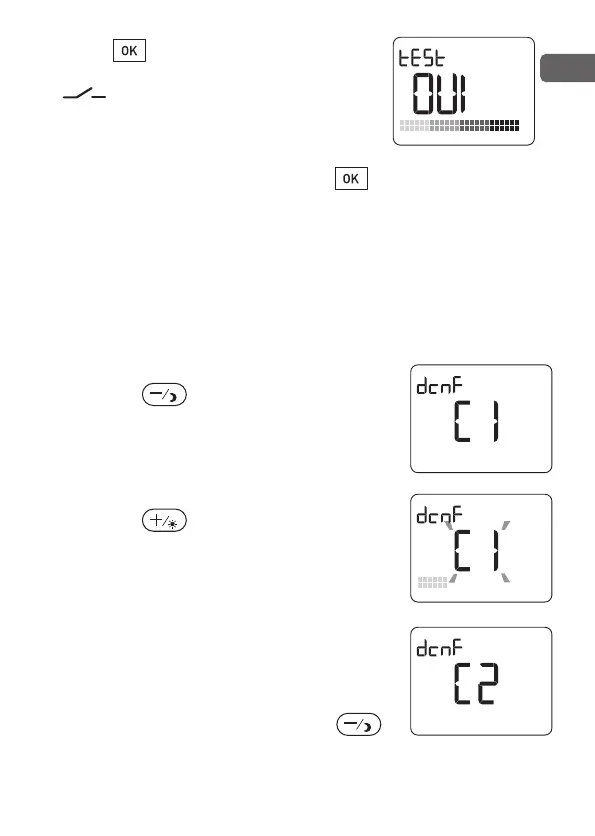
Press to activate the test mode.
The transmission is correct if the red
“ ” LED flashes (every 3 seconds).
You can then hear the relay open and
close.
➍ To exit the mode, briefly press the button.
Alternatively, the unit will automatically exit the mode
after 1 minute without pressing any button.
2.5 - Removing the association
To remove a heater associated with the thermostat
➊ From the Shutdown mode
➋ Press the bu
tton for 3 seconds.
The unit displays dcnf and the number of the
first heater.
You can identify the receiver by the flashing
of its indicator light.
➌ Using the button, select the heater
to be removed.
The heater number flashes on the screen
(every 3 seconds).
You can then hear the relay open and
close. Press OK to confirm.
The thermostat displays the next heater.
Repeat this operation for each heater to be
r
emoved.
➍ To exit this mode, briefly press the
button.
2705157_rev3_not_TAP_ATERNO_SMART 17/12/2019 12:32 Page 25


 To Next Page