➌
➍
2
T
➊
➋
T
➌
T
R
r
➍
24
➋ On the thermostat:
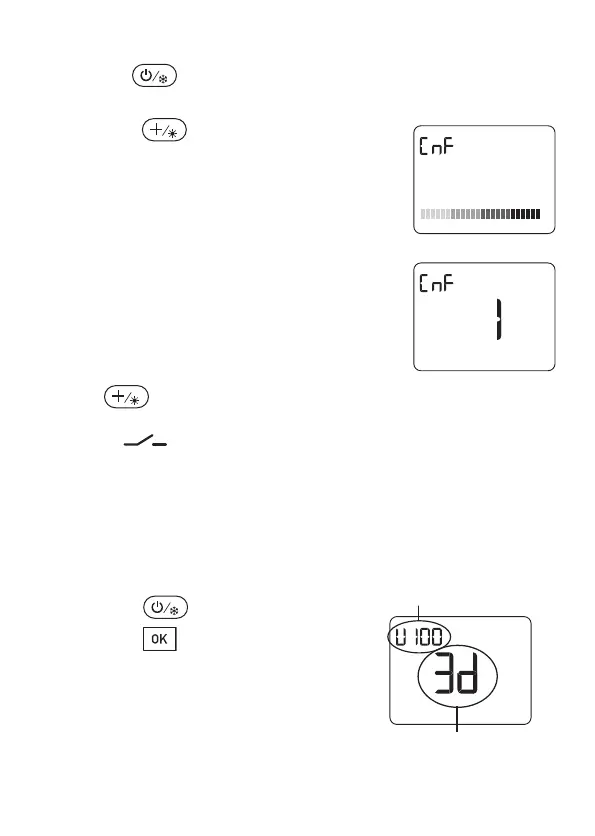
press the button. The unit shows 3 dashes.
➌ Press the button for approximately
3 seconds.
The device displays Cnf and the bar graph
scrolls at the bottom of the screen.
The heater recognised is indicated on the
screen of the thermostat.
Press the OK button to store this heater in
the memory.
If the display of the consumption is
enabled, specify the power (in Watts) of the
heating eleme
nts.
C
onfirm with OK.
Press to exit the configuration mode.
The heater follows the commands of the thermostat.
The red “ ” LED signals the status of the contact.
On = Closed Off = Open
2.4 - Checking wireless
transmission
➊ Press the button.
➋ Press the button for 3 seconds.
The unit displays the software version
and the protocol it uses.
Software version display
Protocol version display
2705157_rev3_not_TAP_ATERNO_SMART 17/12/2019 12:32 Page 24


 To Next Page