33 34
6.2.3 Switch on/off page
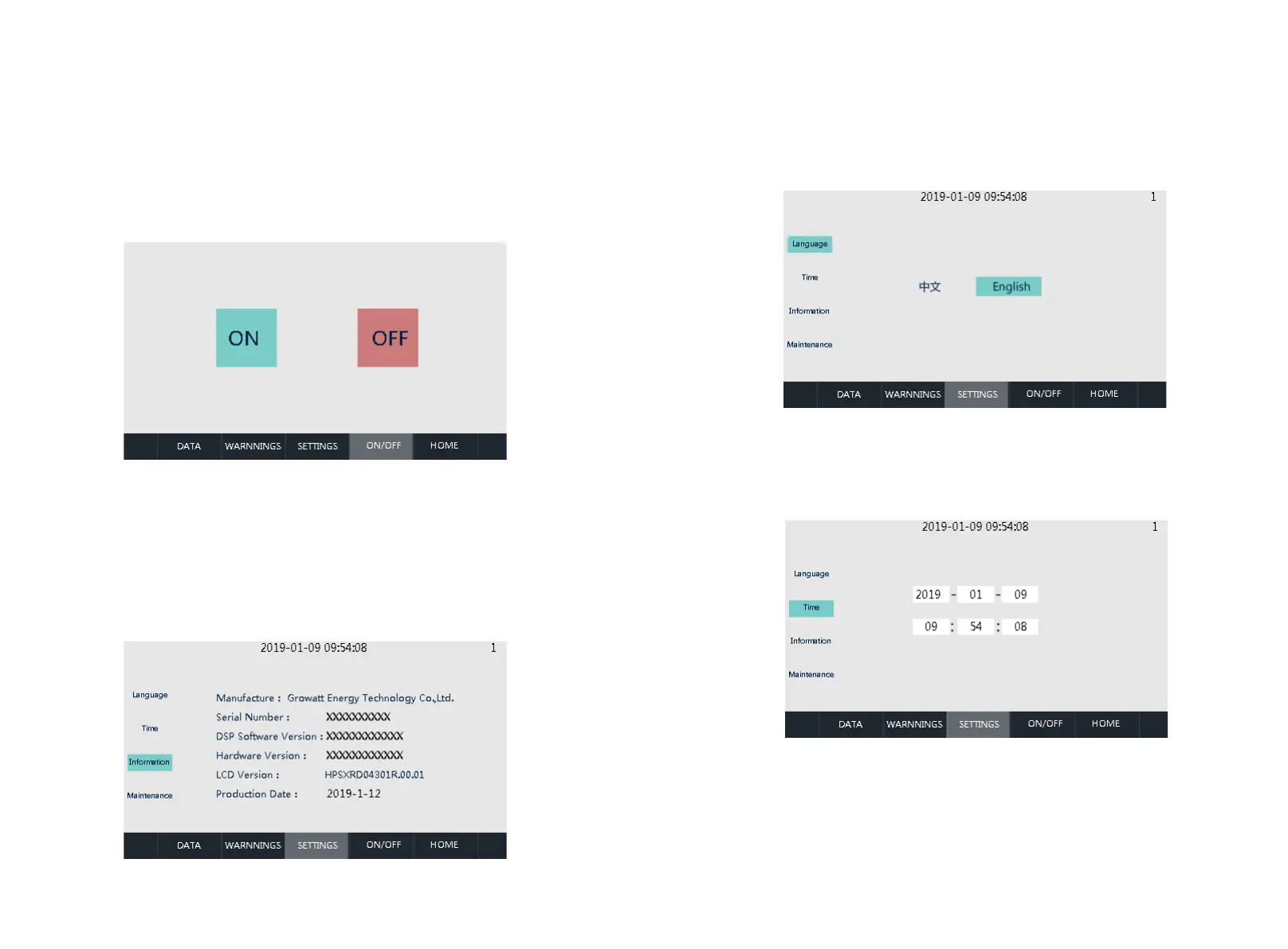
You can enter this page by clicking the [Switch on/off] button in any other interface.
There are the on button, the off button. Used to select power on or off operation. After
selecting, select [Yes] / [No] in the pop-up sub-window to confirm.
6.2.4 System Settings
Click the [System Settings] button in any other interface to enter the sub-menu of
"System Settings". Submenus are: language settings, time settings, device
information, device maintenance. The corresponding submenu interface can be
accessed through the left button. The "Language Settings" interface is accessed by
default. (Device Maintenance: This item is only open to professional maintenance
personnel due to security concerns.)
Language Settings: Select language, currently it only supports Chinese, English
(default language is Chinese).
Time settings: system time setting (if the date and time displayed on LCD is not
inconsistent with the actual date and time, they can be modified here)
Device Information: This p a g e s h o ws the manufac t u r e r, i n v e r t e r serial
number,hardware and software version information, and the date of manufacturing.


 To Next Page