EasyManua.ls Logo

ATI Technologies 2i - User Manual

ATI Technologies 2i
83 pages
Print Icon
To Next Page IconTo Next Page
Loading...
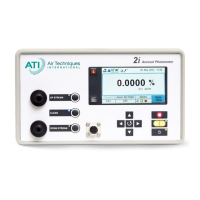
Aerosol Photometer
P/N. 1800224, Revision E
May 2015
Aerosol Photometer
2i
Operation and Maintenance Manual

Table of Contents

Questions and Answers

  • M
    marissa18Aug 3, 2025
    How to troubleshoot power issues in ATI Technologies 2i?
    • T
      Thomas CrossAug 3, 2025
      If your ATI Technologies Measuring Instrument is not powering up, there are a couple of things to check: * First, ensure the power cable is securely plugged into both the instrument and an appropriate power outlet. If it is not plugged - plug power cable into an appropriate power outlet. * Second, check the system fuse(s) to see if one has blown. If it is blown - check system fuse(s).
  • J
    Jeremy CookAug 10, 2025
    What to do if ATI Technologies 2i Measuring Instruments have line blockage?
    • L
      leah12Aug 11, 2025
      If you're experiencing a line blockage with your ATI Technologies Measuring Instruments, consider the following: * Check the lint screen in the hose and clean it if there's excessive debris. * Inspect the probe and umbilical for any foreign objects that may have been pulled into the line by the vacuum pump and remove them if possible. * Ensure the probe nozzle isn't obstructed. Move the probe to an area free of obstructions that could prevent flow through the instrument. * If the pressure transducer or thermistor is damaged, call ATI for service.
  • M
    Megan NguyenAug 17, 2025
    Why does ATI Technologies 2i show incorrect temperature?
    • D
      Denise HansonAug 17, 2025
      If your ATI Technologies Measuring Instruments are showing an incorrect temperature, here's what you can check: * Ensure the ambient temperature is within the range of 5°C to 50°C. If the ambient temperature is below 5°C or above 50°C, move the instrument to a temperature in the specified range. * Make sure the probe nozzle isn't obstructed. Move the probe to an area free of obstructions that could prevent flow through the instrument. * If the thermistor is damaged, call ATI for service.
  • A
    Anthony BarrettAug 25, 2025
    What to do if Multiplier Tube (PMT) is inoperable in ATI Technologies Measuring Instruments?
    • Y
      Yvette MackAug 25, 2025
      If the Multiplier Tube (PMT) in your ATI Technologies Measuring Instruments is inoperable, call ATI for service. No voltage to PMT and scattering chamber dirty or contaminated are also reasons to call ATI for service.

Summary

Introduction and Precautions

Precautions

Lists general safety rules, shipping hazards, and serviceability cautions for the instrument.

Photometer Overview

Filter Leak Testing: The Most Common Application

Explains the primary use of the 2i for detecting leaks in HEPA/ULPA filtration systems.

Know Your Equipment

Front Panel General Overview

Describes the components of the 2i's front panel, including the LCD display and function keys.

Scanning Probe Overview

Details the components and functions of the scanning probe, including its LCD screen and nozzles.

Operating the 2 i: Basic Operation

Before You Begin

Lists essential steps and checks before powering on and operating the 2i Aerosol Photometer.

Basic Operation

Outlines the step-by-step process for powering on, initializing, and setting up the photometer.

Reporting Modes

Introduces the different reporting modes available (Summary, Monitoring, Continuous) for data output.

Alarms Modes and Set Point

Details how to set alarm points and manage audible, visual, and vibratory alarm modes.

Software Reference

Menu Structure and Options

Provides an overview of the 2i menu structure, facilitating navigation between different options.

Top Level Menu Options

Shows the main menu structure, allowing access to settings like concentration, reference, setup, and reagent.

Alarm Set Point

Explains how to change the instrument's alarm set point threshold for % leakage.

Alarms

Describes how to select and manage audible, vibratory, and visual alarms.

Set 100% to Upstream Concentration

Guides the user through the process of setting the 100% reference using upstream aerosol concentration.

Set Internal Reference

Explains how to establish an internal reference based on factory calibration settings.

Reporting Functions

Configures reporting modes (Summary, Monitoring, Continuous) for data output and logging.

Error Messages

Lists common error IDs, their reasons, and suggested remedies for troubleshooting.

Maintaining the Photometer

Recommended Scheduled Maintenance

Outlines daily and annual maintenance tasks to ensure optimal instrument performance.

Replacing the Main Power Fuses

Step-by-step instructions for safely replacing the main power fuses in the instrument.

Troubleshooting Guide

Instrument Will Not Power Up

Addresses causes and remedies for the instrument failing to power on.

Error E1 - Sample Line Blockage

Lists probable causes and remedies for sample line blockages, such as debris or obstructions.

Error E2 - Out of Temperature Range

Provides solutions for errors related to ambient temperature being outside the operational range.

Error E3 - Photomultiplier Tube (PMT) Inoperable

Describes troubleshooting steps for errors indicating a non-functional Photomultiplier Tube (PMT).

Contacting ATI

For Technical Support or Application Questions

Provides contact information for technical support and application inquiries via phone and email.

ATI Technologies 2i Specifications

General IconGeneral
BrandATI Technologies
Model2i
CategoryMeasuring Instruments
LanguageEnglish

Related product manuals