4) USB Type-C Interface
The USB Type-C interface is used as a power input port for charging, but can also be used for data
transfer between other devices or mobile devices. The AT907 also supports OTG (On-The-Go) function
that works as a Host Device.
5) Switch Key
This key turns the power of the device ON/OFF. For more details, please refer to “3. Shutdown /
Standby / Restart”.
6) Side Key 1, 2
As a function key that the user can designate a function, it can be used as a UHF reading or barcode
scanning function key.
2. Installing and Removing the Battery
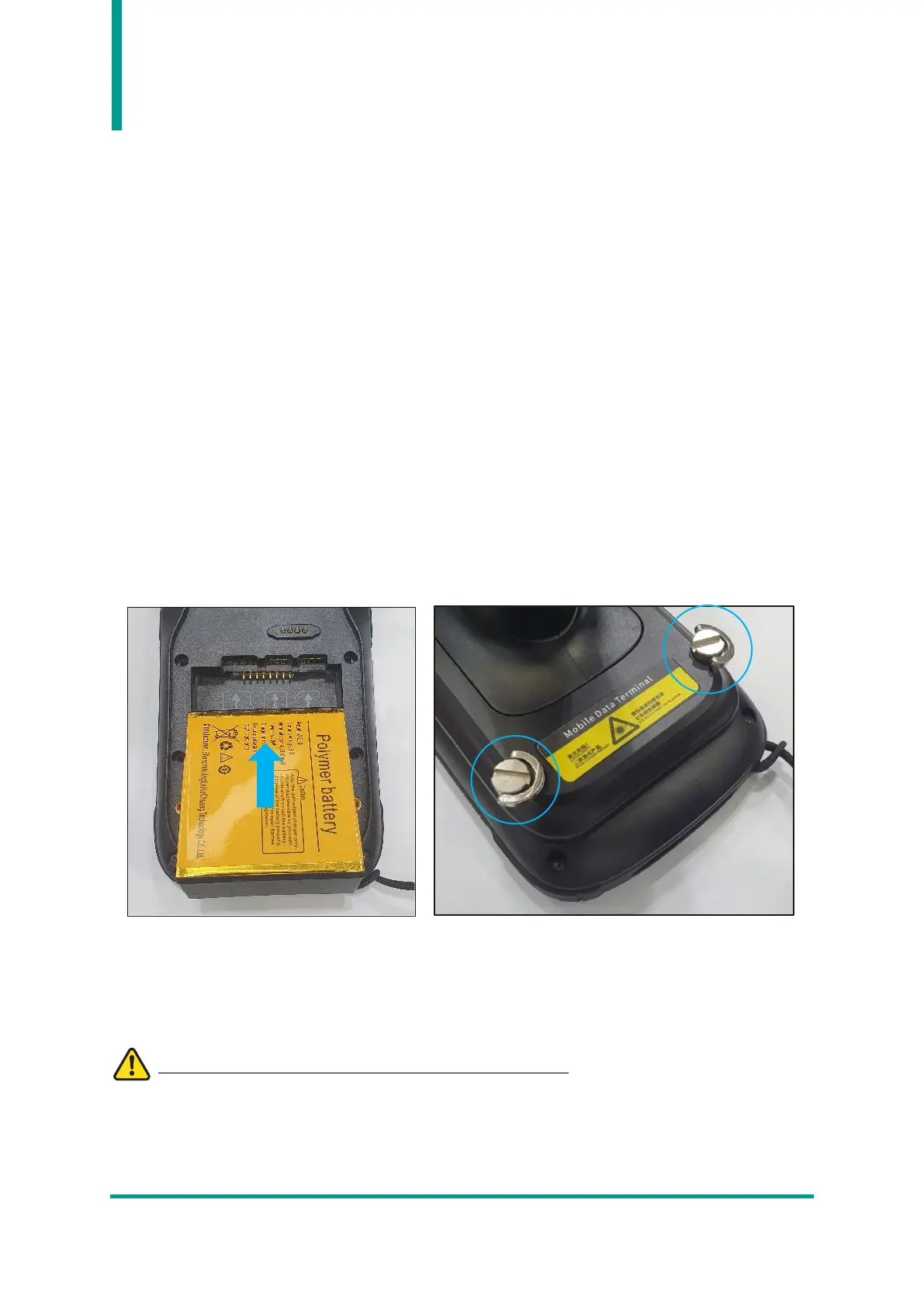
1) Installing the Battery
After installing the battery on the back of the device, assemble the rear cover and tighten the nut to
fix the rear cover.
2) Removing the Battery
In the reverse order of installing the battery, loosen the nut of the rear cover, remove the handle at an
angle to the top, and then take out the battery at an angle upward.
Please disconnect the battery with the device is powered off.


 To Next Page