Introduction to Barcode features
The AT907 comes with Zebra's high-performance 2D barcode engine. User can use the built-in demo
application to collect 1D or 2D barcode data, or user can develop own application to collect barcode
data..
1. Supported Barcode Symbologies
Code39, Code93, Code128, Codebar, EAN-13, EAN-8,UPC-A, UPC-E, ITF14,
UCC/EAN-128, ITF25, Matrix25, EAN-128, ISBN, etc.
PDF417, MicroPDF417, Composite, RSS, TLC-39, Datamatrix, QRcode,
MicroQRcode, Aztec, MaxiCode, PostalCodes, USPostNet, USPlanet,
UKPostal, AustralianPostal, JapanPostal, DutchPostal, etc.
2. Barcode Aiming System
AT907 outputs LED beams and clear reference spots to aim and capture the barcode user wants to read
accurately during barcode reading.
3. Barcode Demo Application
1) Running the barcode demo program
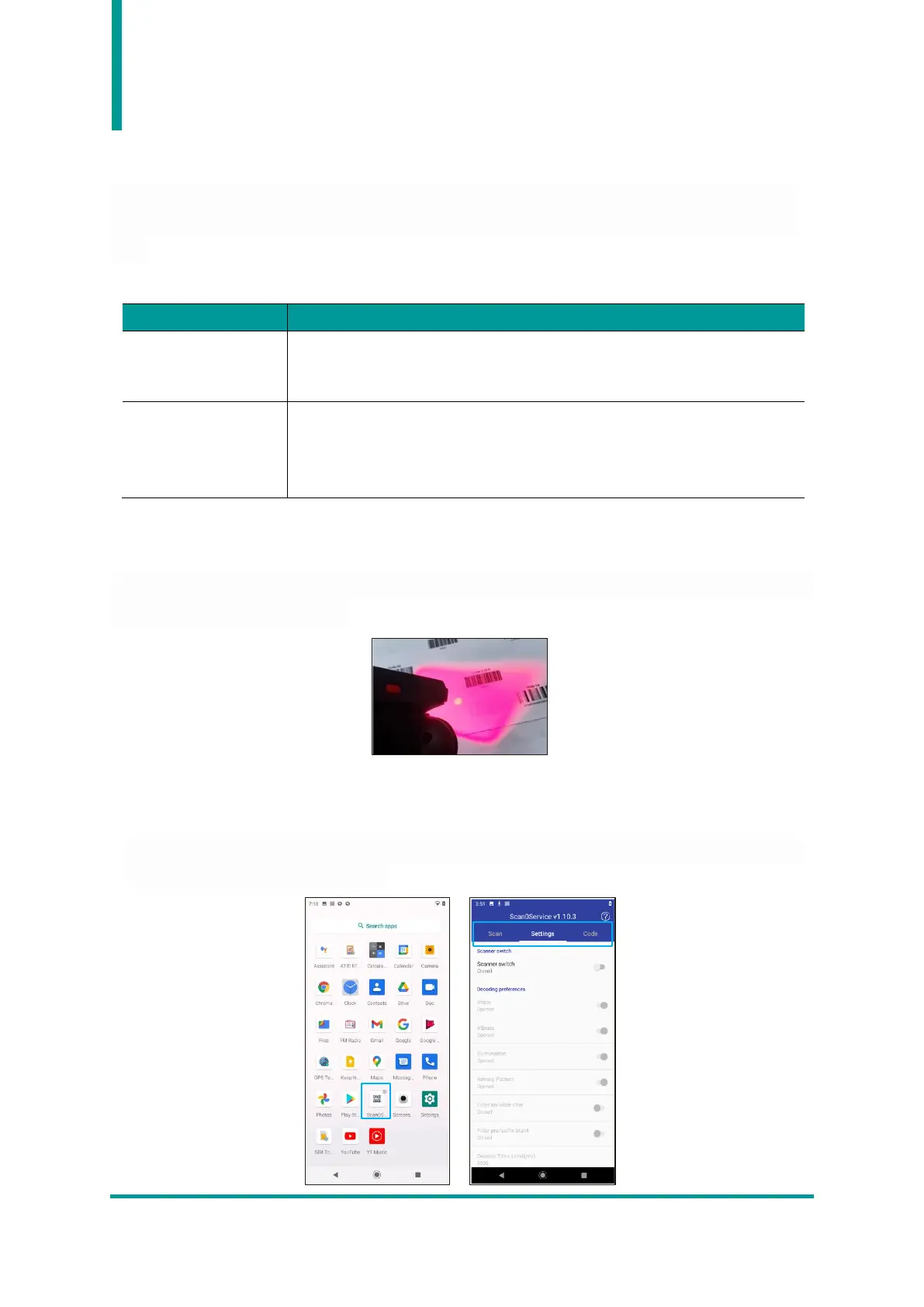
Run the “Scan0Service” app installed on the system. When executed, three selectable menu screens
appear : "Scan", "Setting", and "Code".


 To Next Page