26
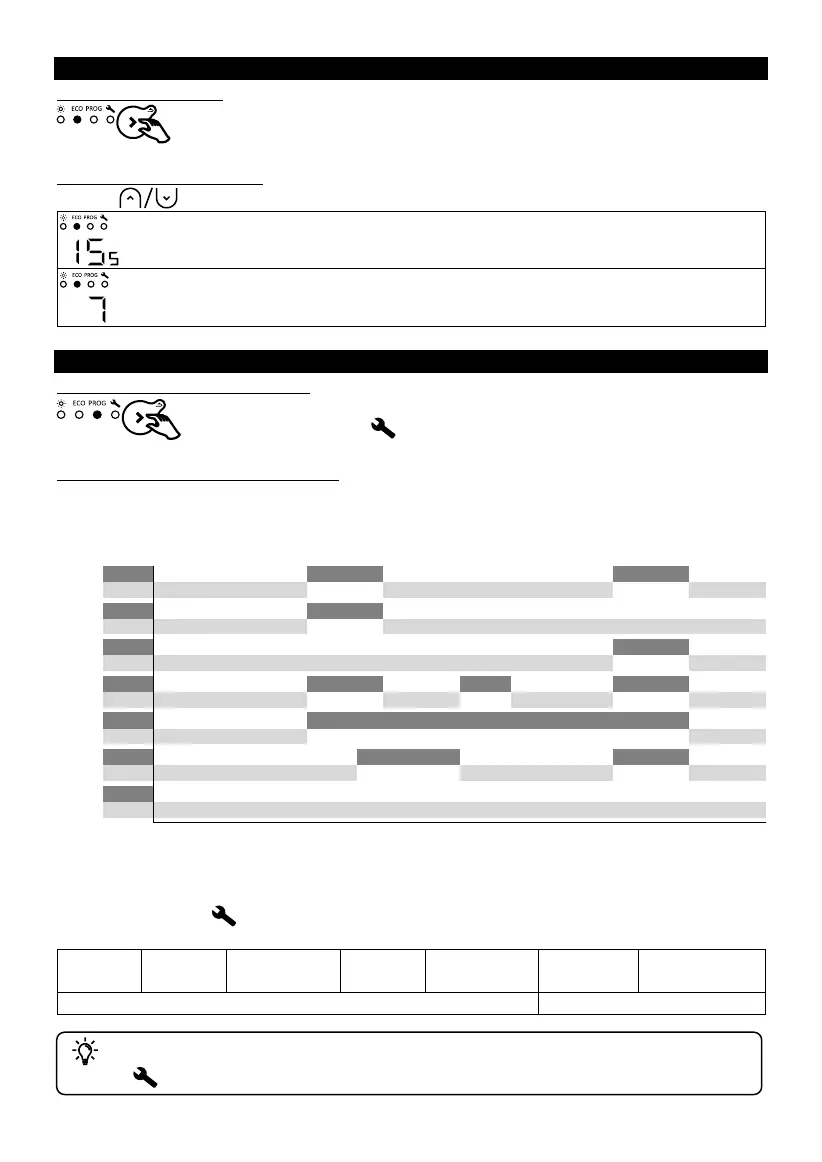
ECO MODE
Selecting Eco mode
Setting the temperature
Use the buttons to set the temperature (desired temperature).
Increase or decrease from 10 °C min. to 19 °C max., in increments of 0.5 °C. The
maximum temperature is limited to 2 °C below the Comfort temperature.
Decrease further to 7 °C (non-modifiable frost protection temperature).
PROGRAMMING MODE
Selecting Programming mode
To use programming mode, you must first set the time and day in
the Settings
.
Operating in Programming mode
The appliance has 7 (modifiable) programs which define at what time of day the appliance must
follow the P3 Comfort temperature (Co, temperature set in Comfort mode) or the Eco temperature
(Ec, Comfort temperature - 2 °C).
Co = Comfort, Ec = Eco
By default, a program is already allocated to each day of the week. You can modify the program
allocation in Settings
.
To change the program (Comfort Co, Eco Ec, Off oF) and the operating ranges, go into
Settings
(see "Settings").










 To Next Page