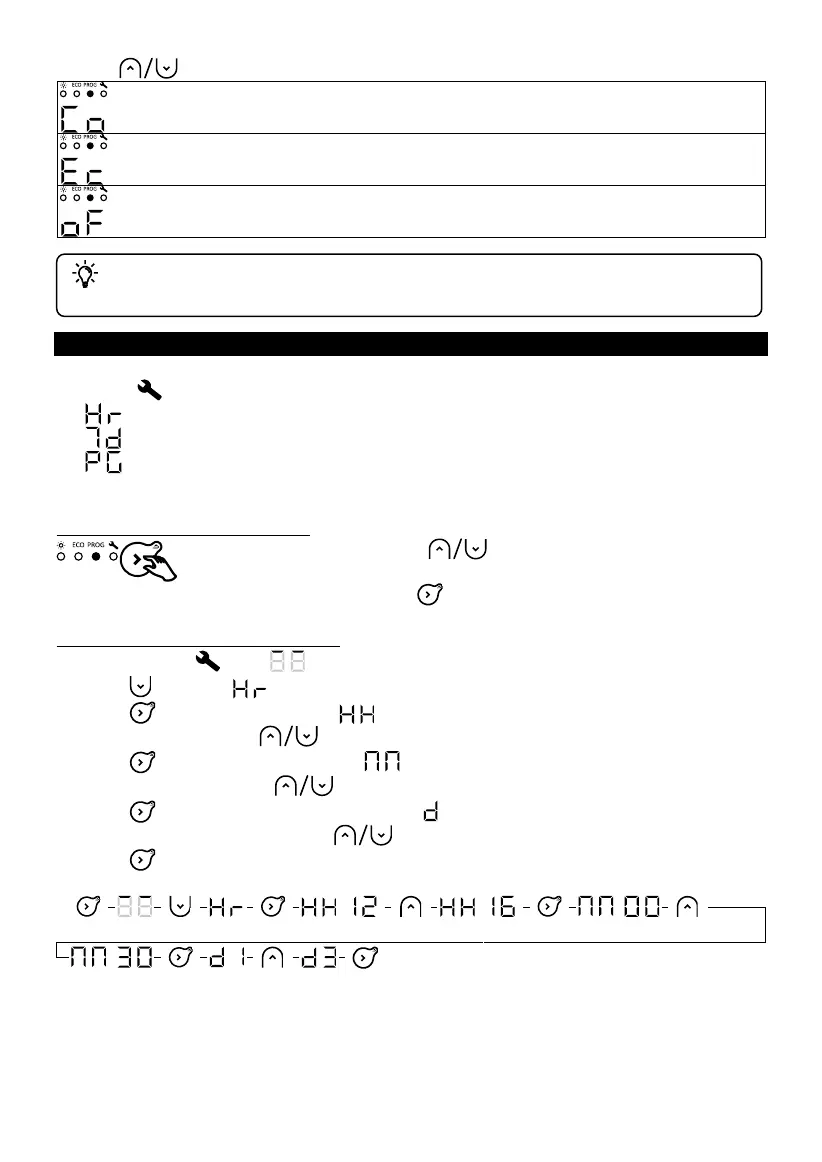
If the screen displays Ec, you are in an Eco operating slot. The Eco temperature is set
3.5°C below the Comfort temperature. The Eco temperature cannot exceed 19 °C.
If the screen displays oF, the appliance will not heat.
We recommend that you use Comfort and Eco modes to control your electricity consumption.
No temperature settings can be made in Programming mode. To set the Comfort
temperature, go to Comfort mode
SETTINGS
In Settings , you can:
- : Set the time and day;
- : Select the program (P1 to P7) for each day of the week (d1 to d7);
- : Personalise each of the programs (P1 to P7), choosing the operating mode (Co, Ec, oF)
for each hour of the day (from 00:00 to 23:00).
Selecting Programming mode
Press and hold the buttons to scroll through the digits
quickly.
Press and hold the button to go back to the previous screen.
Setting the time and current date
1. Select Settings . The symbol will be displayed.
2. Press to display .
3. Press to display the time. The symbol will flash alternately with the hours.
4. Set the hours using the buttons.
5. Press to display the minutes. The symbol will flash alternately with the minutes.
6. Set the minutes using the buttons.
7. Press to display the day of the week. The symbol will flash alternately with the day.
8. Set the day of the week using the buttons.
9. Press to confirm.
Example: to set 16:30 on a Wednesday










 To Next Page