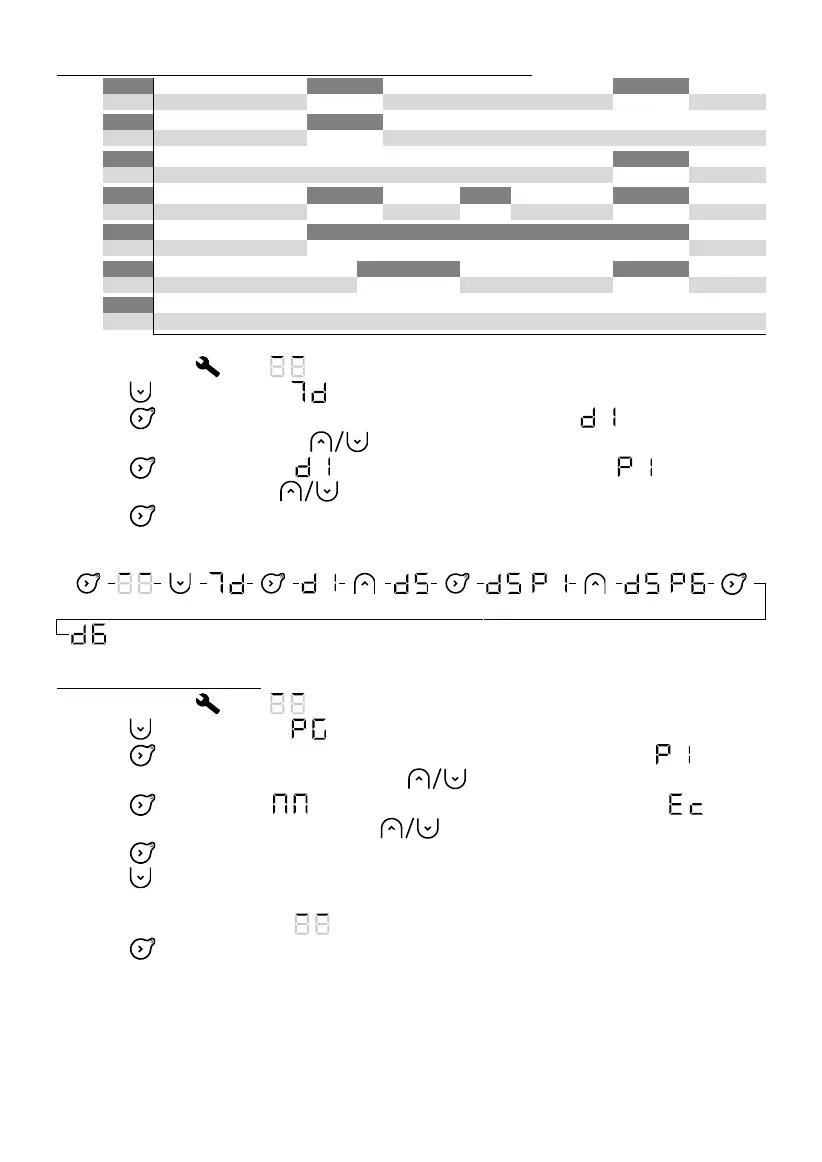
1. Select Settings . The symbol is displayed.
2. Press 3 times to display .
3. Press to display the first day. The day number will be displayed .
4. Select the day to set using the buttons.
5. Press . The day number will flash alternately with the program .
6. Set the program using the buttons.
7. Press to confirm. The next day will be displayed.
8. Go back to step 4 for each of the other days.
Example: I am not working on Friday, so I want to allocate program P6 to Friday (d5)
Personalising a program
1. Select Settings . The symbol is displayed.
2. Press 3 times to display .
3. Press to display the first program. The program number will be displayed .
4. Select the program to be changed using the buttons.
5. Press , the first hour will flash alternately with the operating program .
6. Select the hour to be changed using the buttons.
7. Press several times to select the operating program (Comfort, Eco, Off).
8. Press , to display the next hour.
9. Go back to point 6 for each of the other time slots.
10. After the last hour (23), the symbol will be displayed.
11. Press to go back to the programs list.
12. Go back to point 4 for each program to be changed.
Example: I want to modify program P6. I want the appliance to be switched off between 00:00 and 04:00,
and have Comfort temperature between 09:00 and 13:00, and between 19:00 and 21:00.










 To Next Page