29
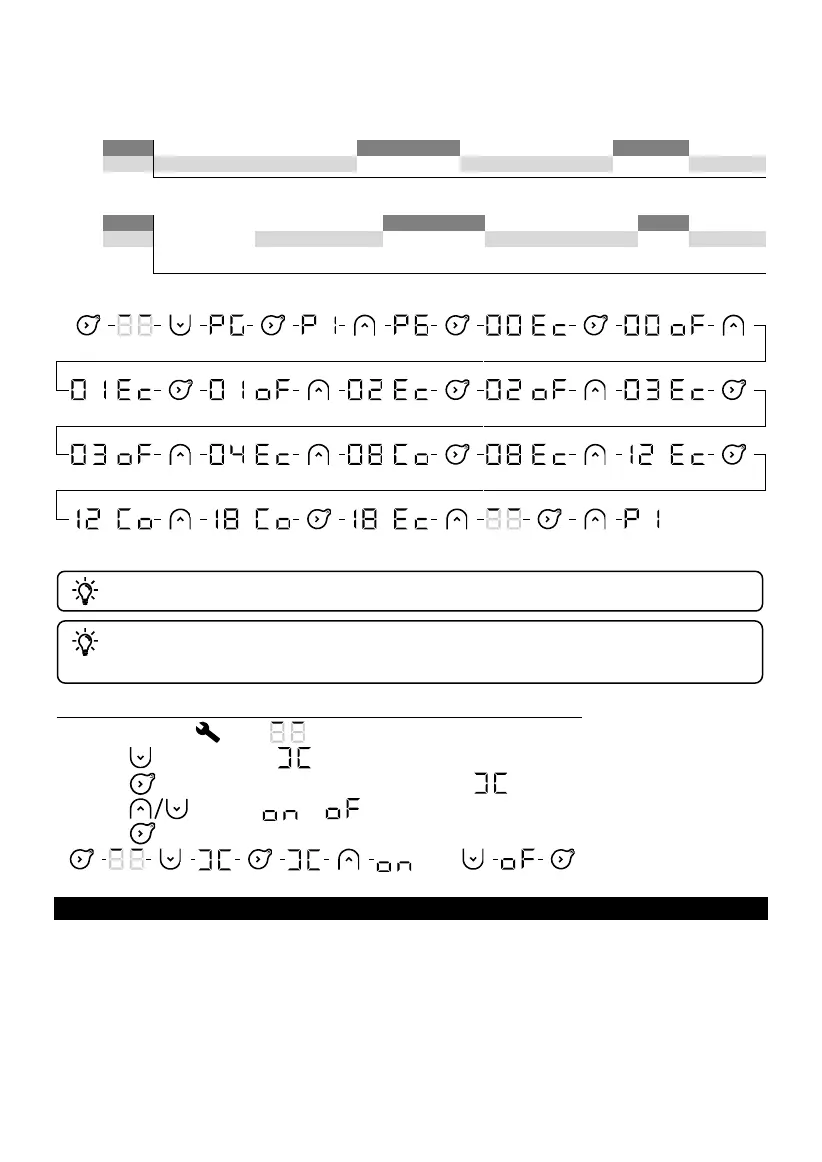
So you need to change the time slots between 00:00 and 04:00 from Eco to Off, and change the slot
between 08:00 and 09:00 from Comfort to Eco, change the slot between 12:00 and 13:00 from Eco to
Comfort, and then change the slot between 18:00 and 19:00 from Comfort to Eco. à Eco.
Predefined P6
There is an automatic inactivity timeout from Settings after one minute.
After a power outage of more than 15 minutes, the programming is retained. The day
and time may need to be reset.
Activating or deactivating the open window detection function
1. Select Settings . The symbol will be displayed.
2. Press twice to display .
3. Press to activate or deactivate the function. The symbol will flash.
4. Press to select or .
5. Press to confirm.
USING A CENTRAL CONTROL SYSTEM
The appliance follows the commands from the central control system for your installation via a
Pilot Wire connection. Ensure that the pilot wire is connected and that Comfort mode or Eco
mode is selected. Use your central control unit to perform operations (follow the instructions in the
manual for your control unit).










 To Next Page