15
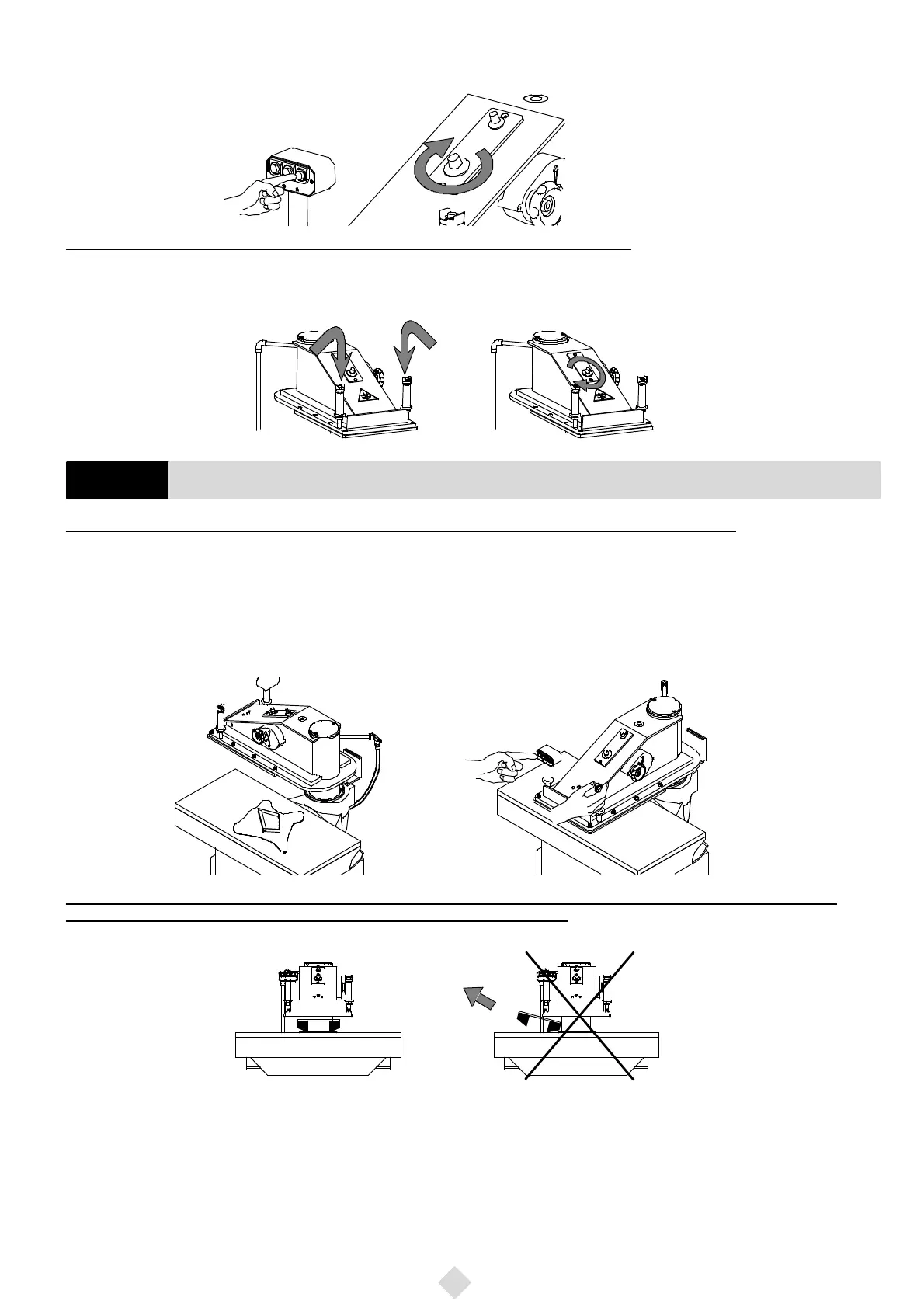
e) ThepushbuttonNo.3(Fig. 14),ontheright,isusedtocutmaterialsparticularlydifficulttocutbymeansoftoolswithagreatlineardevelopment.
Furthermoreitispossibletograduallyincreaseitsvaluebymeansof thepotentiometer shownin thepicture tillreaching themaximum powerof
the machine.
Fig. 14
Machine equipped with control pushbuttons and potentiometer (SE Series)
Tosetthemachineinmotionpressthetwopushbuttonssimultaneously(leftFig. 15),beingthemachineequippedwithanelectricsynchrotempo-
risationdevice(» 3/10seconds).Releasethepushbuttonsonlywhenthearmbeginstomoveupward.Thepotentiometerisusedtoadjustthecutting
power (right Fig. 15).
Fig. 15
WARNING: At any starting up to run the machine arm to no end in order to exhaust all the air from the cylinders.
Equippedwithanautomaticstroke--end,thismachineallowstheoperatortocutwithcutting--diesofdifferentheightswithoutanyadjustment.The
cutting operation is simply carried out as follows:
-- lay the material on the cutting table and place the cutting--die on it (left Fig. 16)
--afteradjustingthestrokethroughthehanwheel(wesuggestastrokeof7¸8mm),simultaneously pressthepush--buttonontherighthandleand
themostsuitableoneamongthoseofthelefthandle(rightFig. 16)comparedwiththelineardevelopmentofthecutting--die,byactingalsoonthe
potentiometersconnectedtothepush--buttonsNo.1andNo.3,ifnecessary.Inthiswayyoucangetthemaximumcuttingaccuracywiththeminimum
cutting--board wear.
Fig. 16
WARNING: in order to avoid wrong cuttings or the cutting- die to be thrown out in the surroundings causing damages, be sure that the
arm always covers the whole cutting- die before pressing the push- buttons (Fig. 17).
Fig. 17
Correct use
Wrong use
133 Cutting operation
GB


 To Next Page