Need help?
Do you have a question about the Atos Unify OpenScape CP710 and is the answer not in the manual?
Information about product compliance with EU directives and disposal of electronic waste.
Guidance on performing software updates without disrupting the phone's connection.
Overview of the user guide's purpose and scope for the OpenScape Desk Phone.
Explanation of icons indicating web interface, phone operations, and administrator intervention.
Steps to connect the phone to the LAN and initiate the boot process.
Description of the remote administration process from initial factory settings.
Procedure to enter the Deployment PIN for automatic remote administration.
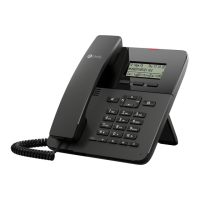
Overview of the physical controls and display elements of the CP710 phone.
Explanation of icons used on the phone screen for status and options.
How volume adjustment is displayed and controlled on the phone's status line.
Description of various screen layouts like landing screen, conversations, and main menu.
Managing contacts and call history, including creating and importing new conversations.
How to view conversation details or initiate a call using navigation and function keys.
Methods for initiating searches in the conversation list by phone number or name.
How incoming calls are signalled, including ringtone and notification LED.
Description of function keys situated on the display and optional key modules.
How to adjust screen brightness via the phone or web interface.
Activating and configuring screen saver options, including image uploads.
Optimizing audio configurations for ringer type, melody, and room acoustics.
Determining whether to accept second calls during an active conversation.
Steps to connect the phone to the OpenScape UC service for unified communication.
Ways to program function keys, directly or via settings menu.
How to change the displayed label for a programmed function key.
How the phone rings and displays information for incoming calls.
Procedure to answer an incoming call using the phone's handset.
Steps to answer a call using the speakerphone function.
Instructions for answering calls using a connected headset.
Enabling the phone to be visible to other Bluetooth devices for pairing.
The process of establishing a Bluetooth connection between devices.
Pairing and connecting a Bluetooth keyboard for phone input.
Setting up and using programmable keys for managing multiple phone lines.
How to accept incoming calls using line keys, including prioritized calls.
Configuring the default screen displayed when the phone is idle or wakes up.
Adjusting screen idle time to manage power consumption and screen dimming.
Arranging phone reminders for appointments within the next 24 hours.
Enabling Do Not Disturb to block incoming calls and manage external caller behavior.
Protecting phone configurations and features with a user-defined password.
Securing the phone against unauthorized access by requiring a user password.
Optimizing audio configurations for ringer type, melody, and room acoustics.
Selecting preferred ringtones from available audio files or custom uploads.
Determining who generates the ringtone and selecting the ringtone type.
Instructions for accessing the phone's configuration via a web browser.
Area for configuring phone and network settings protected by admin password.
How to import contact lists from Outlook or OSM through the web interface.
Guidelines for cleaning and maintaining the telephone's physical condition.
Solutions for common issues like unresponsive keys, no ringing, or inability to dial.
 General
| Type | IP Phone |
|---|---|
| Navigation | 5-way navigation key |
| Protocols | SIP |
| Wall Mountable | Yes |
| Weight | 1.2 kg |
| Audio | Wideband audio |
| Connectivity | Ethernet |
| Ethernet Ports | 2 |
| Power over Ethernet | Yes |
| Power Supply | Optional |
| Programmable Keys | 8 |
| Speakerphone | Yes |
| Headset Support | Yes |
| Supported Codecs | G.711, G.722, G.729 |

 To Next Page