Other settings and functions 166
Call forwarding for fax/ PC/ busy stations
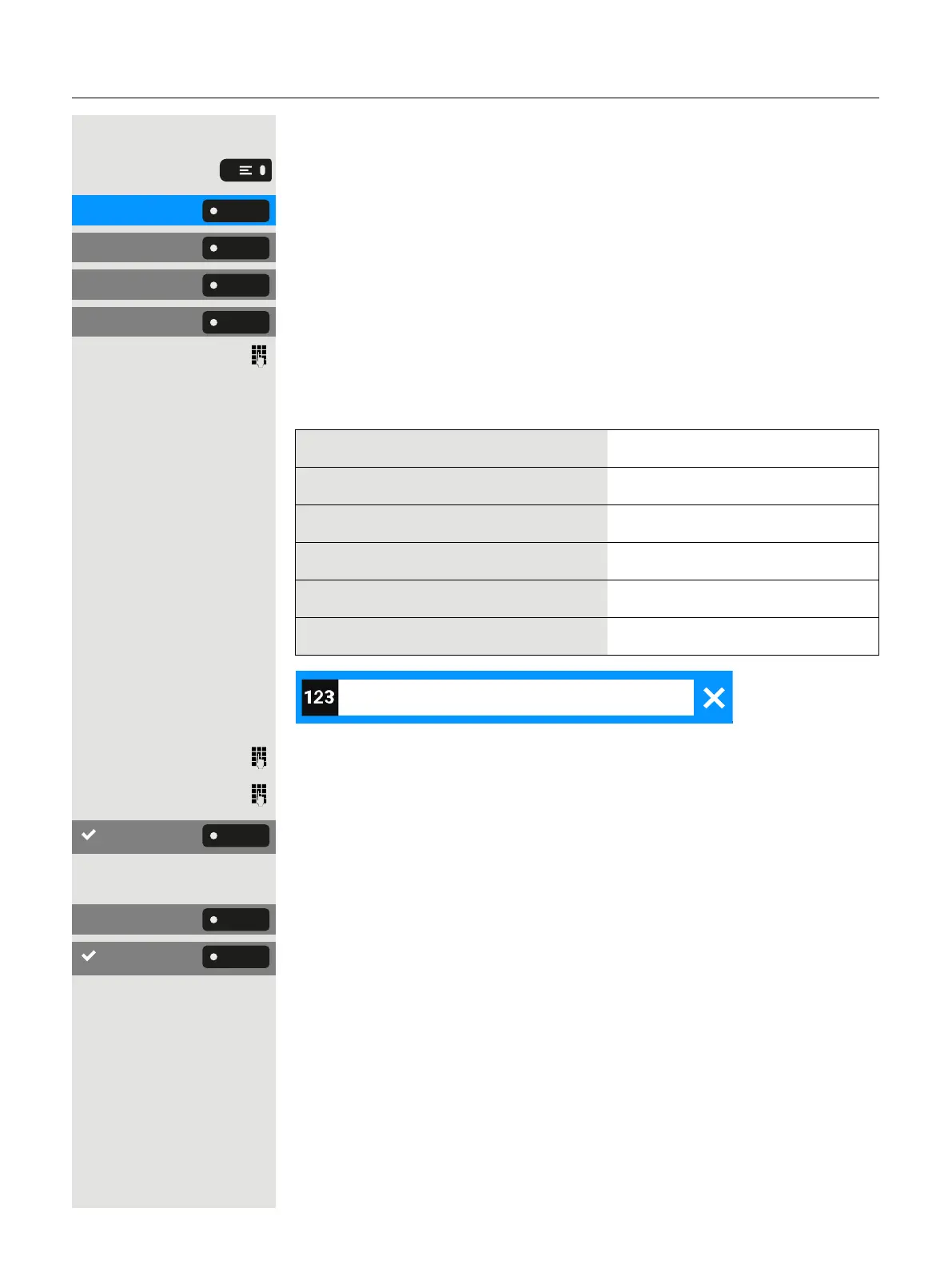
Press the key to open the main menu.
Settings Open “Settings”.
Service menu Select “Service menu”.
Feature settings Select “Feature settings”.
Forwarding type: Select “Forwarding type:”.
Enter the code for the desired call forwarding type. Codes are assigned by
the responsible administrator. In the table, you can enter the key figures
that are valid for you:
“Query call forwarding for fax”:
"Query forwarding for PC":
“Query call forwarding for busy”:
“Deactivate call forwarding for fax”:
“Deactivate call forwarding for PC”:
“Deactivate call forwarding for busy”:
Enter the phone number of the other connection.
Enter the PIN.
Save the setting.
Deactivating
Deactivate Select “Deactivate”.
Save the setting.
Change call forwarding for other connection
To do this, follow the same procedure as for saving / switching on:
l
For a different phone, see "Save destination for other phone - activ-
ate call forwarding" à page 164
l
For fax, PC, or busy, see "Save destination for fax/ PC/ busy sta-
tions - call forwarding activated" à page 164.


 To Next Page