unD6IO-BT
User Manual
Attero Tech LLC 2019 Page 5 614-00033 Rev 01_e
2 – Product Features
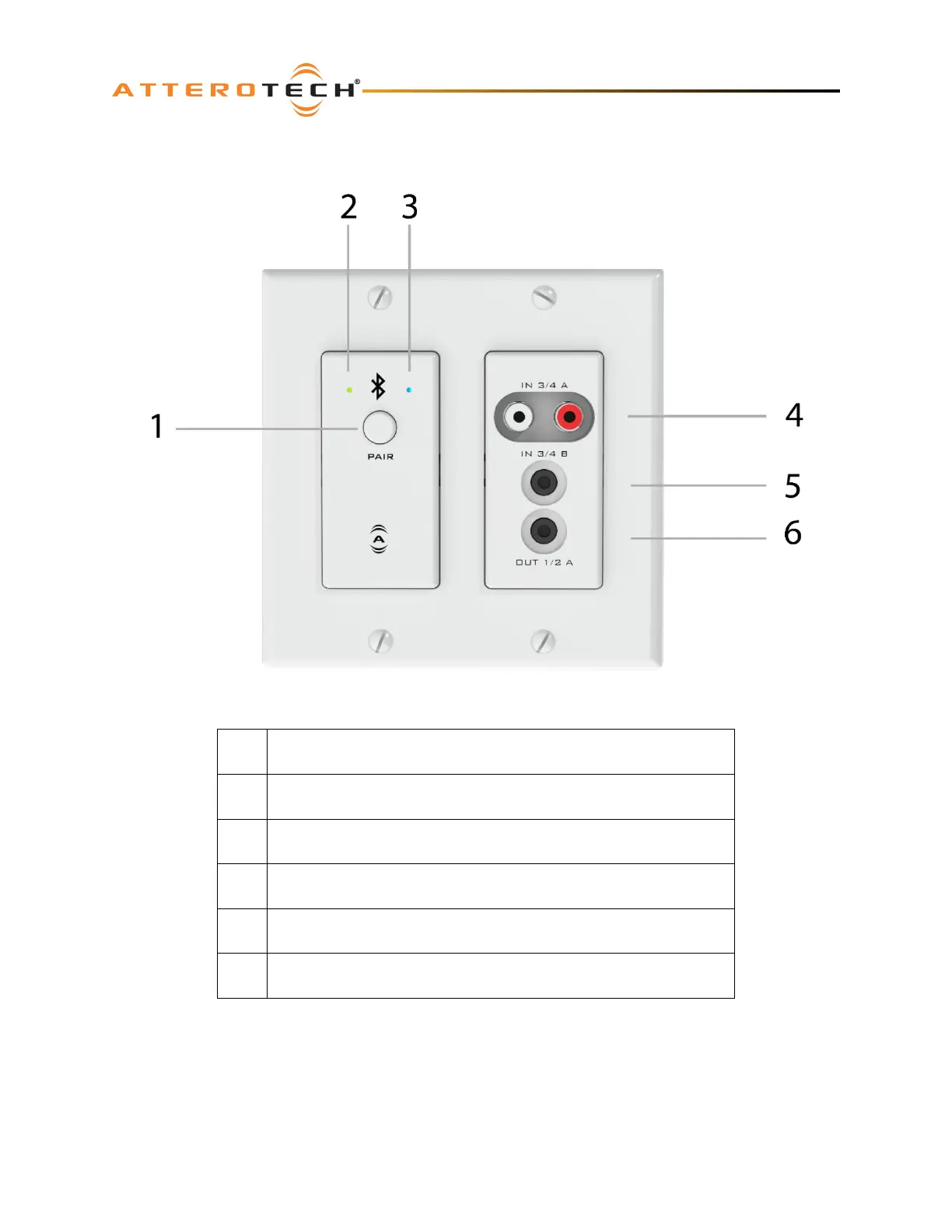
Figure 1 – unD6IO-BT Top Panel Features
1 B
luetooth® pairing/connect button
2 Power/ID/Error indicator (see note below)
3 Bluetooth® status indicator
4 Stereo RCA Inputs
5 Stereo 3.5mm Input
6 Stereo 3.5mm Output
*N
ote: The unD6IO-BT is equipped with error reporting features. Upon power up, the front panel power LED will briefly
light red and then change to green if the device boots successfully. If the LED remains on solid red, this indicates a device
failure. If power cycling the unit does not correct this problem, contact Attero Tech technical support.
*Note: The unD6IO-BT has a label on the front of the metal housing at the top that shows the devices MAC address. This
is important for initial device identification as the last six digits make up part of the devices default network name that
is shown when the device is detected by Dante™ Controller. The full MAC address is also shown on the back of the unit.



 To Next Page