unD6IO-BT
User Manual
Attero Tech LLC 2019 Page 13 614-00033 Rev 01_e
4.2.2 – Call Bridging (only)
In this mode (HFP profile), users may stream incoming/outgoing calls from the paired device to/from the Dante/AES67-
connected network input and output. In this mode, the user is protected from errant streaming of media audio over
Bluetooth® link.
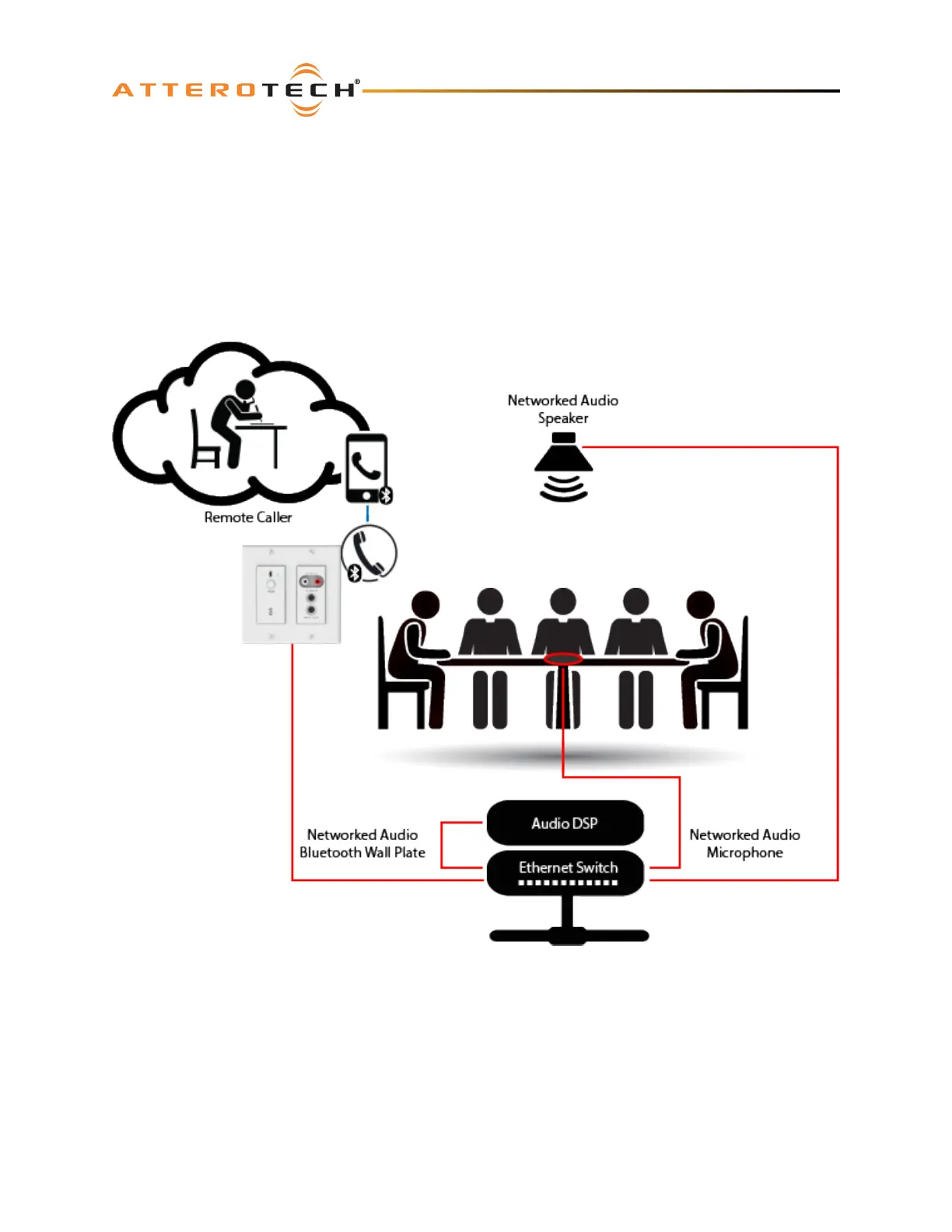
The call bridging mode provides call connectivity for conferencing system users’ Bluetooth equipped devices to a
networked audio based conferencing system. The addition of Bluetooth connectivity provides simple bridging of far end
meeting participants for on the fly meeting productivity and backup conferencing connectivity in case of VoIP and Web-
based conferencing service failures. The application diagram below highlights the general system connectivity for a
networked audio conferencing system utilizing Bluetooth call bridging with Attero Tech’s call bridging enabled networked
audio products.
4.2.3 – Call & Media Bridging
In this mode, both profiles are available giving users the ability to control access of content (call and media) to the system
from the paired device.
*Note: If your application requires call privacy, it is recommended to not utilize the combined call and media bridging
mode as call audio will be shared automatically over the audio connection.



 To Next Page